Work with site elements
You can use the following elements to create a website using SendPulse’s visual website builder:
| Block | A container that holds other elements to create themed sections on a page. |
| Section | A layout element used for placing content horizontally across the page. |
| Column | A layout element used for placing content vertically on the page. |
| Widget |
Functional site elements for displaying information or interacting with visitors. You can add an unlimited number of widgets to one column. |
| Layout | Used to divide content into clearly defined areas. Layouts can be placed inside blocks and sections. |
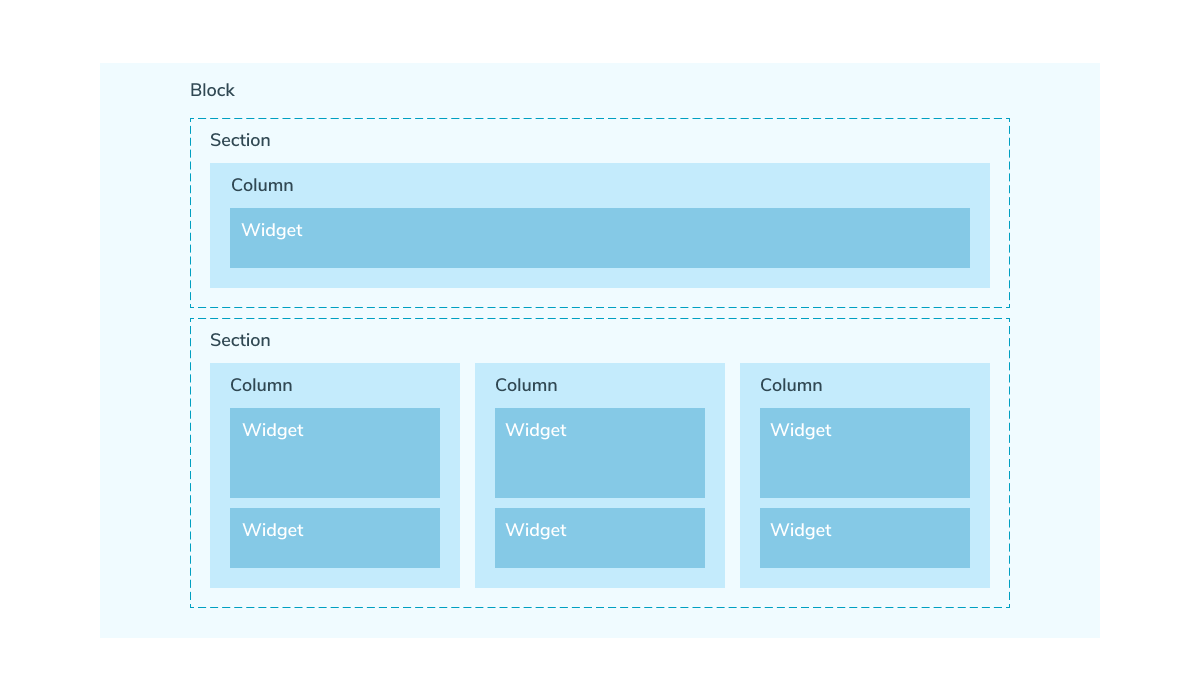
Blocks, sections, layouts, and columns help you organize content on your website, while widgets add functional elements.
It’s important to divide your page content into logically related blocks so that information is clearly structured and easy to read. To do this, follow the principle of proximity: place related elements close to each other.
See also: Website design guidelines.
To speed up your page layout and keep your design consistent, use prebuilt blocks.
Last Updated: 18.07.2025
or