Create deal in the Action element
The Create deal action creates a new deal and a new contact in the CRM system when a subscriber reaches this step in the flow. Use it to turn chatbot events into CRM records automatically. For example, you can create a deal in your pipeline every time a subscriber clicks Buy or requests a callback.
Let's walk you through how to set up the Create deal action.
Add the Action element
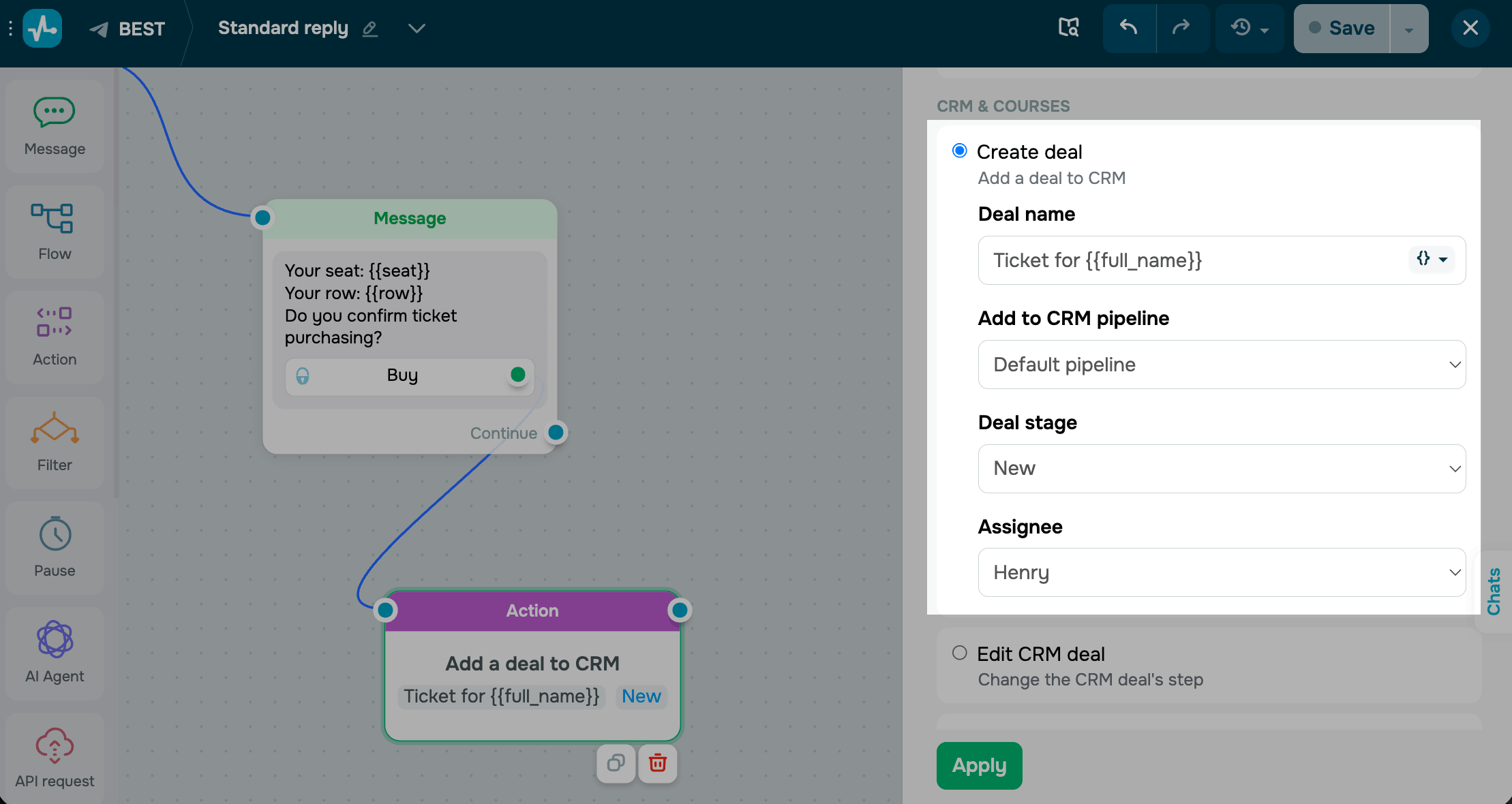
Drag the Action element to the workspace. In the settings that appear, select Create deal.
Enter a deal name. You can also add a chatbot variable to the deal name to pass custom data, such as Order {{product_name}}.
Select the pipeline and deal stage to add your deal to and assign a team member.
Save the element
Click Apply. The element is now ready and will create a new deal in the selected pipeline and a CRM contact every time a subscriber reaches this step.
To test the setup, run the flow once and open your CRM deals. The new deal should appear at the selected stage with the correct name and assignee.
Last Updated: 01.05.2026
or