Remember spending twenty minutes copy-pasting hashtags or refreshing your DMs manually to catch an inquiry? With the latest native and third-party Instagram automation tools, such things feel like a distant memory.
These days, any creator or small business can unlock a true bird’s-eye view of their Instagram communications and sales — this means tracking every DM thread, partnership conversation, affiliate link click, and content performance metrics at once. Instead of bloated social media teams, there are now intelligent AI bots that learn your audience’s behavior or content pipelines that now run on a single person’s laptop.
Here’s a look at the tools and possibilities defining Instagram automation in 2026. We’ve hand-picked tools and platforms that can take the load off your shoulders at every step of your social media journey, from answering DMs and influencer outreach to daily content output and social listening.
Disclosure: This guide is published by SendPulse. Although we cover our own product alongside competitors, we aim to present each tool fairly.
TL;DR Quick overview of popular Instagram automations
If you just want the short version, here’s how different types of Instagram automation fit different goals:
| Automation goal |
What to automate |
Safest method |
Typical tools |
Best for |
Key risk/limitation |
| Fast lead capture |
Turning comments to DMs |
Meta-approved DM automation with keyword triggers |
SendPulse, ManyChat, Vista Social |
Launches, lead magnets |
Messaging window constraints |
| Customer support |
FAQ and routing in DMs |
Bot flows with human handoff |
SMB support |
Requires setup and ongoing training |
| Consistent posting |
Post and Reel scheduling |
Official scheduling tools or API publishing |
ContentStudio, Statusbrew |
Content teams |
Sensitive to Instagram’s policy changes |
| Social proof |
Mentions and UGC discovery |
Social listening tools and UGC inbox |
Sociality, Virlo, Nexos.ai |
Community teams |
Requires permissions and rights management |
| On-brand presence |
Batch content creation |
AI tools with brand guidelines |
PostNitro, Vizard.ai, Tagshop AI |
Small teams with budget constraints |
Homogenized output unless skillfully prompted |
| Smooth brand deals and collabs |
Creator discovery and outreach |
Influencer marketplaces with end-to-end campaign tracking |
Heepsy, Modash, Upfluence |
Influencer marketers |
Over-automation can lead to mismatched partnerships |
| Visibility into content performance |
Analytics and recommendations |
Granular tools focusing on key engagement metrics |
Agorapulse, Swydo |
Content strategists, paid media specialists |
Generic recommendation loops can dull creativity |
To build a relevant toolkit, focus on your Instagram objectives and identify existing bottlenecks in your process:
- Feeling overwhelmed by repetitive DMs? Time to employ a trainable AI chatbot.
- Struggling to generate on-brand content and publish consistently? Look into scheduling and AI editing tools.
- Losing control over your brand’s reputation? Try social listening tools to harness the power of positive UGC and timely react to negative mentions.
What is Instagram automation?
Instagram automation is the use of software tools to handle repetitive tasks, like responding to DMs, scheduling posts, or tracking mentions, without manual effort. These tools work either through Instagram’s own built-in features or through third-party platforms that connect via Meta’s official Graph API. Responding to DMs is usually where the actual sales opportunity lives, which is why Instagram message automation built specifically around selling focuses on turning that reply into a qualified lead, not just an acknowledgment.
That said, not all automation is the same. You’ve probably heard that “some Instagram automation can get you banned” — and that’s partly true. Knowing the difference can save your account, reputation, and a serious amount of wasted budget. There are shady mass-following bots — and then there are sophisticated, policy-compliant automation tools that Fortune 500 brands and top creators quietly rely on every single day. Read on to find out which side of that line your setup should fall on.
How Instagram automation works
At its core, Instagram automation works by connecting approved software to your account through Meta’s official Graph API. These tools then execute actions on your behalf, like sending a DM when someone comments with a specific keyword, publishing a scheduled post at an optimal time, or routing an inquiry to the right team member.
The process typically follows a trigger-action pattern: a user does something (comments, sends a DM, mentions your brand in a Story), and the Instagram automation tool responds based on rules you’ve defined. Think of it as a set of “if this, then that” instructions running 24/7 so you don’t have to.
Native Instagram automation vs. third-party tools
Believe it or not, Instagram itself has nothing against the idea that busy creators and businesses streamline their social media routine — as long as they follow the rules. Otherwise, why would the platform introduce Meta-powered AI image creation, AI auto-replies, post scheduling, automated dubbing, and countless other niche automation features?
Here’s what Instagram explicitly allows, as per Meta’s Platform Terms and the Instagram Platform overview:
- Post, Reel, and Story scheduling — publishing content in advance through Instagram’s native tools, Meta’s official Graph API, or approved partners.
- Automated DM responses — replying to users who have initiated contact.
- Comment-triggered DM flows — automatically sending a DM when a user comments on a post or Reel, provided it goes through the official API.
- Analytics and performance data retrieval — pulling post metrics, audience insights, and engagement data via the Graph API.
- AI-assisted auto-replies — Meta itself recommends informing users when they’re interacting with an automated chat, and supports escalation paths to agents.
Where does native automation fall short? Say you want a DM automation flow that handles objections, qualifies leads, and routes high-intent buyers to a human rep — all while syncing important data to your CRM system. Instagram’s native Creator AI may not get you there at all, or give you a poor idea of your followers’ needs due to its surface-level analytics.
What if you need to enforce a detailed brand design kit across every piece of AI-generated visual content, or build scheduling rules around real-time performance insights rather than a fixed calendar? Again, that depth lives outside the default app.
There’s also a more practical gap worth addressing. Instagram has a long-standing habit of rolling out its flashiest features to select markets, verified accounts, or larger profiles first — leaving smaller creators and businesses in the waiting room for months. Some of these long-awaited features are experimental and can disappear as quietly as they arrive.
Third-party automation tools bridge that gap consistently, offering capabilities that don’t depend on where you’re based or how many followers you have. If you are a small business in Chicago or a mid-sized creator in São Paulo, that accessibility is everything.
Engage users on Instagram
Use our drag-and-drop builder to create AI-powered Instagram chatbots that sell, support, and connect. Run campaigns, share updates, and convert leads hands-free.
Get started for free
Is Instagram automation safe?
Only Meta-approved integrations that connect through the official Graph API can guarantee your automation stays within Instagram’s legal boundaries. Browser bots, password-sharing tools, and scrapers are all prohibited.
To understand why these restrictions exist — and what “safe automation” actually means today — it helps to look at how things used to work.
What “safe Instagram automation” means in 2026
Private API reverse-engineering tools like the infamous Instabot once gave developers unrestricted access to Instagram’s internal app endpoints, enabling mass following, scraping, and DM blasting at scale. That era effectively ended around 2020, when Instagram began aggressively rotating API signatures, fingerprinting sessions, and permanently banning offending accounts.
The underlying logic of all these rules is consent. Instagram’s framework is built around the idea that automated outreach should only follow a user-initiated action — a comment, a Story reply or reaction, a keyword DM, or an ad click. Cold automated blasts to users who haven’t shown interest are not permitted. Today, only Meta-approved integrations can guarantee that your automation stays within these legal boundaries.
Spammy Instagram automation that can get you restricted
Below are the kinds of automation Instagram explicitly prohibits:
- Mass following/unfollowing — using bots to follow and unfollow accounts at scale to inflate follower counts.
- Automated likes — bulk-liking posts from hashtag searches or user lists without genuine interaction.
- Spam comments — submitting unwanted comments or other forms of commercial or harassing communications.
- Unsolicited mass DMs — cold-messaging users who have not initiated contact or opted in.
- Unauthorized data scraping — attempting to access or collect information in an automated way without express permission.
- Automated account creation — creating accounts in unauthorized ways, typically used for bot farms or ban evasion.
- Using unofficial third-party tools — any tool that logs into your account by mimicking human browser behavior rather than connecting through Meta’s official Graph API.
Not only do these practices violate the platform’s guidelines, but they also artificially inflate the so-called vanity metrics instead of facilitating any real engagement.
Account requirements for official Instagram automation
All of the above apply to professional accounts only (Business or Creator), and only when accessed through tools that use Meta’s official Graph API — not browser bots, password-sharing tools, or scrapers.
Beyond that, your Instagram professional account must be linked to a Facebook Business Page, and the person setting up the integration needs admin-level access to that Page in order to grant the necessary permissions.
Messaging limits and DM automation windows
Instagram’s official DM automation rules are more specific than most people realize. Here’s how they actually work in practice:
- The 24-hour window. You can only send automated DMs to a user who has contacted or engaged with you first, and only within 24 hours of that interaction. The clock resets every time the user engages again.
- The 7-day human agent window. While automation is capped at 24 hours, human agents have more breathing room. Once a user initiates contact, your live agent can step into the conversation and reply for up to seven days from that first message.
- The 200 DMs/hour cap. Automated messages sent through the official Messaging API are hard-limited to 200 per hour per account, regardless of account size or verification status. This is enforced at the API level, meaning compliant tools physically cannot exceed it.
These restrictions apply exclusively if you send automated messages routed through the API — not manual DMs via the Instagram app.
What exactly can you automate on Instagram?
There are several legitimate use cases for Instagram automation software — let’s take a closer look at them.
DM automation and conversation flows
This one is a must for any business or creator page — a properly built Instagram chatbot can handle all of the repetitive questions and user inquiries you get while maintaining a personalized approach. It’s a flexible solution: you can always update and redesign your bot to reflect your ongoing processes better.
Small companies can use an Instagram chatbot to create a feeling of constant presence and boost customer loyalty, especially when they’re understaffed. Big brands, in turn, can ease the load on their customer support center while “keeping it real.” That’s exactly what Shein, one of the biggest Chinese online fast-fashion retailers, does.
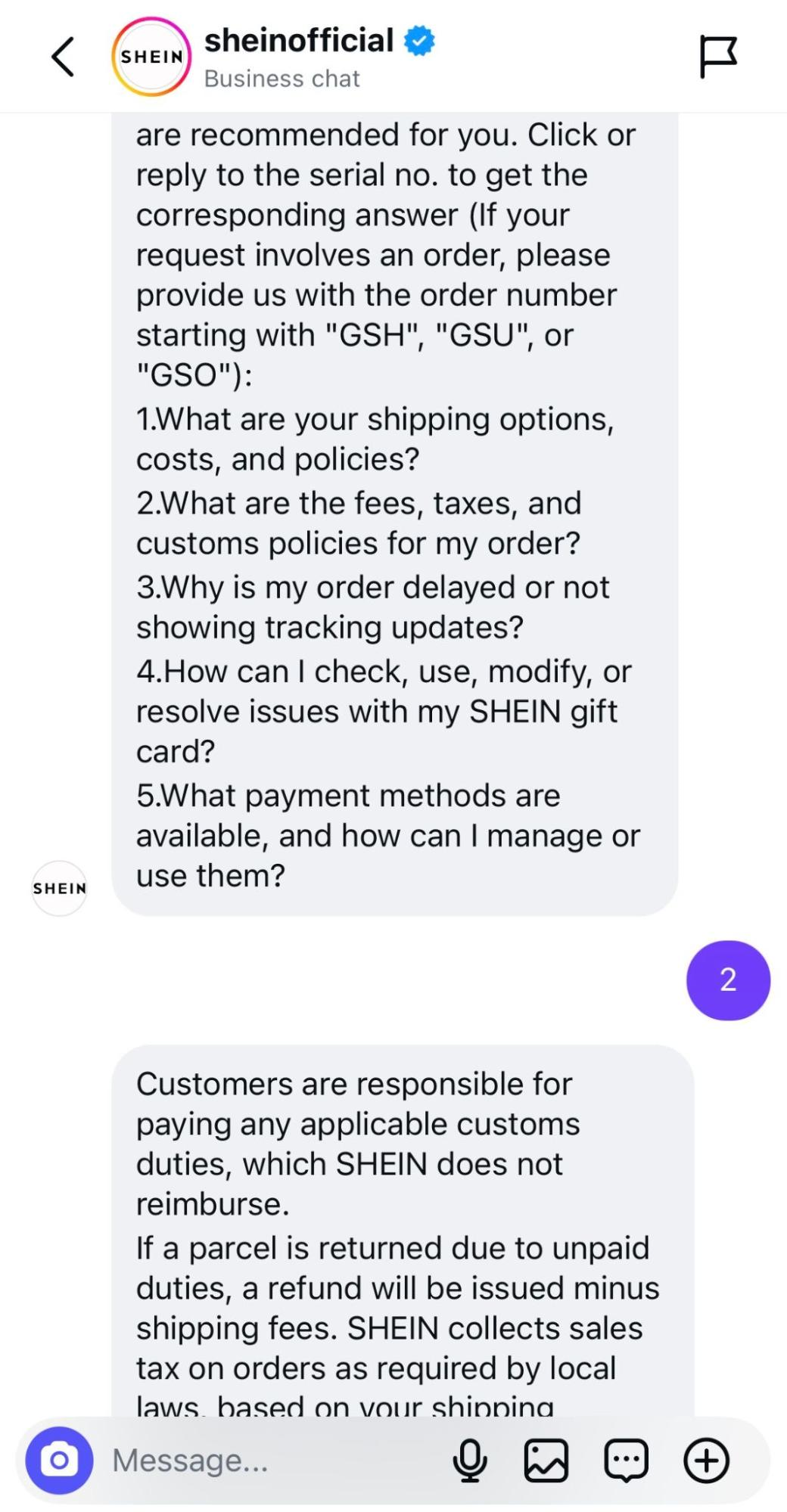 Shein uses an Instagram chatbot to automate its customer service
Here are the most common use cases of Instagram automation bots:
- Customer service and support — a chatbot helps users solve their issues, either via pre-designed paths or through a context-aware AI assistant, or connects them with a real agent.
- Product guidance and education — a bot empowers users to navigate the new niche and learn more about the product or service before considering a purchase.
- Sharing gated content — a chatbot shares an eBook or any other freebie with a user in exchange for their email address.
- Follow-ups — a chatbot asks a user for their order number and immediately provides them with updates regarding their order status.
- Processing complaints and returns — a bot enables users to request a return shipping label or submit feedback in an effortless, chat-based format.
- Gamification — a chatbot runs a quiz or a test to give a user a personal recommendation.
Setting up these scenarios is more approachable than it sounds — most platforms guide you through trigger configuration with step-by-step tooltips right inside the dashboard when you get started.
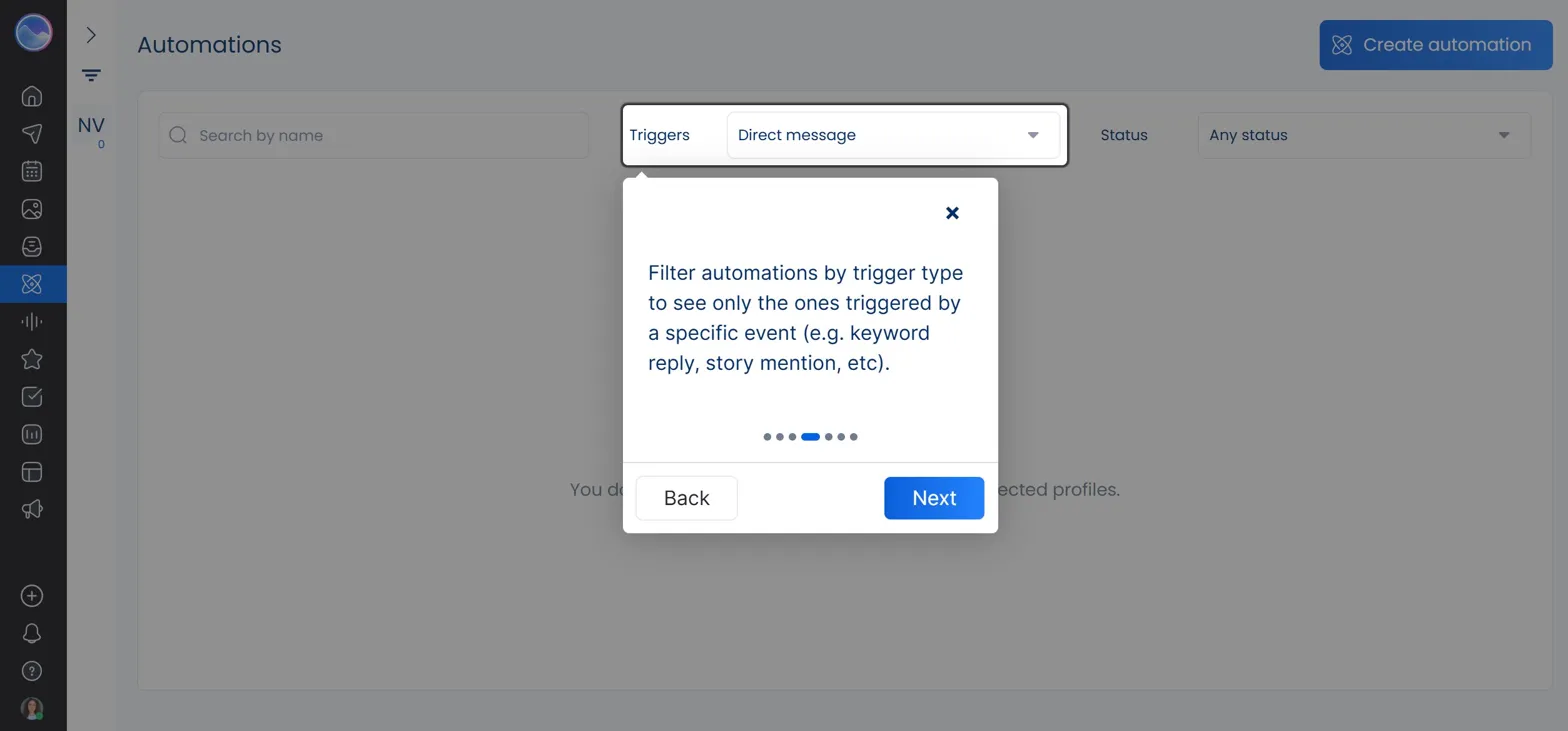 An onboarding tooltip when getting started with Instagram DM automations
The more scenarios you create, the richer and more natural conversations with your Instagram chatbot will feel, especially if you integrate it with AI for the cases when the chats veer off the pre-arranged paths. Your subscribers won’t ever have to leave their favorite platform to communicate with your brand, which creates a lasting positive impression and increased loyalty.
AI-enhanced bots in particular can be trained on your existing content and previous DMs and equipped with custom guidelines regarding the tone, vocabulary, and boundaries of every interaction. In addition, bot messages can be enriched with images, emoji, videos, links, direct payment buttons, and variables for personalization.
Welcome messages and lead qualification flows
The main goal of Instagram automation is to proactively introduce your brand and spark action, which is best done when a new follower just initiates communication. An Instagram chatbot with a set welcome flow can also ask them simple questions to assess their needs, interests, and how far they are in their buyer’s journey. It’s practically lead routing because then your bot can quickly connect them with the right department or the most qualified agent.
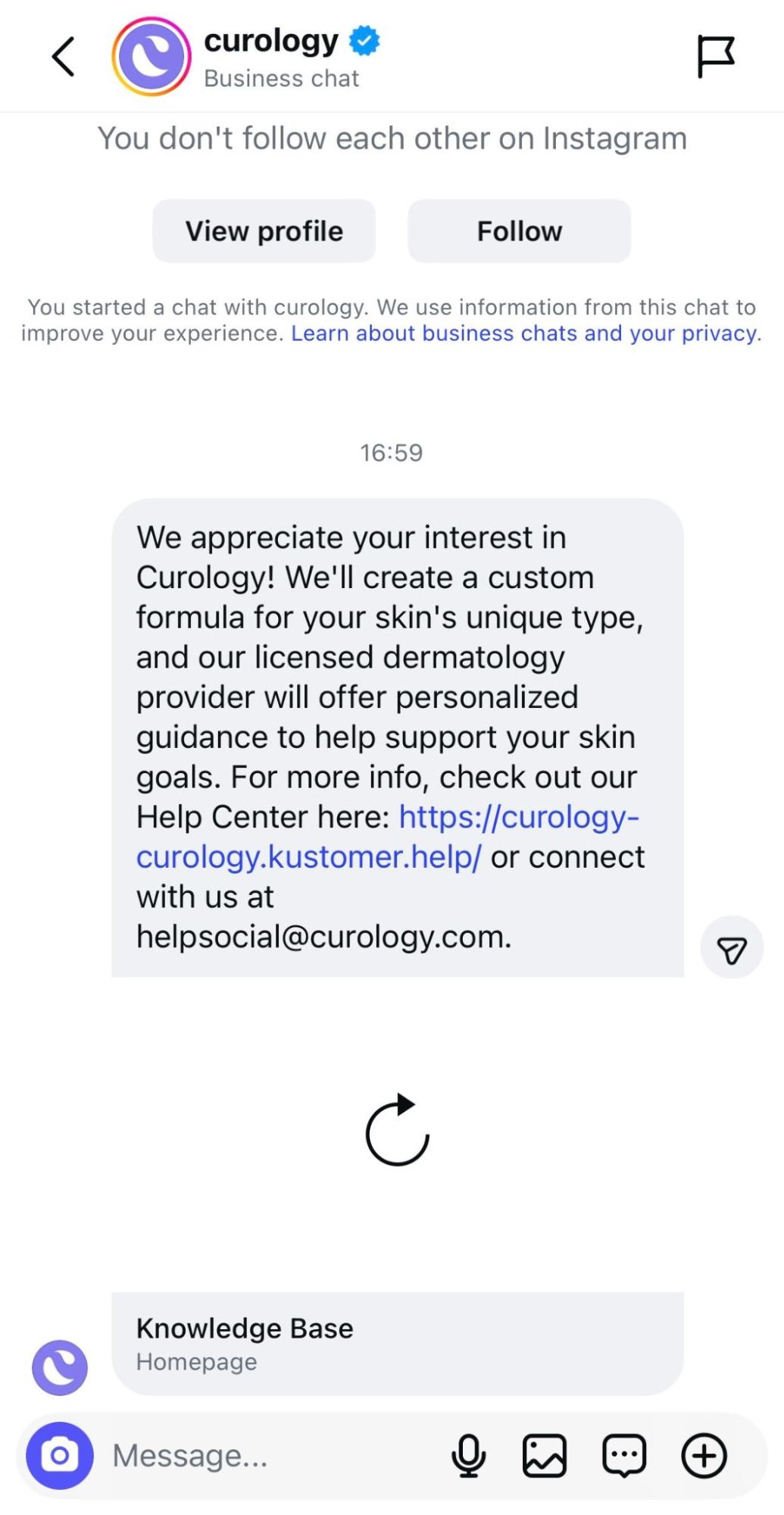 Curology’s automated welcome message on Instagram
This type of automation kills two birds with one stone. Your customer service team only deals with users who have clear intent, and they, in turn, receive the exact information they are looking for — while staying on their favorite social platform.
Driving website traffic from Instagram
Certain Instagram automations, such as self-updating link pages and chatbots, can help your followers find their way to your website and discover other resources related to your brand. Instagram itself only provides business pages with sparse opportunities to share links and CTAs, so third-party Instagram automation software comes in handy.
Bio link pages help you share all your important links and even collect payments with just one URL. Depending on the page builder you choose, you can get more traffic from Instagram by making your link page automatically update with your latest posts — it’ll save you a lot of time and effort.
Instagram chatbots can also boost your website visits by inviting users to check out your latest products or encouraging them to enjoy the perks of being a registered customer. If your follower expresses a desire to sign up for your event or newsletter, it’s also a good time for your bot to send them to a registration page on your website and thus keep them moving down the funnel.
UGC discovery and brand mention monitoring
With dedicated Instagram automation tools, you can effortlessly track your branded hashtags, mentions, and tags in other users’ captions and Stories to quickly discover fresh UGC and customer feedback. Of course, you’ll still need to ask permission before you repost it, but it’ll take just a few seconds since all the tracking has already been done for you.
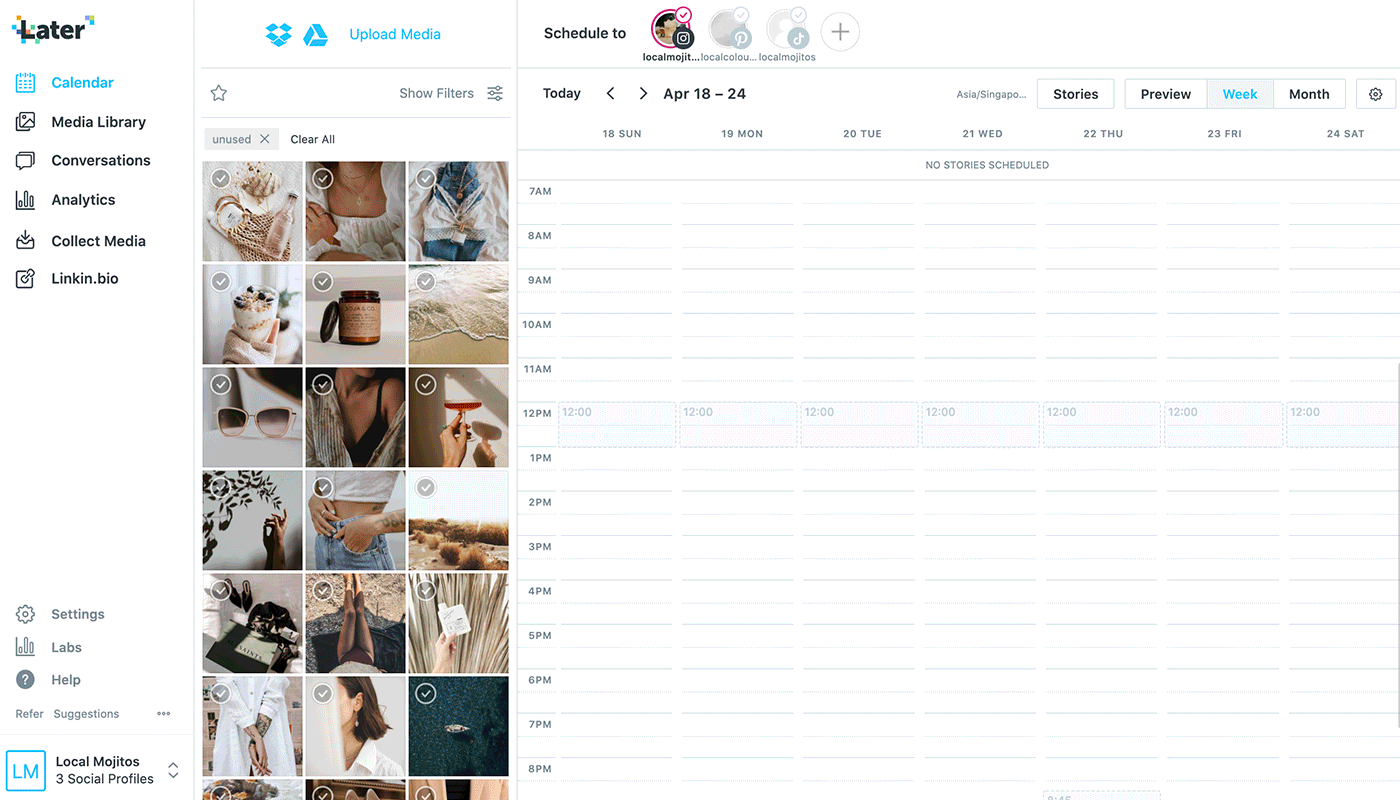 Collect user-generated content from posts with relevant hashtags; source: Later
Monitoring brand mentions is the only way to maintain control of your reputation on Instagram and other social media platforms. Not only does it unlock access to heaps of authentic, user-led content, but it also allows you to always stay on top of negative or controversial customer sentiment before it snowballs into a PR disaster.
Comment automation and comment-to-DM flows
New visitors probably won’t read a long, multi-page FAQ in your Highlights. An Instagram comment automation service, like the one in SendPulse’s chatbot builder, can answer them instantly and in your brand’s voice, whether it’s during business hours or not.
Managing and filtering Instagram comments manually can be overwhelming, especially considering that new followers tend to ask the same questions. The most practical solution is to build an automation flow where each FAQ receives an instant, approved, and up-to-date reply.
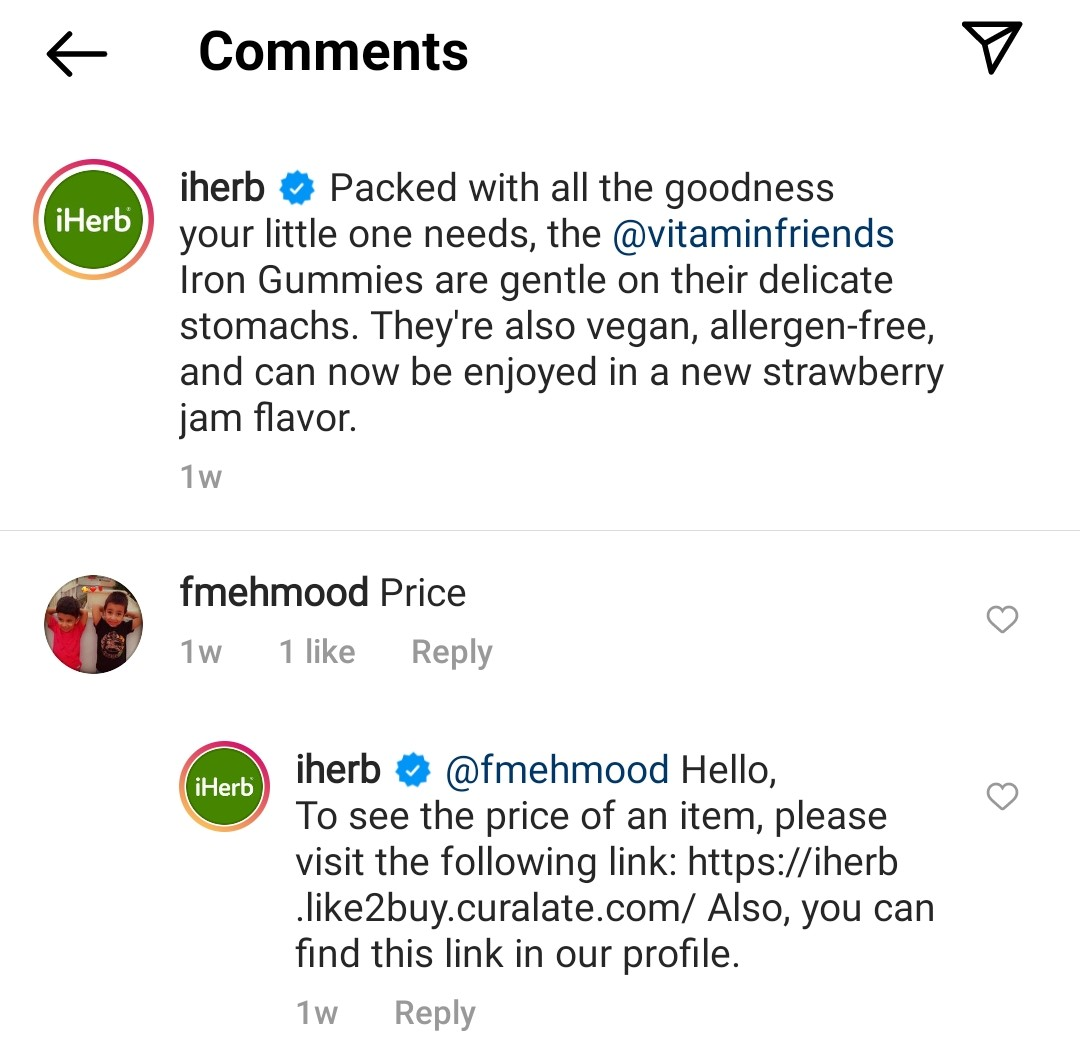 iHerb tracks its Instagram comments and instantly reacts to them
Better yet, some Instagram automation tools provide you with a unified inbox where you get a comprehensive view of your past and ongoing conversations across all social channels. This results in a shared context for your entire team and removes the need to juggle multiple tools.
Content scheduling and team collaboration
With Instagram scheduling automation in place, you can plan your carousels, Reels, and Stories in bulk and never worry about missing the optimal posting window when your audience is most active. Being able to map out months’ worth of content in a drag-and-drop calendar frees up significant bandwidth and gives you the peace of mind that your account stays consistent and visible.
Most Instagram planning tools have a feed preview, which helps you both with scheduling and creating an aesthetic layout.
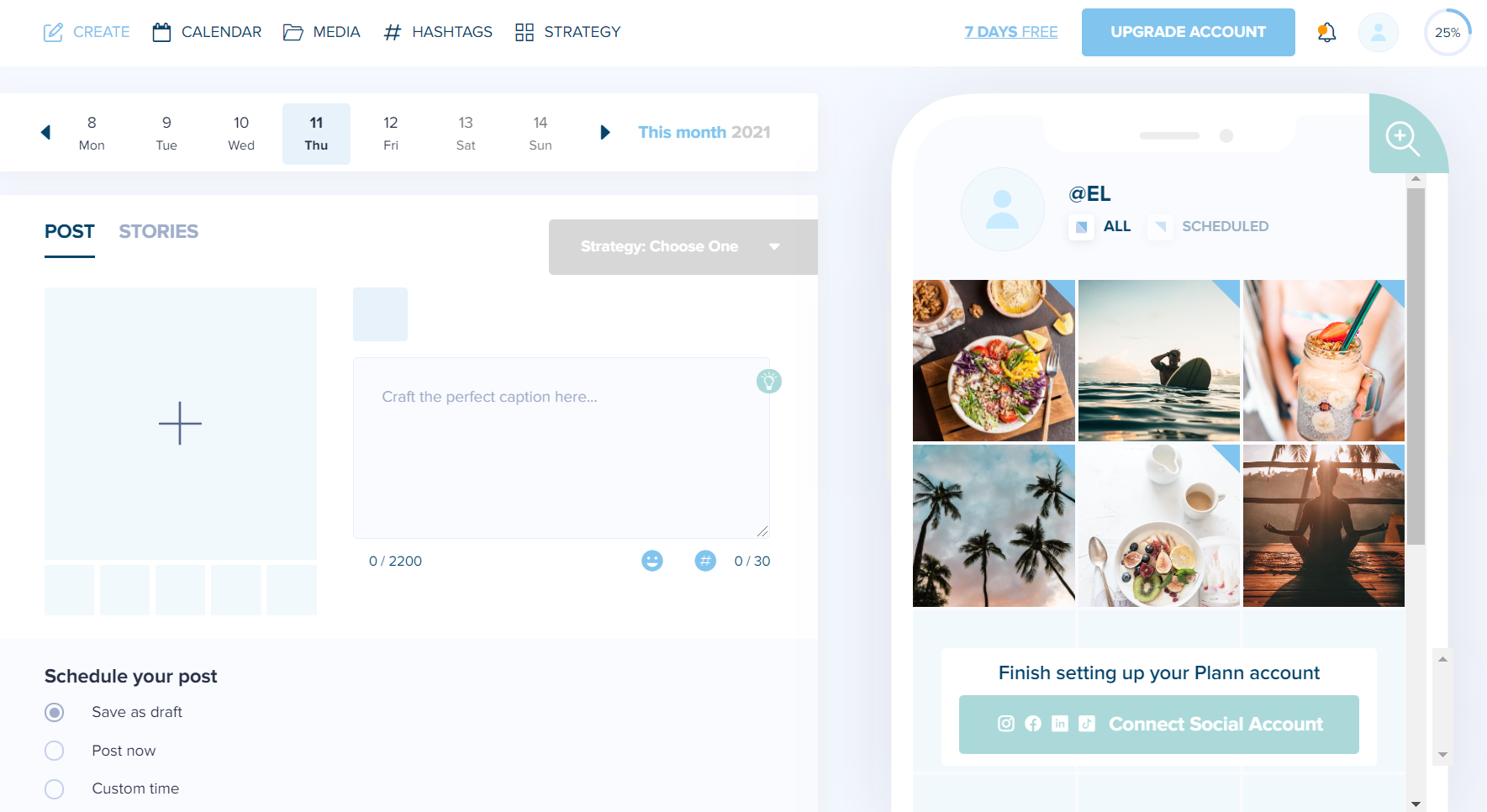 Automate your posting and organize your feed
In addition, thanks to built-in collaboration features, you can securely share your planned content with clients or teammates, gather feedback, and get sign-off without ever leaving the platform. The best Instagram automation tools come with shared workspaces, comment threads, and role-based permissions that let everyone from the copywriter to the client weigh in at the right stage.
Analytics and performance tracking
Instagram’s native analytics have come a long way — reach, impressions, follower growth, content performance, and even audience demographics are all available out of the box for professional accounts. While it might be enough for casual creators, anyone treating Instagram as a genuine revenue channel will quickly realize they could benefit from a more holistic view of what’s going on.
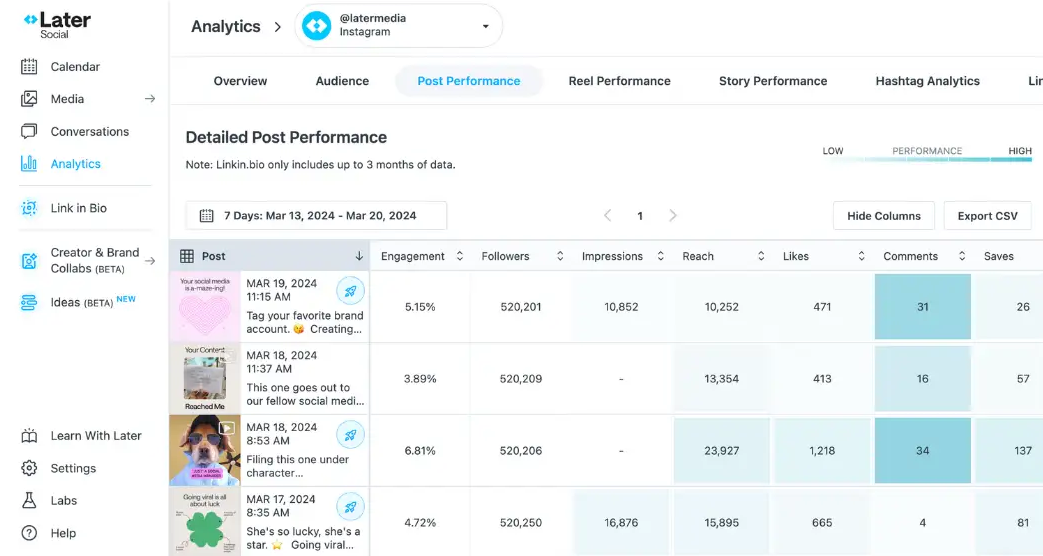 Viewing detailed Instagram analytics in Later; source: Later
That’s exactly the gap that third-party analytics platforms are built to fill. These tools pull your Instagram data and stitch it together with every other channel in your stack, giving you a complete picture of your social media performance rather than disconnected snapshots. Think scheduled, fully customizable reports, agent-level performance analysis, or deep CRM integration.
Influencer discovery and campaign management
Finding the right influencer used to mean hours of manual scrolling, gut-feel decisions, and negotiations stretched across weeks of back-and-forth emails. When multiplied by ten, twenty, or fifty creators simultaneously, the process becomes completely unsustainable. What’s even worse, a 200K-follower account can look impressive until you dig into the engagement ratio, notice the audience is concentrated in the wrong geography, or spot purchased followers.
Modern influencer marketplaces have automated most of this pipeline from end to end. Platforms like Modash let you publish a campaign brief and immediately surface a filtered pool of matched creators — already vetted by niche, audience demographics, engagement authenticity, location, and content style. It’s one of those rare platforms where you don’t need a walkthrough video to find your way around — the creator search and filters just work the way you’d expect them to.
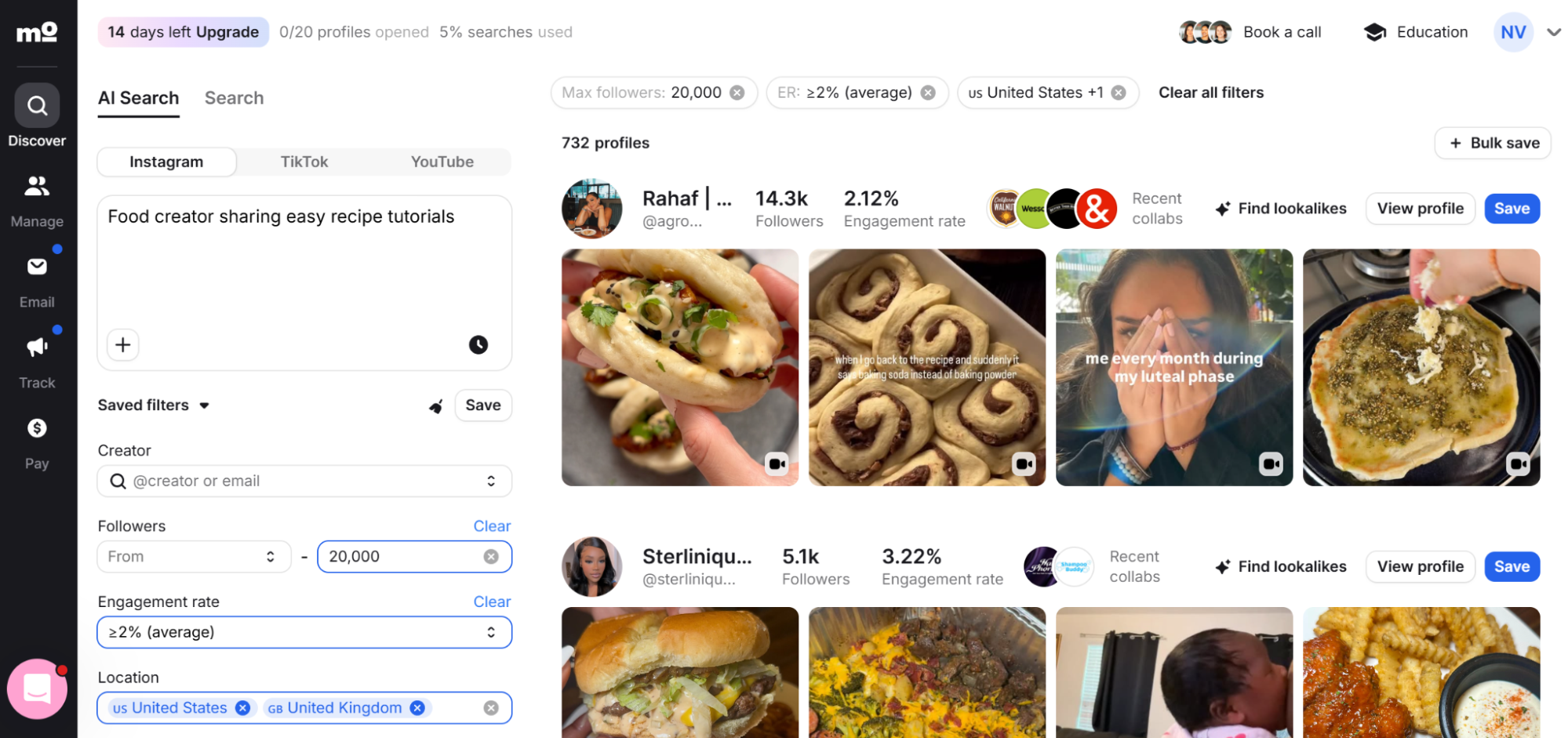 Discovering Instagram food creators using AI and specific filters at Modash
Outreach, negotiation, and contract generation usually happen inside the same platform, with digital sign-off and content approval workflows. Once a campaign is live, you get visibility into the campaign’s reach, impressions, link clicks, promo code redemptions, and attributed sales in real time. When the campaign wraps, automated payout systems handle creator compensation directly, calculated against agreed deliverables and performance thresholds.
AI-powered content creation at scale
Most content teams sooner or later face an operational bottleneck. Considering how fast social trends shift, putting out polished, platform-ready assets at the appropriate pace is genuinely difficult without the right infrastructure in place.
AI-powered content creation tools address this problem, streamlining Reels production, viral hook polishing, caption writing, carousel template design, and so on.
Some editors allow you to pre-load your brand fonts, logos, and color palettes to generate consistent visuals in seconds. Others use AI to analyze long-form recordings and break them down into potentially viral clips ready for Reels. AI can also be employed for transforming existing customer photos and sentiment into short-form UGC clips, shoppable galleries, and video ads — no filming required.
Please note that all information in this post, including features, pricing, and positioning, is accurate as of May 5, 2026.
Now that you know what’s possible, let’s look at the specific Instagram automation tools behind these use cases.
Here’s a snapshot of every tool we cover in this guide — sorted by category, so you can jump straight to the ones that match your goals.
| Tool |
Category |
Best for |
Free plan |
Starting price |
| SendPulse |
DM & comment automation |
Full Instagram-to-CRM ecosystem |
✅
10,000 msgs/mo, 500 contacts, 3 bots |
$12/mo |
| ManyChat |
DM & comment automation |
Creator-led DM sales and lead qualification |
✅
25 contacts, 2 channels |
$17/mo |
| Vista Social |
DM & comment automation |
Agencies needing an all-in-one social suite |
❌
14-day trial |
$79/mo |
| Sociality.io |
UGC discovery & social listening |
Brand monitoring and content operations |
❌
14-day trial |
$99/mo |
| Virlo |
UGC discovery & social listening |
Short-form video trend intelligence |
❌
7-day trial |
$49/mo |
| Nexos.ai |
UGC discovery & social listening |
Custom AI-powered UGC workflows |
❌
7-day trial |
$27/mo |
| ContentStudio |
Scheduling & publishing |
Agencies with high content volume |
❌
7-day trial |
$29/mo |
| Statusbrew |
Scheduling & publishing |
Budget-conscious teams needing stability |
❌
14-day trial |
$89/mo |
| Heepsy |
Influencer discovery & campaigns |
Long-term ambassador management |
✅
360 search results |
~$104/mo |
| Upfluence |
Influencer discovery & campaigns |
Enterprise-level creator programs |
❌
Free demo |
Custom pricing |
| PostNitro |
Content creation |
Carousel creation at scale |
✅
5 downloads/mo |
$15/mo |
| Vizard.ai |
Content creation |
Long-form to Reels repurposing |
✅
60 credits/mo |
$29/mo |
| Tagshop AI |
Content creation |
AI-generated UGC-style video ads |
✅
15 credits |
$29/mo |
| Agorapulse |
Analytics |
Revenue attribution and social management |
❌
30-day trial |
$99/mo per user |
| Swydo |
Analytics |
Paid media reporting across channels |
❌
14-day trial |
$69/mo |
Instagram DM and comment automation tools
On one end of the spectrum, there are specialized chatbot builders with complex logic and AI-powered responses. On the other end, you have lightweight, action-based DM automations provided by social media platforms that do it all.
SendPulse
SendPulse is an all-in-one marketing and sales automation platform combining over ten popular tools, such as chatbots, email, CRM, pop-ups, and more. It covers and automates every step of the customer journey, from lead capture to sales tracking, and Instagram bots play a big role in that.
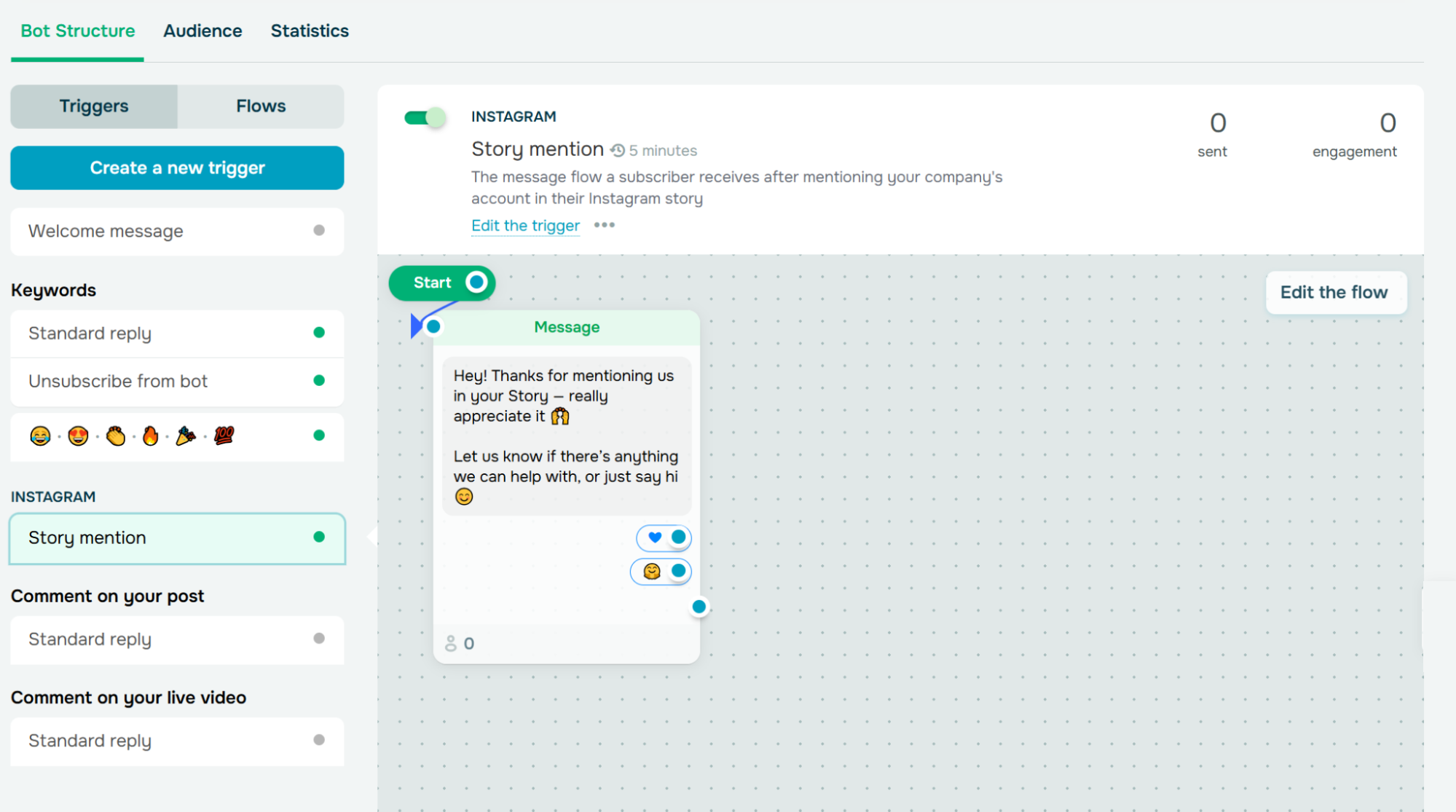 Setting up an Instagram chatbot flow in response to a Story mention in SendPulse
Here’s a quick overview of SendPulse features related to Instagram automation:
- drag-and-drop trigger- and keyword-based chatbot flow editor;
- prompt-based AI chatbot flow builder;
- auto-replies to Instagram comments;
- rich messages and campaign personalization via variables;
- automated DMs to new Instagram subscribers and Story mentions;
- trainable on-brand AI agents for service, support, and data capture;
- flexible, ready-made chatbot templates for common scenarios;
- seamless switch from bot to human agents;
- unified inbox for Instagram, TikTok, WhatsApp, and other channels;
- smart chat routing and collaboration features for agents;
- 360 automation templates for effortless omnichannel communication;
- link-in-bio page builder for Instagram and other platforms;
- in-chat product cards and payment buttons;
- direct syncing with the built-in CRM system;
- integrations with Google Sheets, Shopify, and 40+ other tools;
- embeddable chatbot subscription widgets for websites;
- in-depth analytics with agent performance breakdown.
Best for. The platform is best suited if your goal is to build an entire ecosystem for monetizing your expertise, product, or services on social media platforms and outside of them. Once you capture the initial interest of your Instagram followers through the chatbot, you can then direct them to your website, online course, or newsletter, also powered by SendPulse.
Limitations. SendPulse does not yet offer Instagram content scheduling, social listening, or design tools.
Pricing. SendPulse has a free-forever basic plan with up to 10,000 monthly messages and three bots. Paid plans with unlimited chatbots and advanced features start at $12 a month, billed monthly. Paying yearly will save you 20%.

Create your free SendPulse account
Start using powerful tools to attract, engage, and retain customers — all on one platform. Sign up for free and explore what you can build.
Get started for free
ManyChat
ManyChat is a popular conversational marketing platform for automating interactions across Instagram, WhatsApp, TikTok, and Facebook Messenger. It helps influencers and businesses not only stay on top of their DMs and comments but also grow their email and SMS lists.
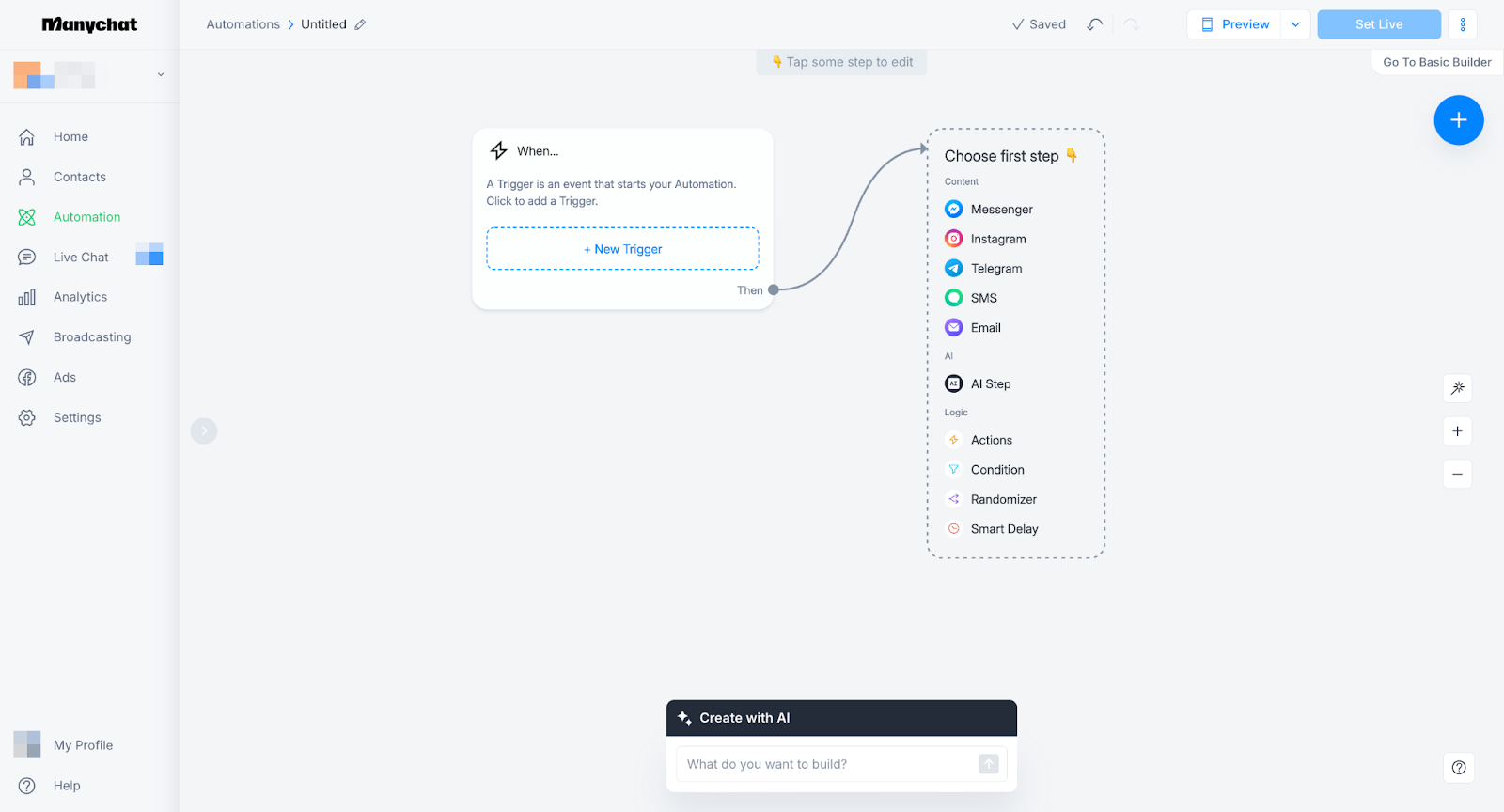 Building an automation in ManyChat; source: ManyChat
Let’s go through ManyChat’s best Instagram automation features:
- intuitive visual chatbot flow builder;
- effortless AI flow builder;
- goal-oriented, context-aware AI assistant;
- reusable flows across bots;
- automated replies to comments under posts and in Instagram Lives;
- automated DMs to new followers and Story mentions;
- conversation starters in DMs;
- routing based on responses, tags, or external data;
- trackable personalized campaigns;
- 60+ ready-made automation templates;
- follower status check;
- easy appointment booking links in DMs;
- omnichannel inbox with reminders and scheduled messages;
- email automation support;
- nuanced tracking, including revenue growth;
- 1,500+ integrations.
Best for. ManyChat is intended for creators and social-media-first businesses who want to qualify leads and close sales without pulling their audience out of Instagram. There’s also a dedicated tier for larger brands and agencies with automation playbooks, attribution and performance tracking, and centralized control over creators.
Limitations. The platform is purpose-built for chat automation and has no post scheduling, content calendar, or social media management capabilities. Its email capabilities are also very limited.
Pricing. ManyChat has a free plan for testing with up to 25 contacts. Paid plans start at $17 a month, billed monthly, for up to 250 contacts. Annual plans are 30% cheaper. ManyChat AI can be purchased as an add-on for $29 per month.
Vista Social
Vista Social is an all-in-one social media management platform for agencies, social media managers, and brands that want to run their entire social operation from a single dashboard.
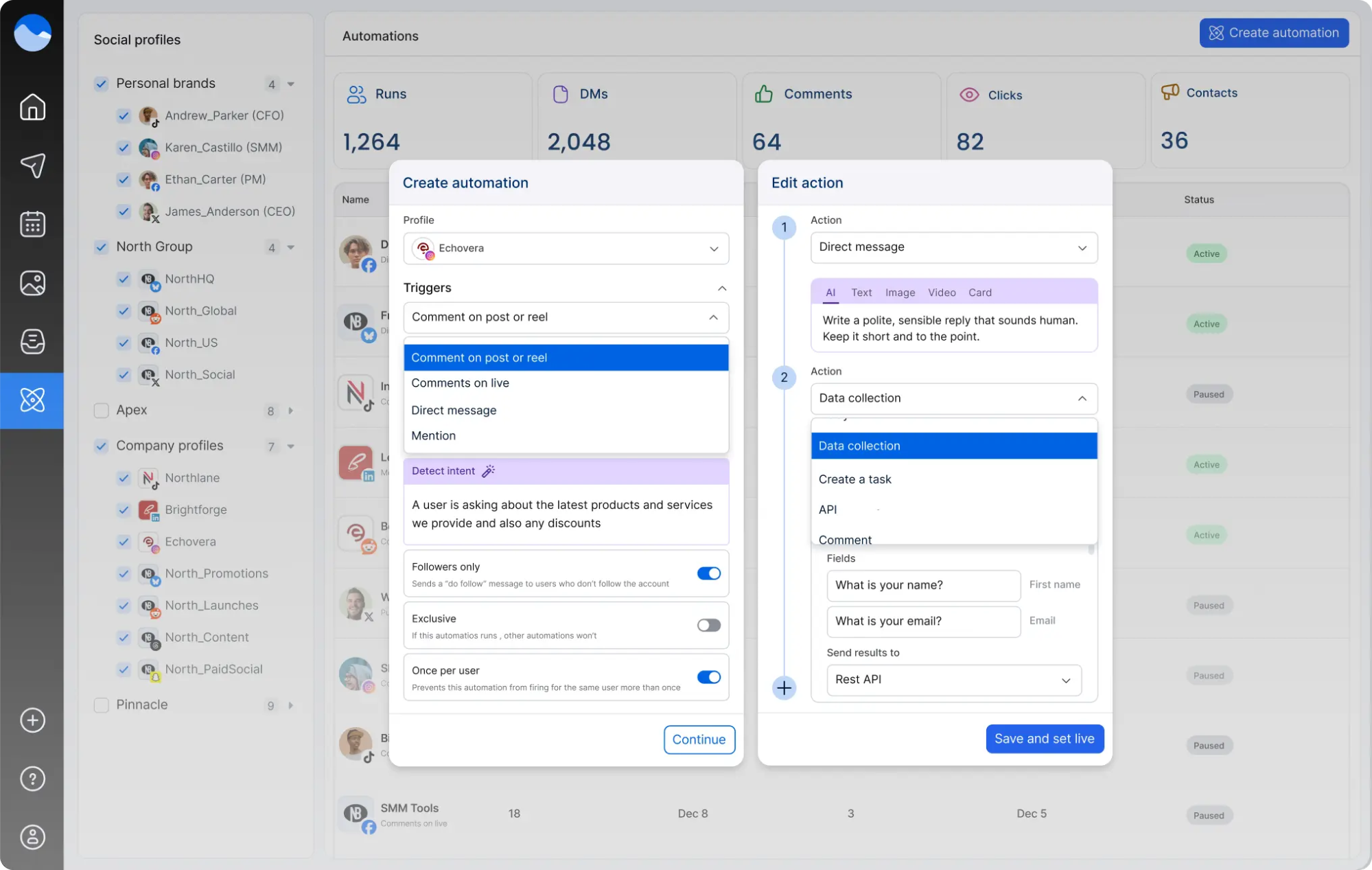 Creating an Instagram DM automation in Vista Social; source: Vista Social
Vista Social’s Instagram automation toolkit includes:
- auto-replies to Instagram DMs, mentions, and comments;
- easy trigger-based three-step automation builder;
- personalized messages, links, or offers;
- trainable AI for free-form chat conversations;
- guardrails and escalation rules for handoff from AI to agent;
- AI content brainstorming based on existing brand assets;
- visual content calendar with bulk scheduling and auto-publishing;
- AI-assisted post generation, caption rewriting, and hashtag suggestions;
- social cross-platform listening;
- built-in media library with a Canva AI integration;
- UGC discovery tools with automated crediting;
- sentiment analysis for monitoring brand mentions;
- customizable link-in-bio pages with embedded AI bots;
- single social inbox with a ticketing system integration;
- CRM, collaborations, and task assignment features included;
- 13+ supported social channels;
- intuitive analytics dashboard with custom reports;
- 40+ integrations.
Best for. The platform covers all aspects of social media marketing — content scheduling, listening, analytics, and DM automation — making it a strong fit for Instagram-native businesses, agencies, and enterprises that need a comprehensive social media command center rather than a standalone chatbot tool.
Limitations. Vista Social has little to offer to creators and small businesses who aim to reliably monetize their reach or guide their audience toward other channels like email.
Pricing. The service comes with a free 14-day trial. Professional plans start at $79 per month for three user seats, billed monthly. Annual billing is 20% cheaper.
Instagram UGC discovery and social listening tools
Social listening and UGC discovery rarely come as standalone tools — in most cases, they’re bundled into broader social media management platforms, which means finding the right listening solution might tick several other boxes on your list at the same time.
Sociality.io
Sociality.io is a social media management and intelligence platform with a decade of experience behind it. The platform offers one central hub for UGC discovery, user engagement, competitor analysis, content planning, and analytics. Its strongest suit is the listening module — it pulls mentions from Instagram, YouTube, blogs, forums, and the broader web into one stream, with sentiment tagging and multilingual support that most competitors still treat as a premium add-on.
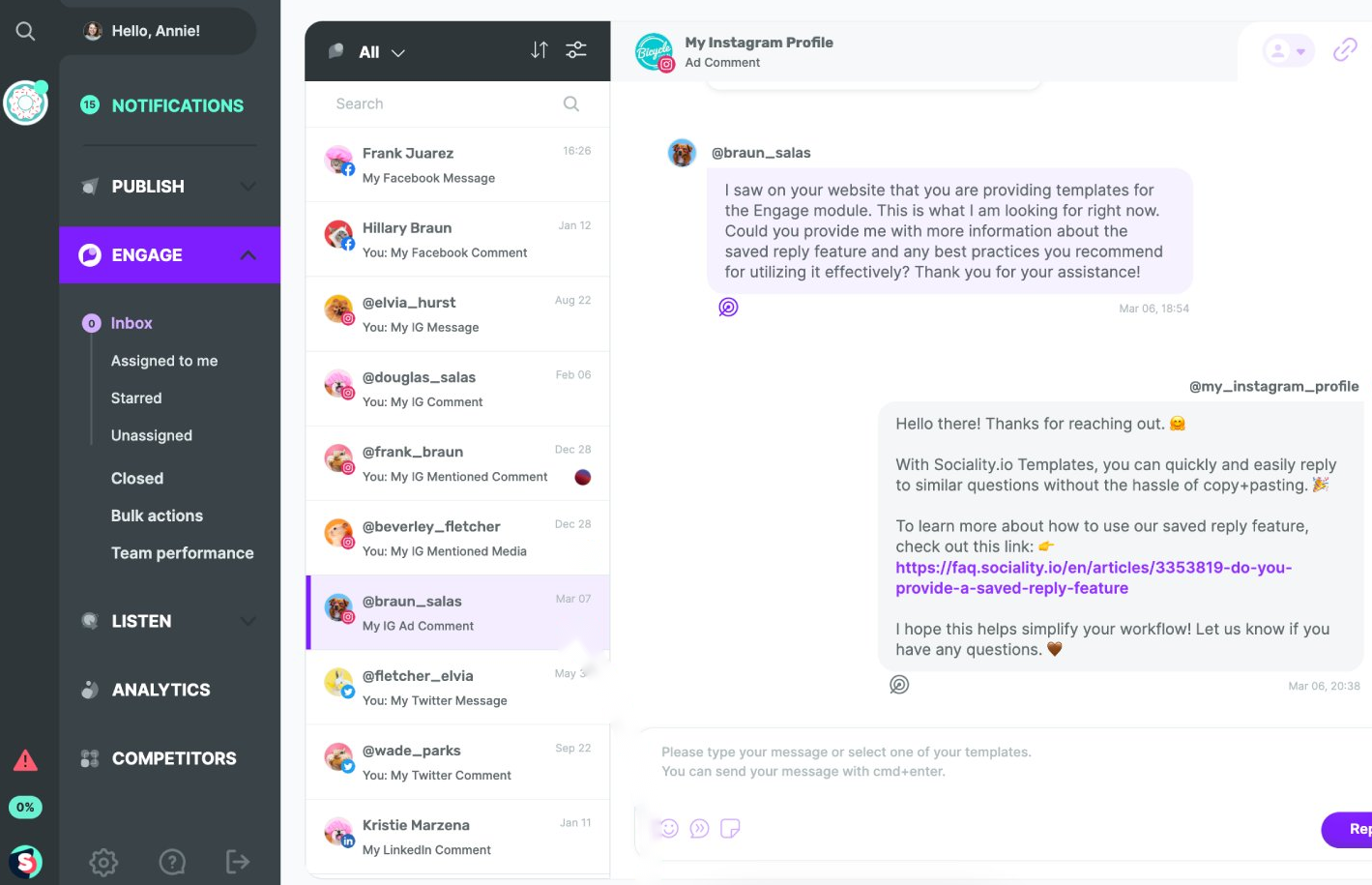 Sociality.io offers diverse Instagram automation tools; source: Sociality.io
Here’s what Sociality.io has to offer in terms of Instagram automation:
- social listening across Instagram, YouTube, blogs, news sites, forums, and broader web;
- monitoring of all direct and indirect mentions and advanced search criteria;
- sentiment analysis behind UGC;
- support for hundreds of languages;
- industry trend analysis and opinion leader discovery tools;
- customizable email alerts and exportable reports;
- competitor intelligence, including their social media performance metrics, content strategy, and ad campaigns;
- content scheduling and auto-publishing across Instagram, Facebook, LinkedIn, TikTok, and YouTube;
- unified social inbox with CRM capabilities;
- reply templates for light conversational automation;
- comprehensive social media KPI tracking;
- team performance reports;
- desktop-level social media management mobile app.
Best for. Sociality.io targets the needs of brands that need deep performance data and brand monitoring alongside their day-to-day content operations. It is best used in combination with AI agents, which can be connected to the platform via the MCP.
Limitations. The platform is neither a chatbot builder nor a DM automation solution, although it offers some surface-level reply automation. To turn it into a full Instagram automation powerhouse, you’ll need to bring your own AI agents.
Pricing. You can start by signing up for a 14-day free trial. Combined plans (MCP + Sociality Dashboard) start at $99 a month, billed monthly. Annual billing gives you a discount.
Virlo
Virlo is an AI-powered trend intelligence platform built specifically for short-form video creators, agencies, and eCommerce brands. The main goal of the service is to help you decipher what goes viral in your niche and why — and turn that intelligence into strategic UGC campaigns, scripts, and briefs.
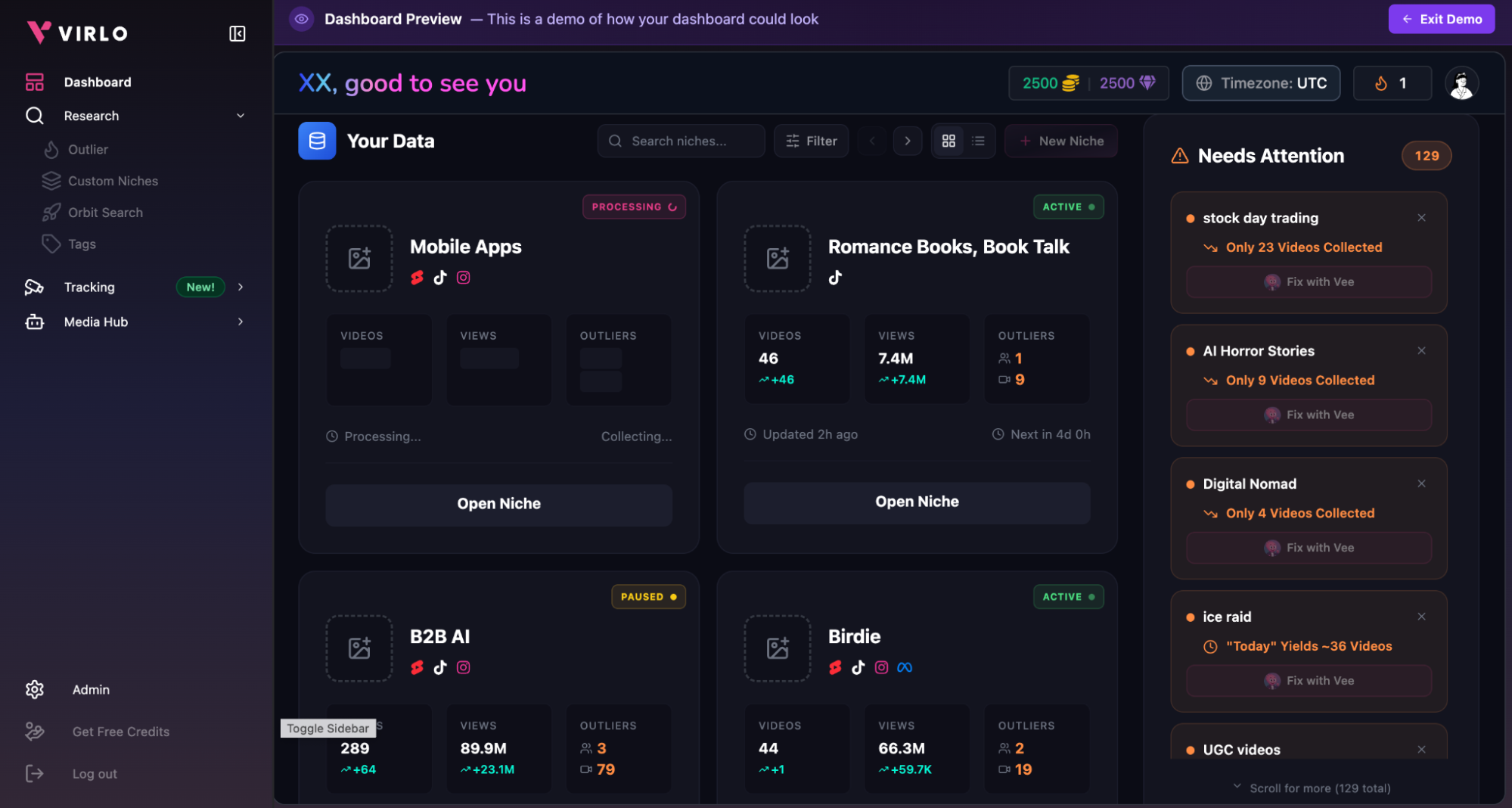 Exploring trend data in Virlo’s dashboard
Virlo’s feature list includes:
- hands-off trend and UGC tracking across IG Reels, TikTok, and YT Shorts 24/7;
- viral video formula and metric breakdown;
- deep AI analysis on hooks, sentiment, and posting patterns;
- built-in Content Studio for data-informed asset generation;
- custom niche filters for laser-precise monitoring;
- competitor Meta ads intelligence;
- collaboration tools;
- exports in Excel, CSV, JSON, or PDF format;
- integrations with Slack, Discord, Webhooks, Zapier, n8n, etc.
Best for. Virlo makes most sense for Reel- and TikTok-native businesses that rely heavily on authentic content and UGC influencer campaigns. The platform empowers these brands to make informed decisions and navigate niche trends and formats in a systematic way.
Limitations. The service acts as a search engine for short-form content — its narrow focus excludes any typical social media management or DM automation features. On the other hand, Virlo can be paired with third-party AI tools via the MCP. The 7-day trial feels a bit tight if you want to evaluate trend accuracy over a full content cycle.
Pricing. There’s a 7-day free trial available. Monthly plans start at $49 a month. Paying yearly saves you 30%.
Nexos.ai
Nexos.ai is a versatile no-code AI agent platform for marketing, sales, and productivity. It provides access to every leading LLM from a single workspace and enables you to create custom AI assistants with a single prompt. While not a purpose-built UGC tool, its custom AI agents can be configured for UGC discovery, trend monitoring, and influencer outreach workflows — we set up a functional UGC scout agent during our trial in minutes.
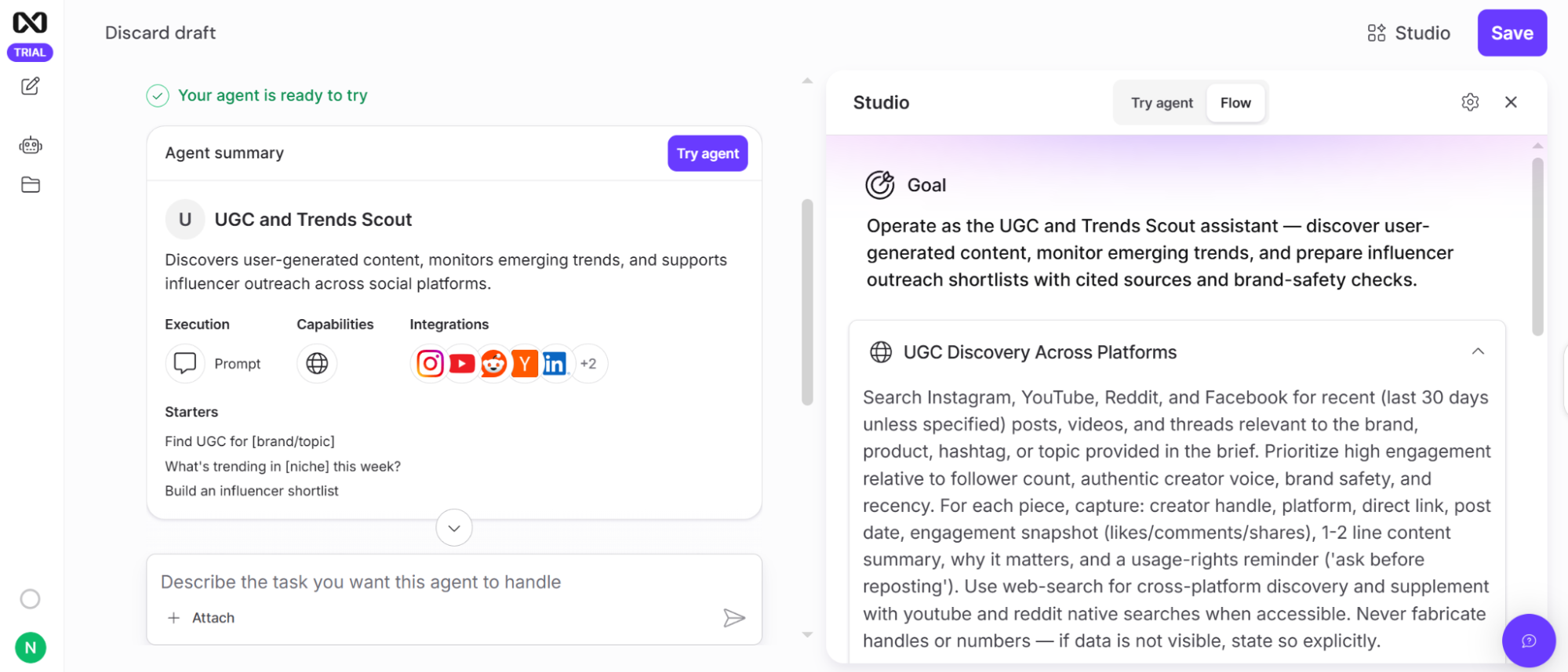 A custom UGC discovery agent we built in Nexos.ai using a single prompt
The platform has multiple features that can be useful for Instagram automation and beyond:
- conversational AI agent builder with fine controls;
- library of specialized AI Agents pre-built for marketing, sales, and HR;
- scheduling tools for running AI agents on custom terms;
- automation recipes for content drafting, deep research, and campaign analysis;
- event-based triggers for AI agents;
- one-click cross-team agent sharing;
- AI answers based on your company’s knowledge;
- AI integrations with Slack, Google Workspace, SharePoint, Jira, and more;
- SOC 2 Type 1, ISO 27001, and GDPR compliance.
Best for. Nexos.ai is an all-rounder AI agent solution rather than a rigid, purpose-built UGC solution out of the box. As such, it unlocks limitless possibilities, allowing social media managers to outsource entire UGC discovery, influencer outreach, creation, and analytics workflows to AI.
Limitations. The platform has no native social media publishing, scheduling, DM automation, or direct Instagram integration. UGC discovery and trend monitoring require building and maintaining custom agents.
Pricing. Nexos.ai comes with a 7-day free trial. Paid plans start at $27 a month, billed monthly. You can save 20% by paying annually.
Instagram scheduling and publishing tools
As mentioned before, Instagram’s built-in scheduling is quite limited for now and spans only up to 30 days. Third-party Instagram automation tools bridge that gap, allowing for more flexibility and a wider planning horizon.
ContentStudio
ContentStudio is an all-in-one social media management solution enhanced with AI. It supports 11 channels, including Instagram, YouTube, and TikTok. The platform revolves around a unified content calendar that doubles as a collaboration hub, with an AI layer handling caption generation, clip restyling, and publishing optimization.
Here are ContentStudio’s automation features at a glance:
- smart scheduling and publishing at optimal times;
- Calendar, Grid, and Feed content views;
- shareable calendars and posts with custom approval chains;
- version history and status monitoring for each content piece;
- AI caption writer and image creator;
- AI clip maker for restyling and automated captions;
- built-in media library and intuitive content navigation;
- trending content and influencer discovery;
- internal messaging, role-based access, and activity logs for agents;
- single social inbox with chat assignment and one-click responses;
- API plan for developers;
- detailed multi-channel insights and competitor analysis.
Best for. With its white-labeling and integrated generative AI, the platform caters to businesses and agencies with an established Instagram presence and sizable content output.
Limitations. ContentStudio’s toolkit doesn’t include conversational automation beyond canned replies, so you’ll still need a dedicated chatbot tool for DM flows.
Pricing. The platform offers a 7-day free trial. Paid plans start at $29 a month for five social accounts, billed monthly. To save up to 34%, opt for an annual subscription.
Statusbrew
Statusbrew positions itself as a secure and budget-friendly Sprout Social and Hootsuite alternative for businesses and agencies of all sizes with 10+ supported channels. Its standout trait is flat-rate pricing that doesn’t penalize you for adding team members, with a unified inbox at the center pulling DMs, comments, and mentions into one filterable view.
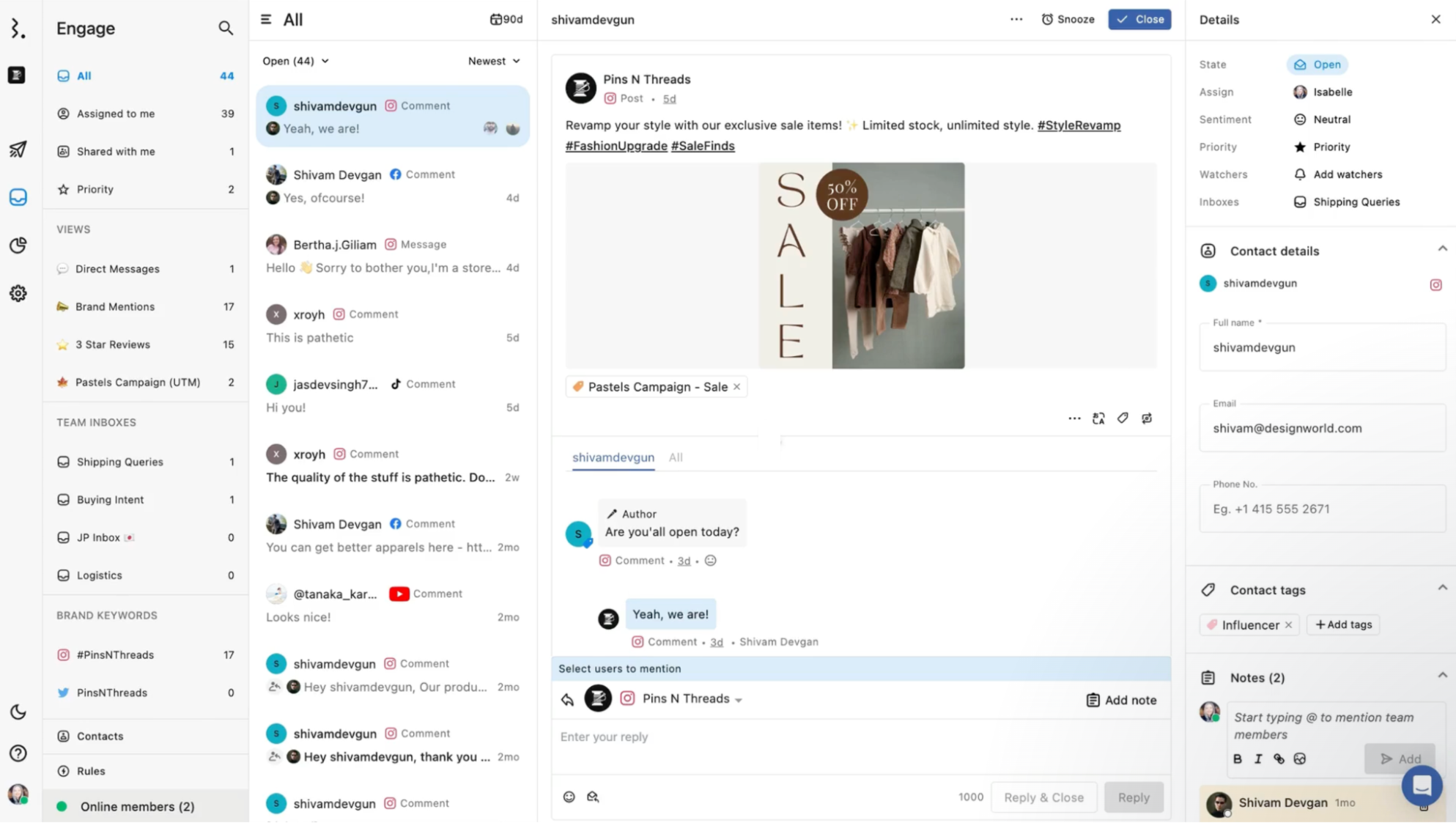 Navigating the unified inbox in Statusbrew; source: Statusbrew
Its feature list includes:
- shareable social calendars with List, Weekly, Monthly, or Grid layouts;
- bulk post scheduling;
- full native feature support, including Instagram collaborator tagging;
- suggested optimal publishing times;
- content approval workflows;
- AI content writer;
- singular inbox with 25+ filtering options;
- saved, suggested & auto-replies for basic Instagram DM automation;
- auto-routing and moderation for Instagram messages and comments;
- grid-like Instagram link-in-bio pages;
- CRM integrations;
- ready-made reporting templates with 230+ metrics;
- paid reporting dashboards with 15+ metrics;
- competition analysis tools;
- SOC 2 and GDPR compliance.
Best for. Statusbrew is well-suited for small businesses and enterprises alike due to its moderate and locked-in pricing, responsive support team, and personalized onboarding and training.
Limitations. Since the platform is mostly focused on social media planning and inbox management, it lacks social listening and competitor research. The auto-reply options work for basic FAQ coverage but won’t replace a purpose-built bot.
Pricing. Statusbrew offers a two-week free trial. Paid plans start at $89 a month for five social profiles, billed monthly. Annual billing comes with a discount.
Influencer marketing tools for Instagram
We’ve already mentioned Modash, one of the most popular influencer discovery platforms — here are two more powerful alternatives.
Heepsy
Heepsy offers access to an extensive network of influencers across Instagram, TikTok, and YouTube, and covers every step of campaign orchestration, from vetting and bulk outreach to payments and in-depth reporting. Sign-up is near-instant, and the AI-powered creator search is intuitive enough to return usable results on your first query.
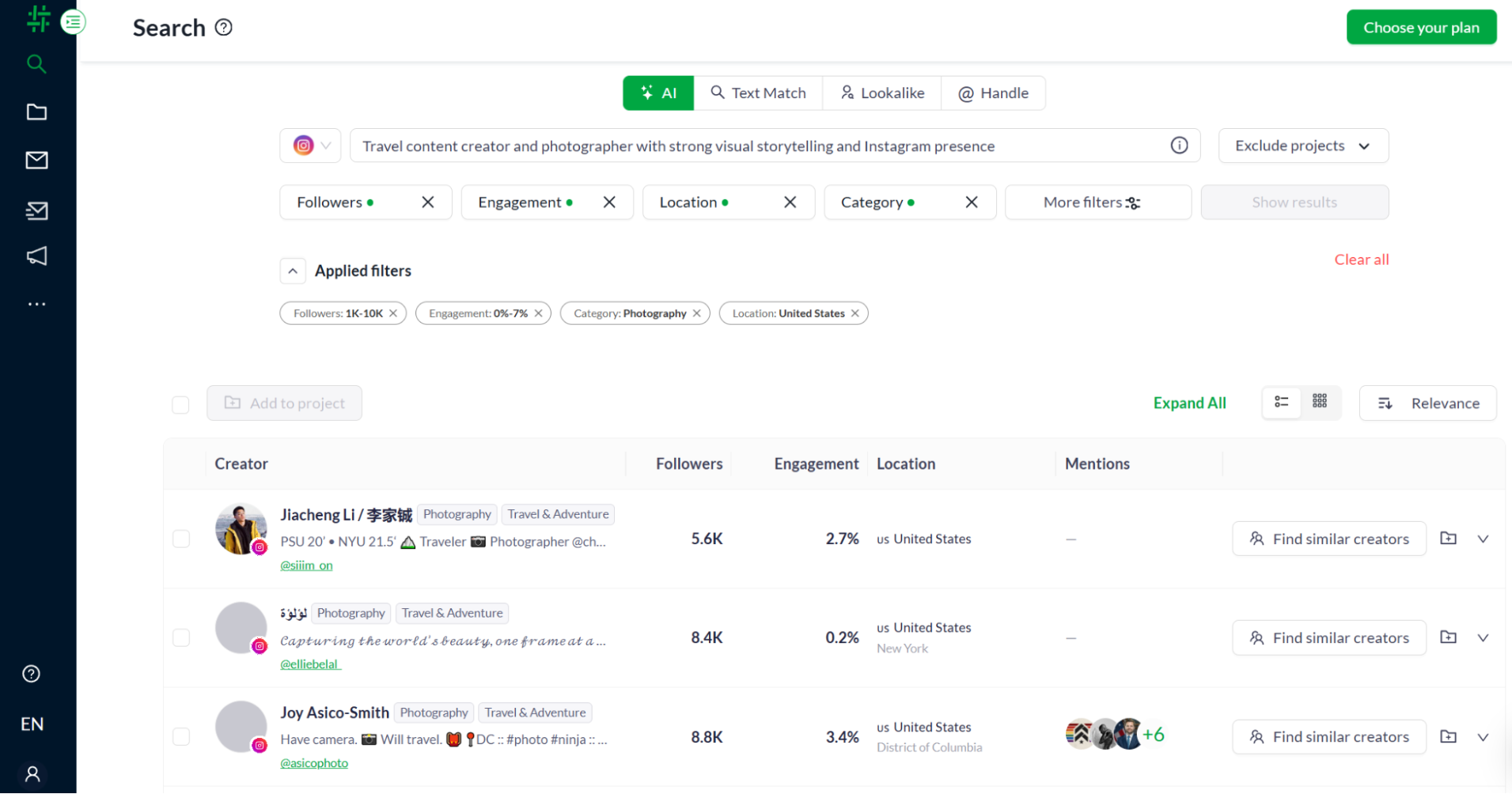 Filtering US-based photography micro-influencers by engagement rate in Heepsy’s AI search
Let’s take a closer look at how Heepsy helps with Instagram influencer marketing automation:
- creator search by niche, reach, location, audience demographics, or engagement metrics;
- influencer lookalike discovery;
- visibility into authenticity metrics;
- creator detection among your own followers;
- bulk outreach with editable dynamic templates;
- dedicated application pages for collecting UGC;
- competitor influencer collaboration discovery;
- integrated campaign and media management;
- built-in influencer payment system;
- customizable user-friendly influencer CRM system;
- sales tracking via a Shopify integration;
- detailed campaign tracking.
Best for. Heepsy promotes long-term ambassador management and continuity, empowering agencies and brands to reuse top-performing creators and boost internal knowledge sharing.
Limitations. Heepsy’s insights are estimated and based on merging AI algorithms with significant sampling. It’s possible to request specific creator data refreshes.
Pricing. There’s a limited free plan for initial creator discovery. Advanced plans start at around $104 a month for 50 outreach emails, billed monthly. You can get 20% off by paying yearly.
Upfluence
Upfluence is an influencer discovery and management solution that executes entire creator programs on AI autopilot. The platform’s AI copilot, Jaice, handles everything from campaign brief to creator shortlisting to outreach, while the backend ties directly into eCommerce infrastructure for product seeding, promo codes, and revenue attribution.
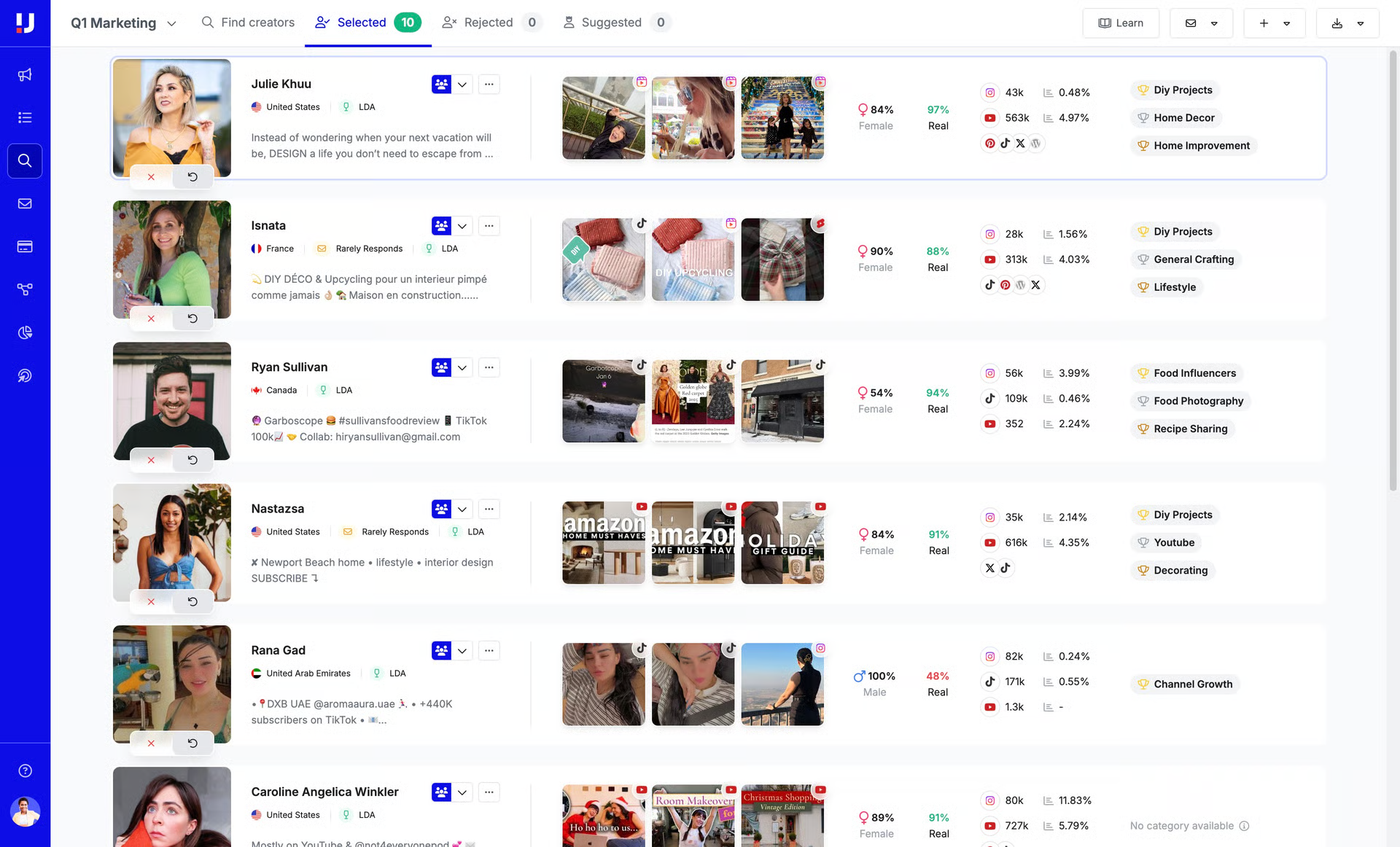 Influencer discovery with Upfluence; source: Upfluence
The platform’s features include:
- AI-copilot Jaice for automated campaign launch, creator selection, and outreach;
- data-rich creator profiles with authenticity metrics;
- advanced AI-powered audience filtering;
- influencer detection among existing follower base;
- automated workflows (one-click shipping, emails, mass promo codes, affiliate links);
- centralized inbox;
- flexible influencer CRM system;
- automated product seeding with inventory updates and control;
- bulk creator payments with full traceability and automatic tax record exports;
- campaign ROI, awareness, engagement, and long-term metric tracking;
- creator data API for developers;
- Chrome extension for easy access to in-depth creator analytics;
- integrations with Shopify, Amazon, Stripe, Zapier, Klaviyo, etc.
Best for. For Instagram- and TikTok-savvy brands, Upfluence can be a game-changer as it streamlines every aspect of influencer marketing with AI and allows you to attribute every sale, click, and conversion back to the creator that drove it — and forecast future results based on historical data.
Limitations. Upfluence, with its tailored pricing, clearly targets mid-to-large brands and agencies with serious influencer budgets and continuous UGC flow, which makes it a non-starter for smaller teams that just want to sign up and get going.
Pricing. The platform offers a free demo and custom pricing plans.
AI tools for Instagram content creation
Instagram’s native AI features, like Story backgrounds, AI stickers, Auto Translate, and Auto Dub for Reels, are a decent starting point, but they won’t take you very far. If your goal is consistent on-brand output, you may need third-party Instagram content generation tools.
PostNitro
PostNitro is an AI-powered carousel maker for Instagram, LinkedIn, and TikTok. It goes beyond basic templates by transforming your text, URLs, or even X (Twitter) threads into high-res, multi-slide carousels in minutes. The editor lets you pick a target platform, set the tone, and choose an AI model right from the same panel, so you go from a topic idea to a styled multi-slide draft without switching tabs.
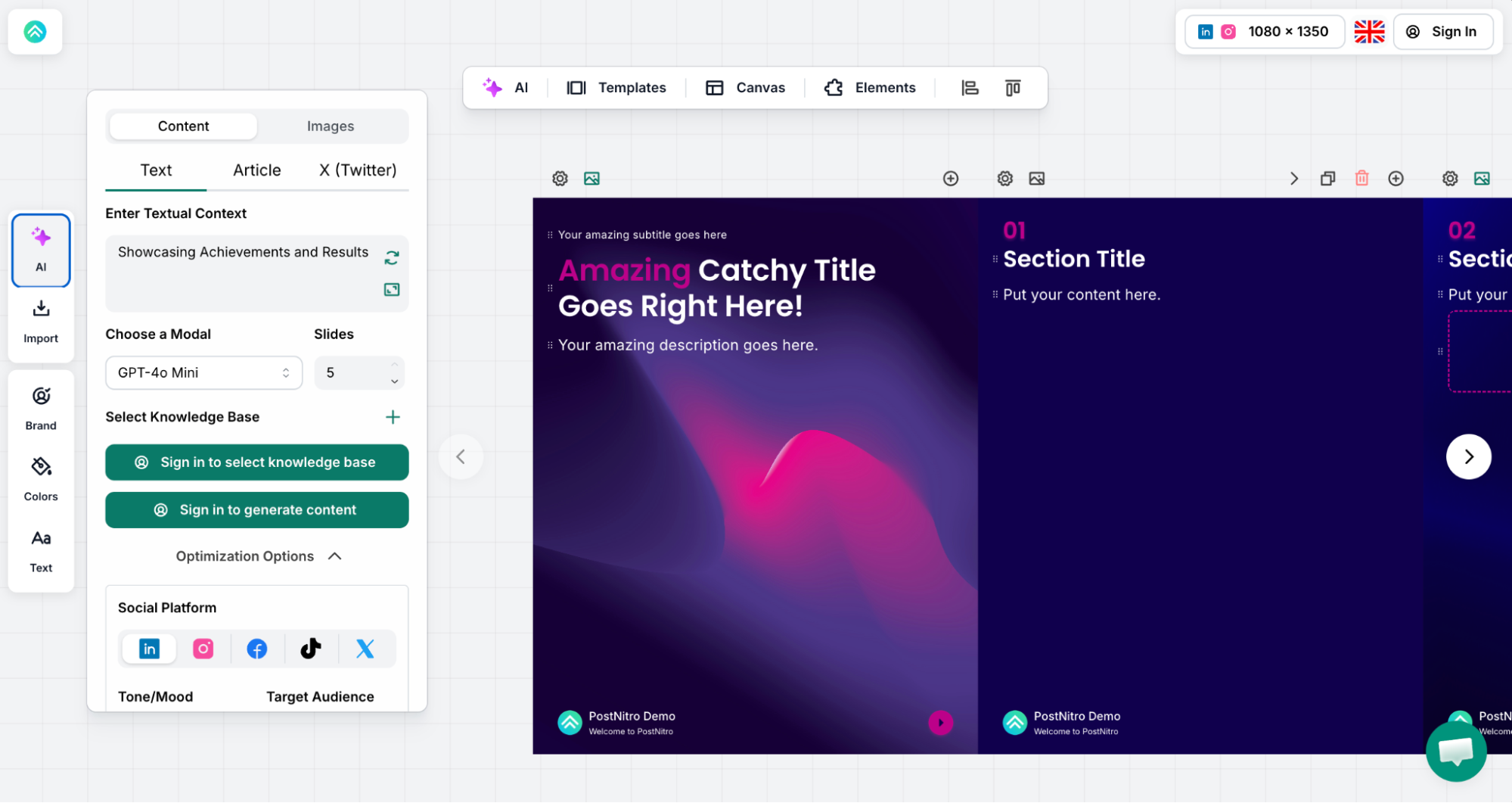 A five-slide Instagram carousel PostNitro generated from our text prompt
Let’s look at the platform’s feature list:
- 100+ professionally designed, customizable templates;
- built-in AI text and image generator;
- AI-suggested or custom font and color combinations;
- built-in content scheduling;
- content calendar and cross-platform publishing;
- brand kit integration;
- dedicated project workspaces;
- team collaboration tools;
- multi-format export;
- integrations with 1,000+ apps.
Best for. Carousels consistently outperform single-image posts for saves, shares, and follower growth, but producing them at volume has always been a pain. PostNitro is one of those highly niche tools that address the issue, making expert content creation at scale genuinely possible for teams without a dedicated designer.
Limitations. PostNitro clearly states its purpose and isn’t pretending to be an all-rounder tool like Canva. For other design challenges, you may need a separate app.
Pricing. The platform offers a free plan with up to five monthly downloads. Paid plans start at $15 a month, billed monthly. Annual billing gives you two months for free.
Vizard.ai
Vizard.ai is an AI-enhanced clip maker and video repurposing platform built for creators and businesses whose entire content strategy is built on long-form content — and who can’t afford to let a single recording go to waste. You feed it a video link or file, and the AI breaks it down into scored, captioned clips ready for Reels. We gave it a 45-second tutorial video and got back a ranked clip with an auto-generated title and transcript within minutes.
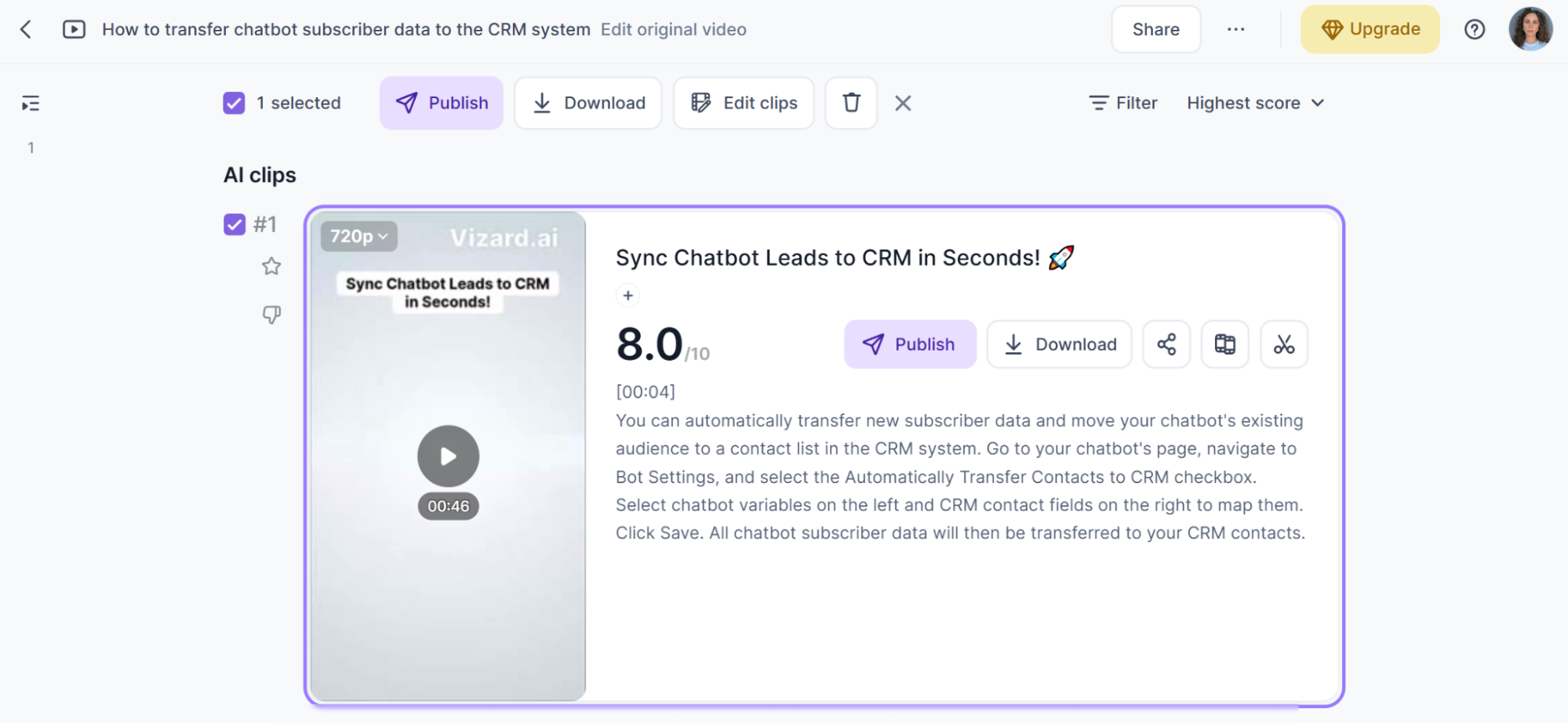 An AI-scored clip Vizard.ai generated from a video we uploaded
Here are the particular features that make Vizard.ai useful for Instagram automation:
- AI video highlight discovery (30+ clips from a single recording);
- transcription-based or timeline video editing;
- instant video ratio changes;
- dynamic aesthetic captions in 50+ languages;
- auto-generated emojis;
- branded templates;
- Kling 3.0 AI video generator;
- AI B-roll clips for engaging storytelling;
- AI-generated captions and hashtags;
- centralized hub for seamless project management;
- seamless downloads and shares;
- optimization for TikTok, Instagram, and YouTube Shorts.
Best for. Vizard.ai hits the sweet spot for influencers, marketers, video essayists, podcasters, interviewers, live streamers, and coaches. The AI handles the time-consuming parts of viral clip-making while keeping you in complete control.
Limitations. The platform is not trying to replace a full video editor, which may disappoint creators who need advanced capabilities like color grading, motion graphics, multi-track audio mixing, or precise frame-level control.
Pricing. You can start off with a free plan with 60 monthly credits. More advanced plans are all volume-based and start at $29 a month, billed monthly. Buying an annual subscription can save you five months.
Tagshop AI
Tagshop AI is an AI UGC video engine for generating ads, explainers, try-ons, product showcases, and other influencer-style videos. The core idea is simple: instead of hiring a creator for every ad variation, you pick an AI avatar, feed it a script or product URL, specify the selling points, and get a polished Reel-ready clip back.
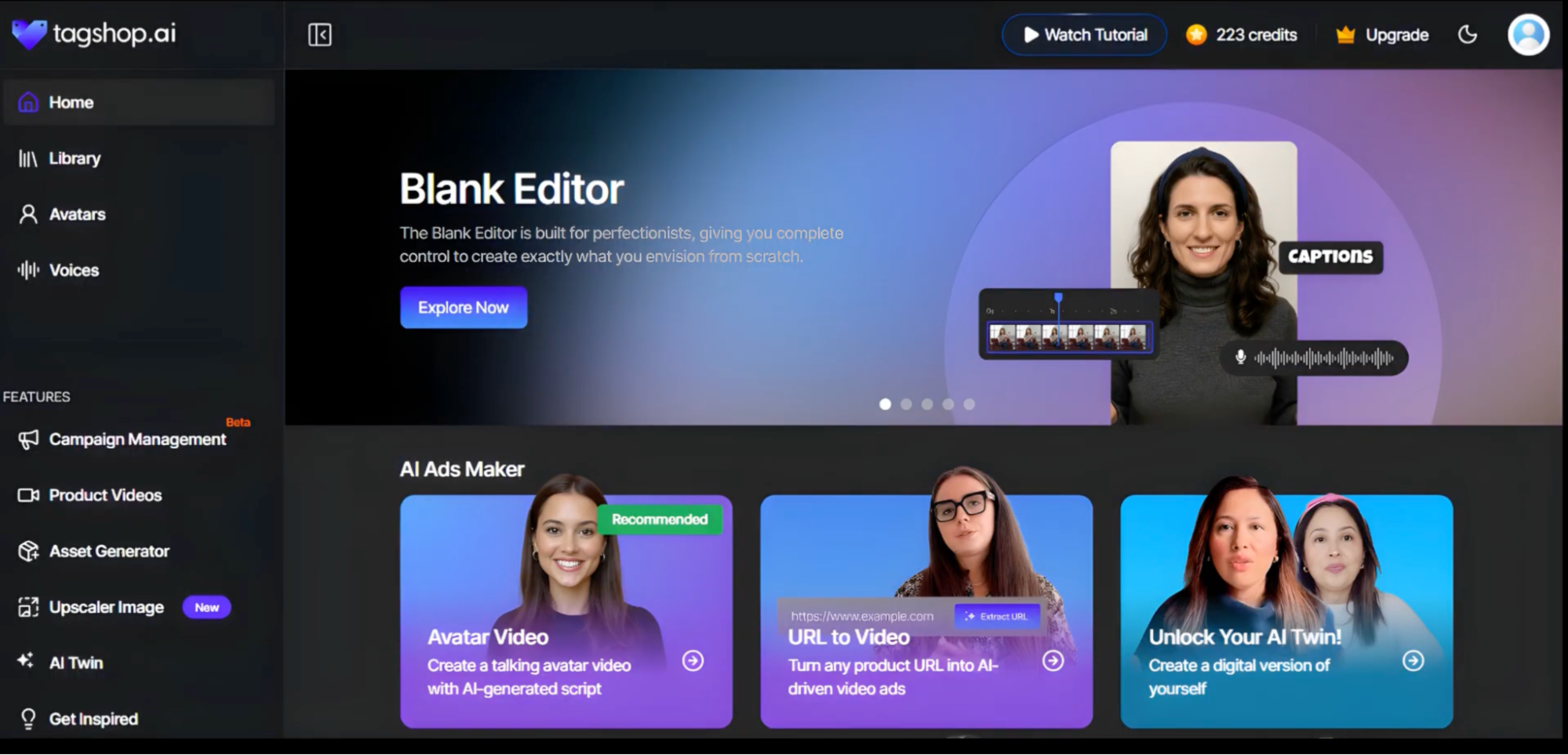 Tagshop AI’s dashboard; source: YouTube
The following features make the platform a lifesaver for Instagram-based creators and businesses:
- 300+ lifelike influencer avatars;
- script generation in 75+ languages;
- AI voice and face cloning with automatic lip-sync;
- URL-to-video conversion;
- text- and image-to-video conversion;
- AI background changer;
- automated Reel generation with transitions, text, and audio baked in;
- direct Meta and TikTok campaign setup.
Best for. Tagshop AI sits at a unique intersection of UGC, social commerce, and AI video production. It’s a perfect app for marketers who want to take things up a notch, generating ten variations of a UGC-style Reels ad in the time it usually takes to brief one creator.
Limitations. The service is purpose-built for eCommerce and performance marketing, which makes it a poor fit for creators or brands whose Instagram persona isn’t tied to a product catalog.
Pricing. There’s a free plan with 15 credits. Professional plans start at $29 a month, billed monthly. You can save up to 60% by paying yearly.
Instagram analytics tools
At the end of the day, none of the platforms we’ve covered delivers its full value without solid data intelligence sitting underneath it. Here are two advanced Instagram analytics tools worth knowing about.
Agorapulse
Agorapulse is an all-in-one social media management platform covering 11 networks, including Instagram, Facebook, TikTok, LinkedIn, YouTube, Pinterest, Threads, Bluesky, and Reddit. Beyond standard engagement metrics, the platform connects Instagram activity to website conversions through Google Analytics integration and assigns revenue back to specific posts, campaigns, and even individual team members.
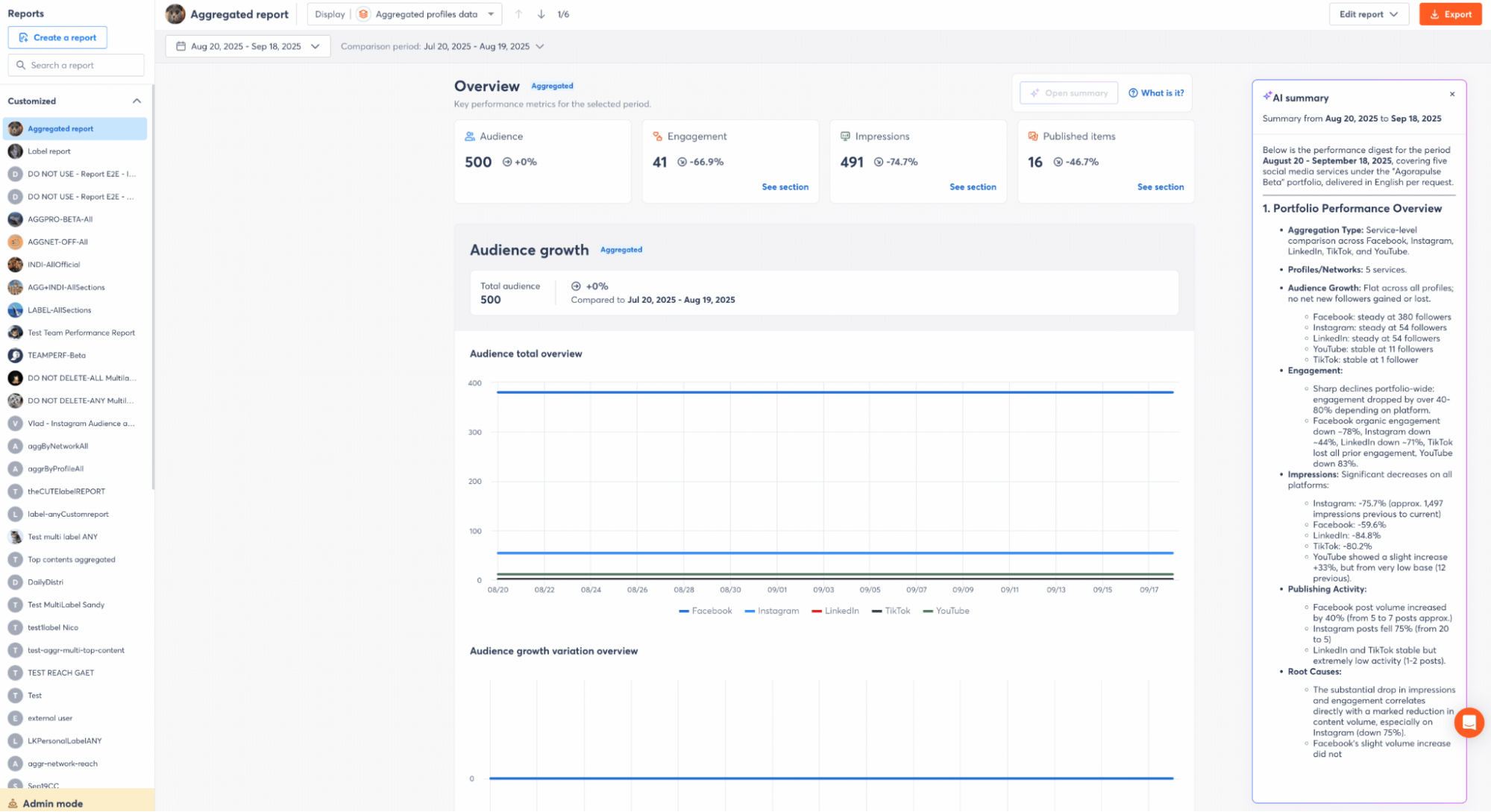 Generating an AI report summary in Agorapulse; source: Agorapulse
Here are some features that make the service outstanding when it comes to Instagram intelligence and ROI measurement:
- integrated AI assistant for outsourcing entire workflows;
- custom reports with Google Analytics integration;
- AI report summaries;
- revenue attribution by campaign, event, and agent;
- AI recommendations based on historical data;
- community management stats;
- advanced social listening and sentiment analysis;
- competitor Instagram and Facebook page tracking;
- customizable crisis keyword alerts;
- inbox with UTM tracking codes for links and AI-powered DM automation;
- social media calendar and publishing time optimization;
- popular CRM integrations;
- self-hosted MCP for connecting custom AI agents.
Best for. With its MCP and robust URL tracking, Agorapulse targets social media managers and agencies who aim to see past superficial metrics. The platform helps tie Instagram content directly to website traffic, lead generation, and revenue attribution, all with the help of AI.
Limitations. Agorapulse’s per-user pricing model is its most significant drawback, making it less attractive to smaller teams and businesses.
Pricing. Agorapulse offers a free 30-day trial. Paid plans start at $99 a month per user, billed monthly. An annual subscription gives you 20% off.
Swydo
Swydo is an automated marketing reporting and monitoring platform intended for agencies and in-house marketing teams that need to pull performance data from 25+ paid channels, including Instagram. Its core strength is consolidation — you can pull Instagram Ads metrics alongside Google Ads, Meta, and LinkedIn data into a single white-labeled report, with smart alerts that flag performance anomalies before a client does.
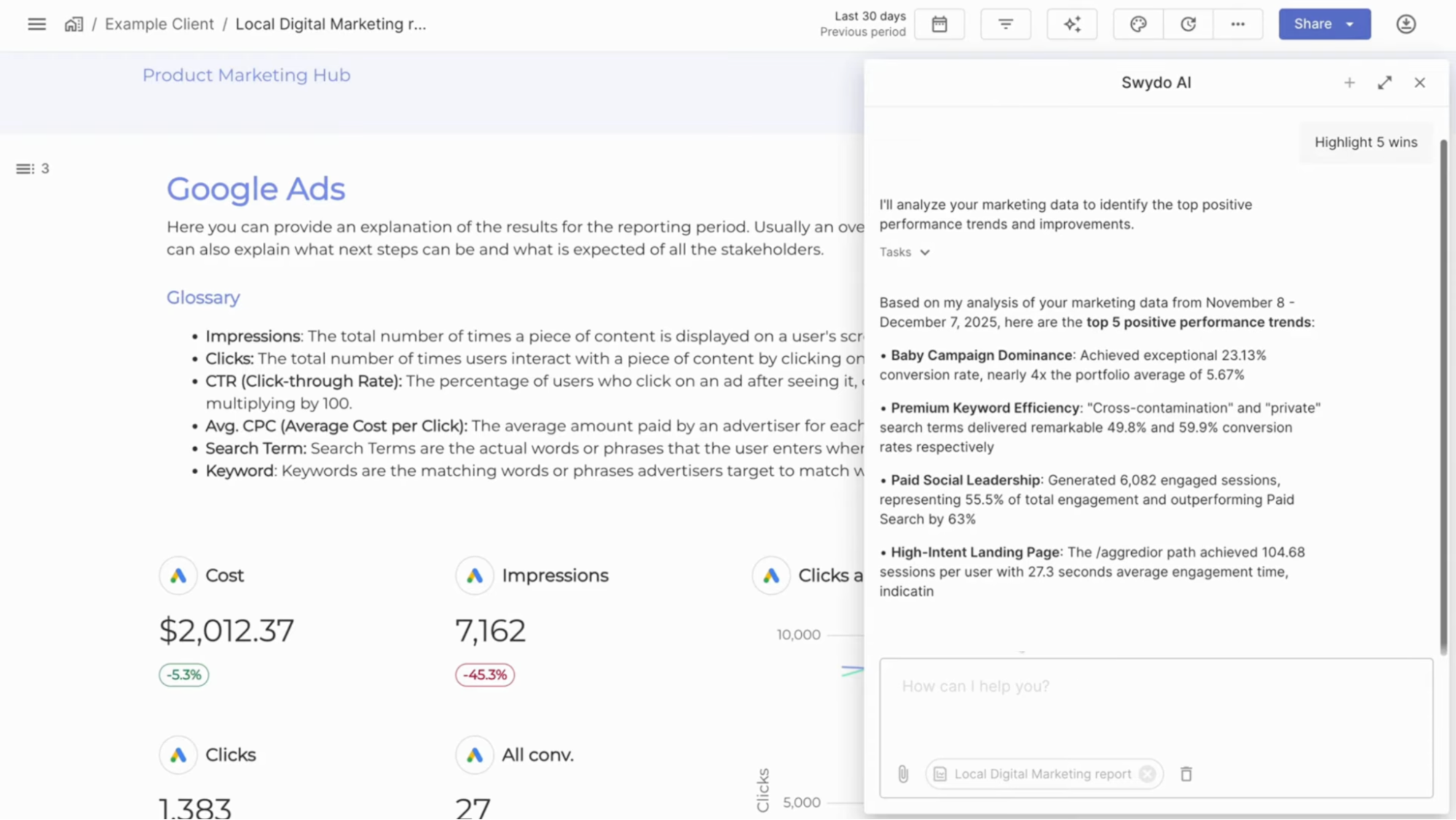 Swydo’s AI paid media report summary; source: YouTube
Swydo’s feature list includes:
- report and dashboard templates for socials, PPC, etc.;
- AI reporting assistant;
- 92+ available metrics for Instagram Ads reports;
- professional data visualizations;
- flexible goal setting and tracking;
- metrics from up to five ad platforms in one widget;
- customizable monitoring boards;
- smart triggers, proactive alerts, and 24/7 monitoring;
- automated white-label reporting;
- role-based access;
- integrations with all popular paid media tools;
- reports in 14 available languages.
Best for. Swydo is a good match for small to mid-sized digital marketing agencies and PPC-focused teams that manage multiple clients across paid media channels and need a branded, no-fuss reporting solution.
Limitations. The platform is built almost entirely around paid media reporting — if you’re looking for engagement insights beyond ads, you will find the coverage thin.
Pricing. There’s a free 14-day trial. Swydo’s volume-based pricing starts at $69 a month for ten data sources. Annual billing makes the subscription 10% cheaper.
The bottom line
You don’t need ten tools to run Instagram well. The right setup depends on where your biggest bottleneck is right now:
- If DMs and comments are eating your time, start with an AI-powered chatbot builder like SendPulse or ManyChat, or social management tools with dedicated features like Vista Social.
- If you’re drowning in content production, a scheduling platform like ContentStudio or Statusbrew paired with an AI creation tool like PostNitro or Vizard.ai will give you the most breathing room.
- If brand reputation and UGC keep slipping through the cracks, a social listening tool like Sociality or Virlo will surface what you’re missing.
- If influencer partnerships are your growth lever but the manual work is unsustainable, Heepsy or Upfluence can automate the pipeline from discovery to payout.
- If you’re flying blind on ROI, Agorapulse or Swydo will connect your Instagram effort to actual revenue data.
Before stitching together a number of shiny apps, though, it’s worth asking whether a single platform could cover the essentials without the overhead. SendPulse handles Instagram DM and comment automation, syncs chat data into an integrated CRM system, offers email automation, and lets you launch digital products like online courses — all from one dashboard.
Create your free account today and see it for yourself!