Travel decisions rarely happen instantly. A potential client compares destinations, calculates budgets, asks about cancellation policies, and expects immediate answers at every step. If your response takes hours, they’ve already moved on.
That’s where AI travel chatbots are really helpful. They respond within seconds, qualify leads, guide travelers through options, and keep conversations moving toward a booking across messaging apps or your website.
For travel agencies and tour operators, this means shorter decision cycles, higher-quality leads, and fewer missed opportunities. In this guide, we’ll break down how travel chatbots work, where they drive the most value, and how to build one step by step using SendPulse.
TL;DR
Travel chatbots help agencies, airlines, booking platforms, and tour operators turn slow, fragmented conversations into faster booking decisions. This guide covers the strongest chatbot use cases, expert tips for building high-performing flows, and real-world examples grouped by travel business type.
You’ll also find a hands-on guide to setting up an AI-powered travel chatbot with SendPulse.

Try our visual chatbot builder
Create AI-powered chatbots for your website, WhatsApp, Facebook, Instagram, TikTok, and Telegram. Run up to three bots and send 10,000 messages per month for free.
Get started for free
What is a chatbot for the travel industry?
A chatbot for the travel industry is a conversational assistant that helps travelers move from “just browsing” to “ready to book.” It works within the channels they already use, including websites, WhatsApp, Instagram, Facebook Messenger, and other messaging platforms.
Unlike a generic customer support bot that mainly answers questions and routes tickets, a travel chatbot is built to support decision-making. It qualifies intent, recommends options, and nudges the user to the next step in the booking process.
To do that well, a tourism chatbot needs to handle multi-step logic that shifts based on context:
- dates and availability – travel windows, check-in/check-out dates, and seasonal restrictions;
- pricing logic – per-person vs. per-room rates, child pricing, currency, and inclusions or exclusions;
- preferences – budget range, trip style, departure city, dietary needs, pace, and interests;
- risk questions – cancellation rules, visa requirements, insurance, safety, and weather;
- high-consideration behavior – customers compare, hesitate, and return to book later.
That’s why effective travel chatbot flows are less like scripted menus and more like guided mini-consultations.
4 key reasons travel businesses are investing in travel chatbots
A potential client can open five tabs, message two agencies, and check three booking platforms in under ten minutes. If your response is slow or fragmented across channels, you lose the booking.
Here’s a closer look at why chatbots have become a strategic investment for travel businesses.
Faster responses
Modern travelers expect instant responses across every channel they use. They don’t think in terms of “departments” or “business hours.” Instead, they message you on Instagram, WhatsApp, or your website and expect the same speed and clarity everywhere. Waiting for an email reply feels outdated when competitors respond in seconds.
Every delayed reply increases the risk of losing a prospect to someone faster. AI-powered travel agency chatbots respond at the moment of intent, qualify it in real time, and keep the conversation moving even outside working hours. Reducing response time alone can meaningfully increase the share of inquiries that turn into active opportunities.
Mobile-first communication
At the same time, travel planning has gone mobile-first and messaging-first. People research destinations on their phones, ask questions in chat, and make decisions in short bursts. If your sales funnel is not optimized for conversational mobile interactions, you’re forcing customers to slow down. And most users refuse to do so.
According to Euromonitor International, 66% of global travel bookings are now made online, and mobile devices account for 35% of those online sales. For travel businesses, this shift makes mobile-first communication, including chatbots, essential for meeting expectations and capturing demand in real time.
Better lead qualification
Speed isn’t the only advantage. Chatbots also improve lead quality. Instead of agents spending time on basic discovery questions, the bot collects travel dates, budget range, preferred destinations, number of travelers, and trip purpose upfront. Hotels can use the same approach on their own channels with SendPulse’s AI chatbot for hotels, which answers guests’ questions and confirms bookings on WhatsApp, Instagram, or Facebook.
By the time a human joins the conversation, the lead is structured, informed, and closer to a buying decision. This shortens the sales cycle and allows agents to focus on high-value conversations.
Automated sales conversations
Chatbots also automate repetitive sales conversations that consume a large share of team capacity. Questions about pricing, cancellation policies, visa requirements, seasonal offers, or available packages can all be handled automatically. AI-powered travel chatbots go even further by suggesting relevant tours, narrowing down options, and proactively offering add-ons such as insurance or transfers.
According to the Euromonitor Voice of the Industry: Travel Survey, 97.8% of travel executives said AI will significantly impact the industry within the next one to five years. For travel agencies, AI-powered chatbots are a practical way to accelerate sales cycles and handle growing demand without adding headcount.

Power up your business with smart tools
From solo creators to global brands, thousands of customers trust SendPulse to run email campaigns, chatbots, automations, and more — all in one place.
Get started for free
12 ways to use travel chatbots to drive revenue
When designed strategically, travel chatbots can become a direct driver of revenue that shortens decision cycles and creates new upsell opportunities along the way. Below are practical travel chatbot use cases you can implement in your business.
Answer common questions
Many travel inquiries start with the same questions: visa requirements, cancellation rules, or payment conditions. When these answers are hard to find or slow to receive, travelers often abandon the conversation and continue their search elsewhere.
A travel chatbot provides instant answers to common queries at any time. Instead of waiting for an agent, users can quickly clarify policies, understand restrictions, and move forward with their booking decision. This keeps prospects engaged and prevents simple questions from becoming lost opportunities.
Provide real-time updates and alerts
Travel plans can change quickly. Flight delays, weather disruptions, or last-minute itinerary adjustments often create stress for travelers and additional workload for support teams.
A travel chatbot can deliver real-time updates directly in the channels customers already use. Instead of searching for information or contacting support, travelers receive timely alerts about schedule changes, weather conditions, or booking updates.
This keeps customers informed, reduces inbound support requests, and builds trust by showing that your brand proactively supports travelers throughout their journey.
Guide users through booking steps
Booking a trip often involves multiple decisions like destination, travel dates, accommodation type, and additional services. When all of this is packed into a single long form, many travelers abandon the process before completing it.
A travel chatbot can guide users step by step. Instead of filling out complex forms, travelers answer a few questions at a time, narrowing down options along the way. This conversational approach makes the booking process feel easier and more natural while helping businesses capture qualified leads.
Narrow down hotel or tour options
Travelers are often overwhelmed by the choice of destinations, hundreds of hotels, etc. It can quickly turn excitement into decision fatigue.
A travel chatbot helps simplify this process by narrowing down options through a few targeted questions. It can ask about budget, preferred destination, or trip type, then immediately filter the most relevant hotels or tours.
With the help of AI bots, travelers receive a curated shortlist that fits their needs. And that makes it easier to compare options and move closer to booking.
Generate quotes or build custom itineraries
Many travelers don’t start with a clear plan. They have a rough idea and expect the agency to shape it into something specific.
AI travel chatbots can handle this early planning stage directly in the conversation. With just a few inputs, such as travel dates, number of travelers, preferred destinations, and budget, the bot can generate package estimates or assemble a draft itinerary. It can pull together flights, accommodation, and add-ons into a preliminary plan within seconds.
Recommend destinations or activities
Some travelers know the kind of trip they want but have no idea where to go. A travel chatbot can take those preferences and turn them into a shortlist of tailored suggestions.
By analyzing user preferences, past interactions, budget, and travel dates, it can recommend destinations, tours, or activities that fit what the traveler actually has in mind. Instead of scrolling through endless options, users get a few relevant ideas that match their plans.
For businesses, these recommendations create opportunities to introduce new destinations, highlight high-margin packages, and guide customers toward bookings they wouldn’t have found on their own.
Support multiple languages automatically
Travel is global, but customer support teams rarely are. International travelers expect to ask questions in their own language, especially when discussing details like visas, bookings, or policies.
AI travel chatbots bridge this gap by handling conversations in multiple languages automatically. A traveler can start a conversation in Spanish, French, or German and receive clear answers without waiting for a multilingual agent.
The result is a broader reach without added headcount. Instead of limiting support to a few languages, businesses can serve a global audience while keeping communication fast and consistent.
To split conversation branches by language manually, add a language selection step at the very beginning of your flow. Then, save the chosen value as a variable in your contact profile. Use this value as a condition check in the next steps to continue the flow in the user's preferred language from that point on.

Dmytro Shemendiuk
Product Manager, Head of Design at SendPulse
Post-booking assistance
The booking shouldn’t be the end of the conversation. In travel, the period between booking and departure is full of opportunities to add value and increase revenue.
A travel chatbot can stay connected with customers after the purchase and offer relevant add-ons at the right moment. This might include travel insurance, airport transfers, or activity packages at the destination. Because the bot already knows the traveler’s itinerary and preferences, it feels timely and personal rather than generic.
Technically, you can set up scheduled follow-up messages that trigger under specific conditions. To give you an idea: you store the booking date as a variable in your flow, then set a timed delay after it – say, a two-day pause. Once that pause expires, the chatbot will automatically send the next message, whether it's an upsell, a reminder, or a quick check-in.
Dmytro Shemendiuk
Product Manager, Head of Design at SendPulse
Proactive lead capture on the website
Most travel websites attract curious visitors who browse destinations, compare tours, and leave without ever contacting the agency. A travel chatbot can change that by starting the conversation at the right moment.
Instead of waiting for users to fill out a contact form, the bot can greet visitors, ask a simple question about their travel plans, and walk them through a few quick questions. In just a few steps, it can collect key details like destination interest, travel dates, and budget.
What begins as an anonymous visit becomes a structured lead. The sales team receives context, travelers receive relevant options, and the website stops leaking potential bookings.
To make sure your chatbot engages leads who are clearly showing interest, configure the chat widget to appear only after a visitor views three or four pages. Alternatively, you can show it after they stay on a target page for a defined time frame.
Dmytro Shemendiuk
Product Manager, Head of Design at SendPulse
Broadcast deals and seasonal promotions
Travel demand often spikes around specific moments: holiday seasons, long weekends, or flash sales on popular destinations. The challenge is reaching interested travelers quickly enough before they book elsewhere.
Travel chatbots turn messaging channels into distribution channels for promotions. Agencies can broadcast limited-time deals, seasonal packages, or early-bird offers directly through WhatsApp, Telegram, Instagram, or Facebook.
Instead of relying solely on email campaigns or website traffic, businesses can deliver offers where travelers are already active. When the message lands in a familiar chat interface, it feels less like a promotion and more like a timely travel suggestion.
Quick reminder: To send a last-minute tour deal on WhatsApp, for example, you need two things – your customers' phone numbers and a Meta-approved message template in the “Marketing” category. SendPulse is an official Meta Solution Provider, so you can create, get approval for, and send that broadcast all in one place.
Dmytro Shemendiuk
Product Manager, Head of Design at SendPulse
Follow up and nurture leads
Not every traveler books on the first interaction. Many compare destinations, discuss plans with friends or family, and return later when they are ready to decide.
A travel chatbot keeps the conversation alive during this gap. It can send gentle reminders about unfinished bookings or suggest alternatives that fit the client’s budget and travel dates.
This can turn lost inquiries into second chances. Instead of waiting for prospects to return on their own, the chatbot brings them back into the conversation at the right moment.
Internal automation for sales teams
Every travel booking is a chain of small internal tasks: collecting trip preferences, routing leads to the right agent, and logging details in the CRM system. When handled manually, these steps slow down response times and add unnecessary admin work.
Travel chatbots can automate much of this process before an agent ever gets involved. They gather key details such as travel dates, group size, and budget, then automatically assign the lead to the right manager and sync the data with the CRM solution.
As a result, sales teams spend less time organizing information and more time advising travelers and closing bookings.
Not all travel chatbots drive results. Some simply answer questions, while others actively move travelers toward booking. The difference comes down to how the bot is designed, which touchpoints it covers, and how well it aligns with real customer journeys.
Below are some proven best practices to help you build travel chatbots that support faster decisions and better lead qualification.
Design around traveler decision paths
A user might start by exploring destinations, switch to budget questions, then return later to compare dates. If your chatbot forces a rigid sequence, it creates friction instead of clarity.
Build flows around real booking journeys. A “Find My Trip” path, for example, might begin with travel dates and trip style, while a returning user could jump straight to pricing or availability. Mapping these decision paths helps the chatbot guide travelers naturally rather than pushing them through generic menus.
Keep conversations structured but flexible
Buttons make conversations faster. Use quick replies for common actions such as “View Europe Tours” or “Check Cancellation Policy,” but allow users to type their own questions when needed.
Add fallback logic so that if someone writes “Do you have family trips in June?”, the chatbot can still route them to relevant options instead of restarting the flow.
Use AI carefully and strategically
AI can make travel chatbots feel smarter, but only when applied to the right scenarios. It works best for inspiration, recommendations, and early planning stages.
A chatbot can suggest a 5-day itinerary in Italy based on budget and interests, for example. But critical details like visa requirements or refund terms should always rely on verified content. Strategic AI use builds confidence, while overusing it can create confusion.
Always offer a human handoff
Some travel decisions require reassurance. When the trip is expensive or time-sensitive, travelers want to speak to a person.
A well-designed chatbot recognizes these moments. If a user is asking about a honeymoon package or a multi-destination itinerary, the bot can collect initial preferences and then transfer the conversation to an agent. This balance keeps automation efficient without sacrificing trust.
Build a multi-channel presence from day one
A prospect might discover your agency on Instagram, ask questions on WhatsApp, and finalize details on your website. Design chatbot experiences that work across channels from the start.
A seasonal tour promotion can be broadcast via Facebook while website visitors are guided through a booking flow. Multi-channel presence increases reach and keeps the journey consistent across every channel the traveler uses.
Collect data gradually
Asking for too much information too early can overwhelm users and reduce engagement. Instead of requesting full travel details in the first message, start with simple questions like destination interest or travel month.
Once the traveler shows intent, the chatbot can gather deeper inputs such as group size or budget. This progressive approach improves completion rates and keeps conversations moving forward.
9 travel chatbot examples by business type
Travel chatbots are used across different types of businesses, from global booking platforms to niche tour operators. While their goals may vary, they all aim to help travelers make decisions faster and stay engaged throughout their journey.
Below are examples of travel chatbots grouped by business type to show how conversational experiences can be adapted to different stages of the travel journey.
Travel agency chatbots
Travel agencies often deal with high-intent conversations where timing and clarity influence bookings. Chatbots for travel agencies are typically used to manage large volumes of inquiries, provide support during the booking process, and reduce pressure on customer service teams.
Take Expedia as an example. They use AI chatbots to assist travelers with support-related requests.
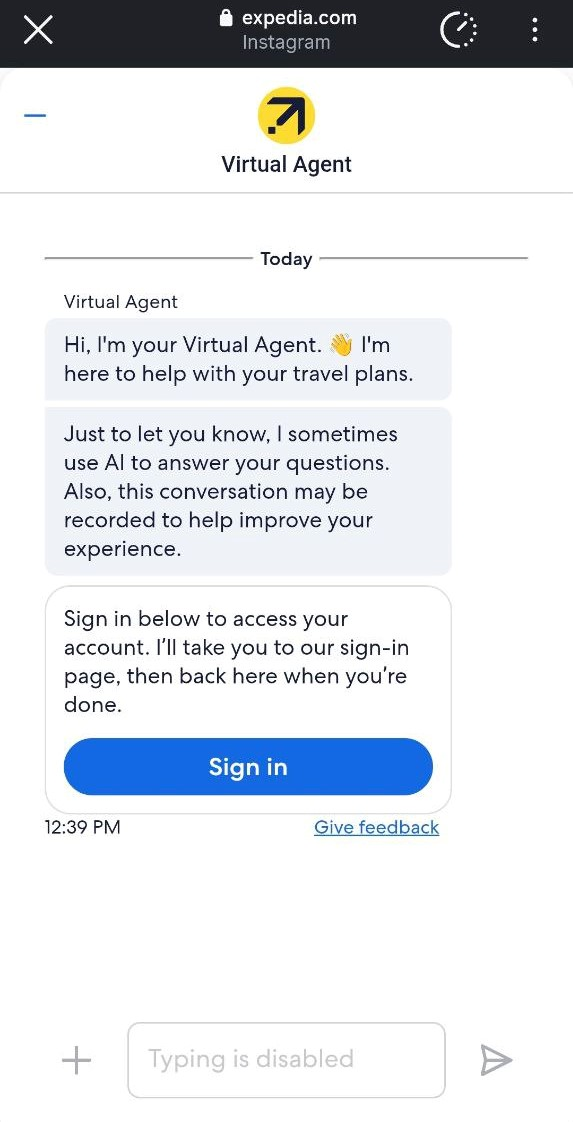 Expedia’s AI travel chatbot helps users manage bookings and resolve support issues
Instead of waiting in queues or searching help centers, users can resolve common issues through conversational interactions. The chatbot can help with booking changes, cancellation policies, itinerary questions, or general travel guidance.
To use the chatbot, travelers need to sign in or create an account. This step is quick, as the platform offers fast registration options such as Google or Facebook login. Once authenticated, the chatbot can access booking details and provide more personalized assistance.
By handling routine support conversations, agencies can respond faster, maintain engagement during critical decision moments, and free up human agents to focus on complex or high-value trips.
Airline chatbots
Airlines operate in time-sensitive environments where travelers need fast answers about flights, delays, or booking changes. In this context, chatbots are mainly used to resolve common issues rapidly and keep the experience friction-free.
American Airlines uses a chatbot on its support pages to do exactly that. The chatbot introduces itself, lets users know some responses may be AI-generated, and reassures users that chats may be monitored to improve service quality. Travelers can either select from ready-made answer options or type their own questions.
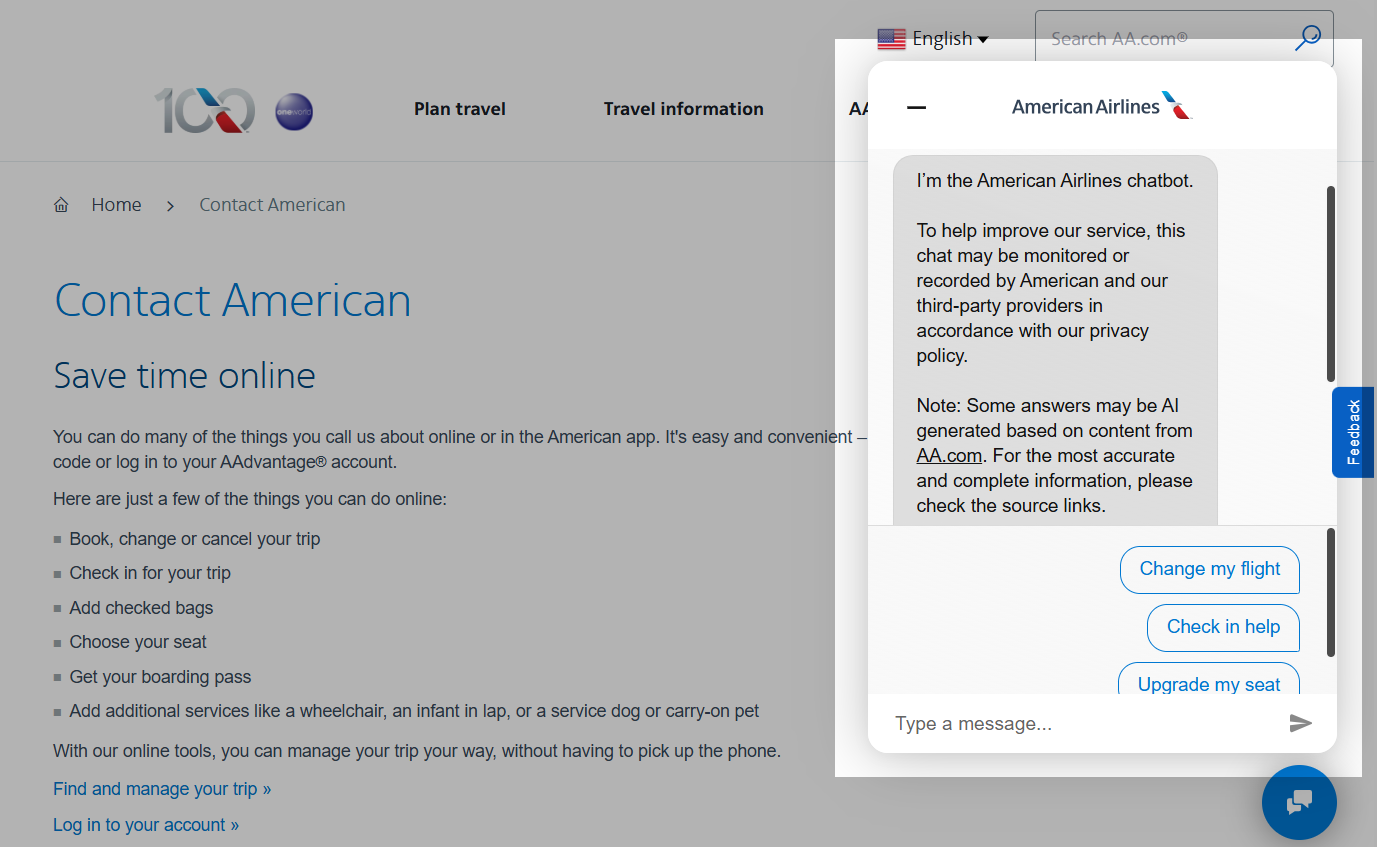 American Airlines’ travel chatbot introducing itself and guiding users to common support requests
When someone types a custom query, the chatbot suggests the pre-defined answers it thinks fit best. It’s a smart middle ground — conversational enough to feel natural, structured enough to get people to the right answer fast.
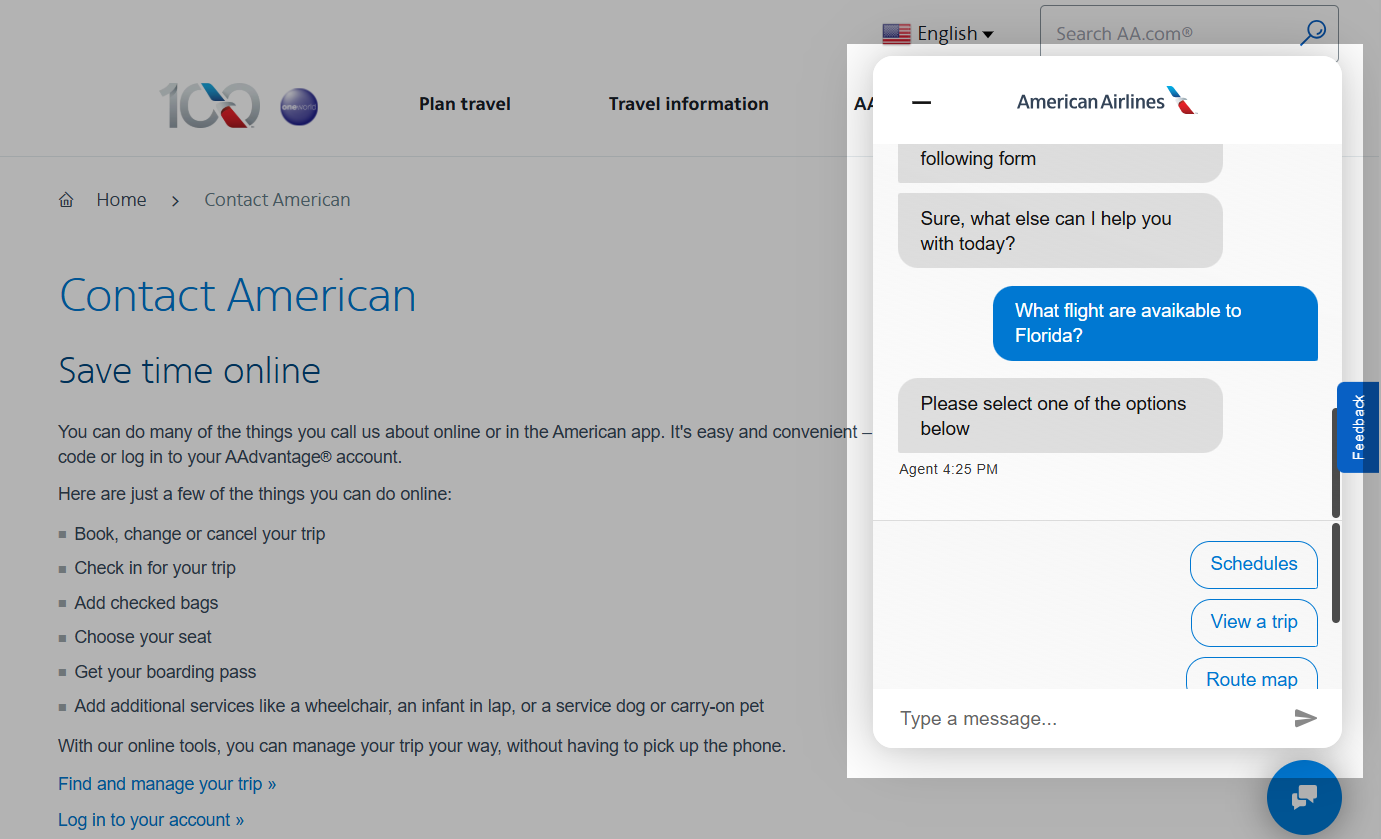 The chatbot suggests pre-defined answers based on user queries
Singapore Airlines takes a similar approach with Kris, its virtual assistant. Kris helps travelers check flight status, look up baggage rules, manage seat selection, and sort out waitlisted bookings — it can even field questions about lounge access and family travel tips.
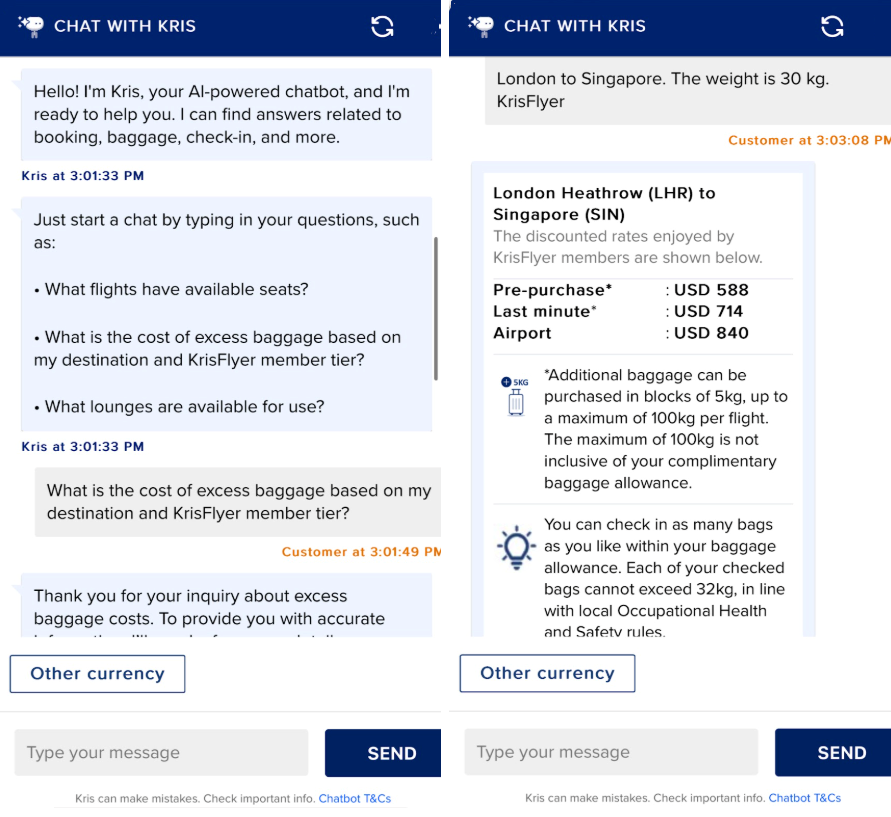 Singapore Airlines’ AI-powered travel assistant handling flight-related inquiries
Since Kris is trained exclusively on Singapore Airlines topics, it doesn’t drift into off-topic conversations. The experience stays tight and relevant – exactly what travelers expect when they need quick answers.
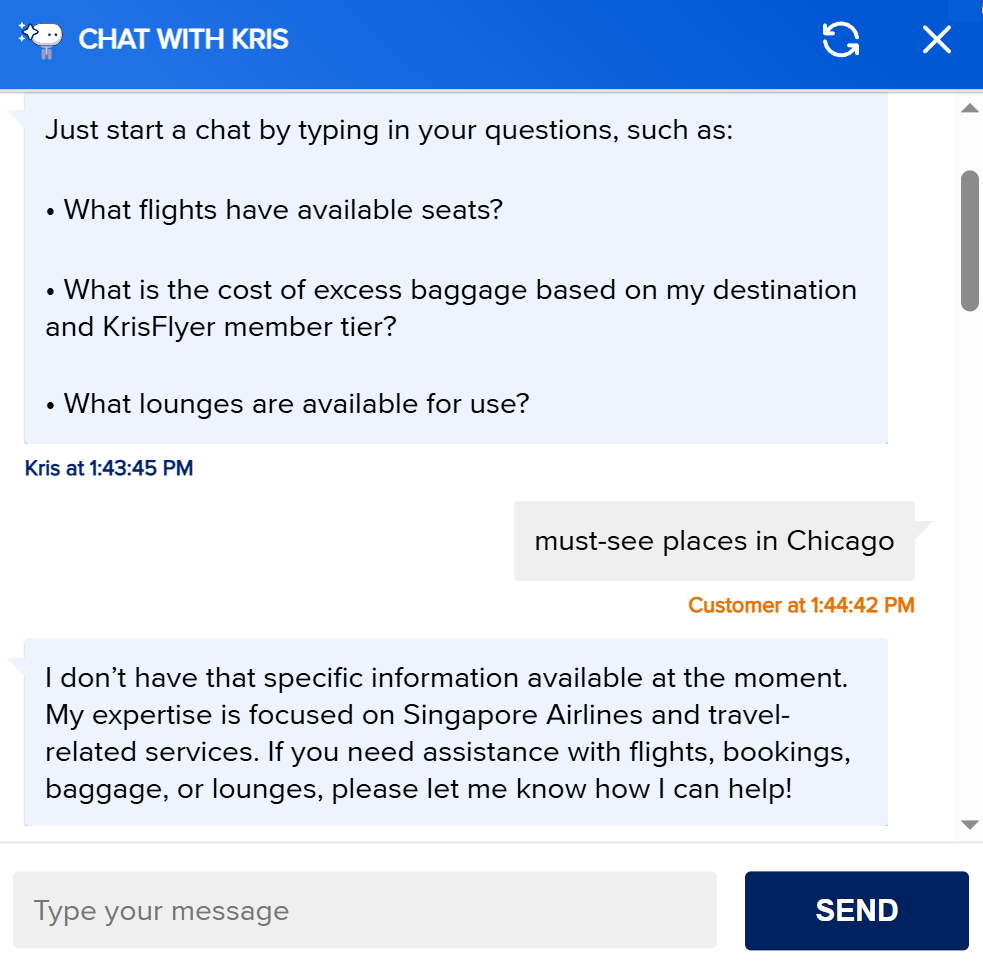 The assistant stays within airline-specific topics
If something falls outside the bot’s scope, it routes the conversation to a human agent, so no request gets lost. It’s a solid example of how chatbots can lighten the load on support teams without sacrificing service quality.
IndiGo, an Indian low-cost carrier, takes a broader approach by turning its chatbot into a one-stop tool for nearly every travel task. Passengers can book flights, check statuses, retrieve boarding passes, check in online, select seats, request baggage changes, ask about refunds, and even arrange wheelchair assistance.
What makes this chatbot stand out is how it blurs the line between support and sales. It can suggest travel options to specific destinations and offer recommendations, functioning more like a trip planner than a help desk.
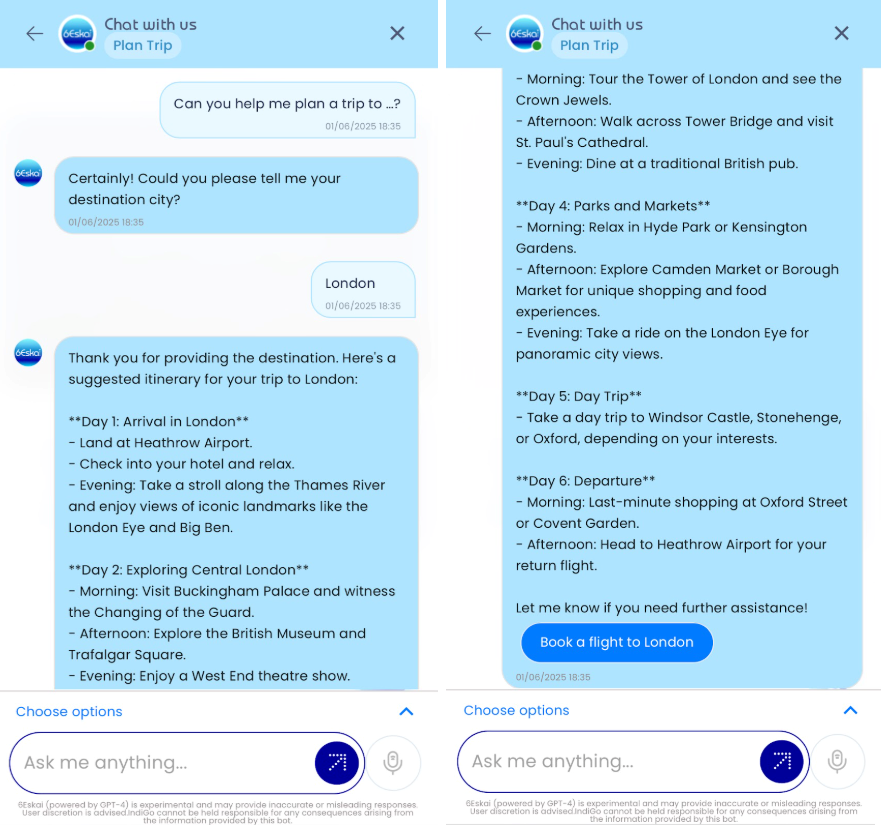 IndiGo’s chatbot recommending travel options and destinations
It even lets users book a flight directly within the conversation.
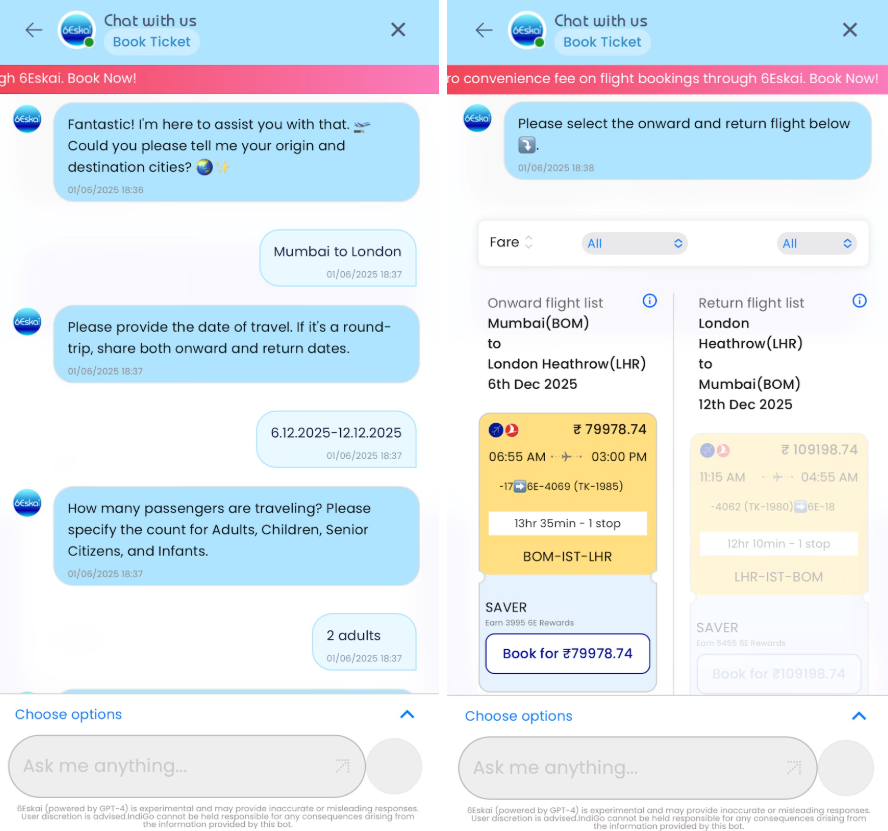 Users can complete a flight booking directly within the chatbot
Online booking platform chatbots
Online booking platforms attract travelers at the discovery stage, when users are still comparing destinations and prices. Here, chatbots help cut the time between inspiration and booking.
Layla.ai is an AI-powered travel planning assistant designed to guide users through trip discovery in a conversational format.
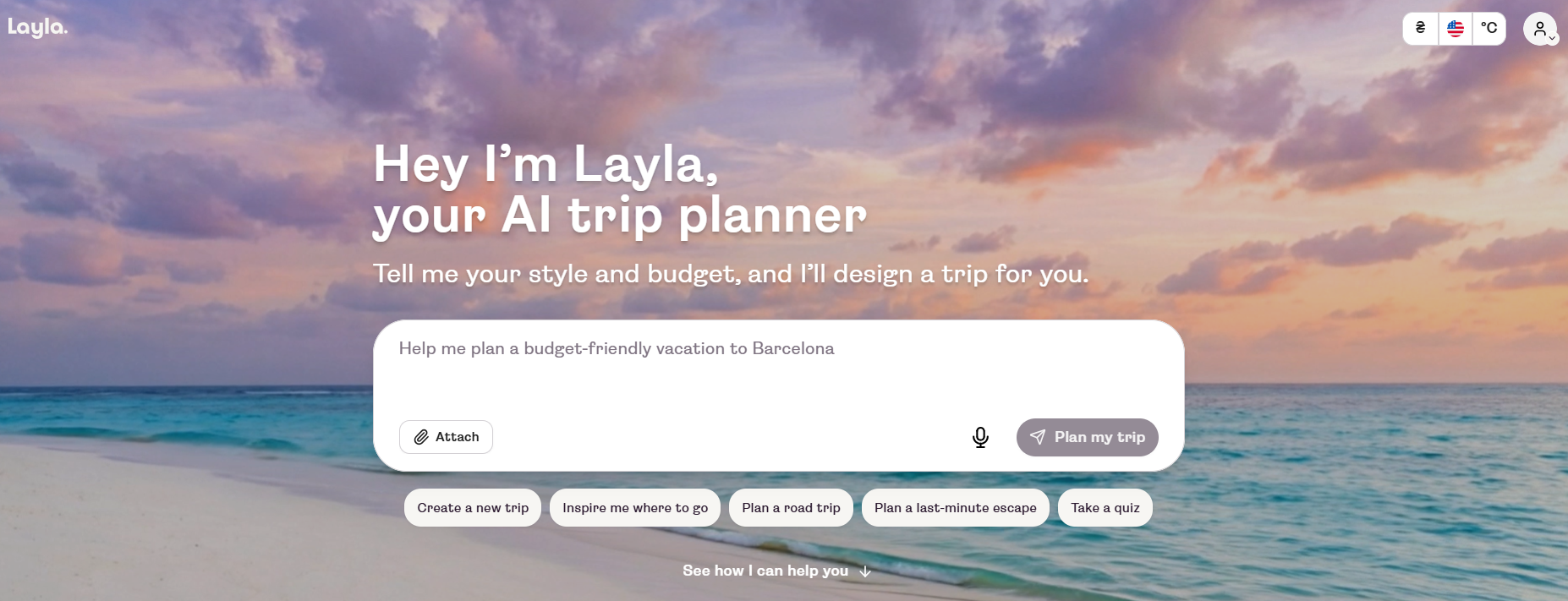 AI-powered assistant generates personalized travel ideas and itineraries
Rather than clicking through filters and scrolling search results, travelers can just describe what they’re looking for, say, a week-long beach trip in Europe on a set budget. The chatbot comes back with destination suggestions, draft itineraries, and relevant travel options. Users can also tap pre-built quick reply buttons for trip types, popular destinations, and planning actions, which keeps the experience fast and intuitive.
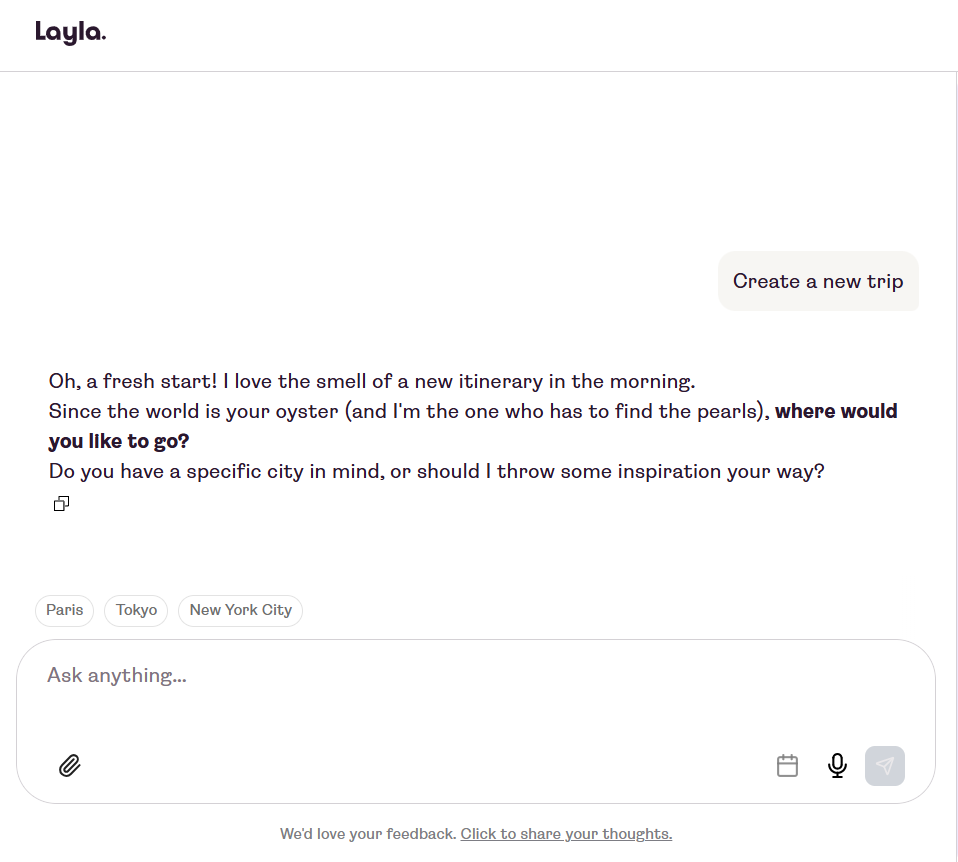 Having a conversation with Layla
Waylo takes a different angle. It’s an AI travel companion focused on supporting travelers beyond the initial planning stage.
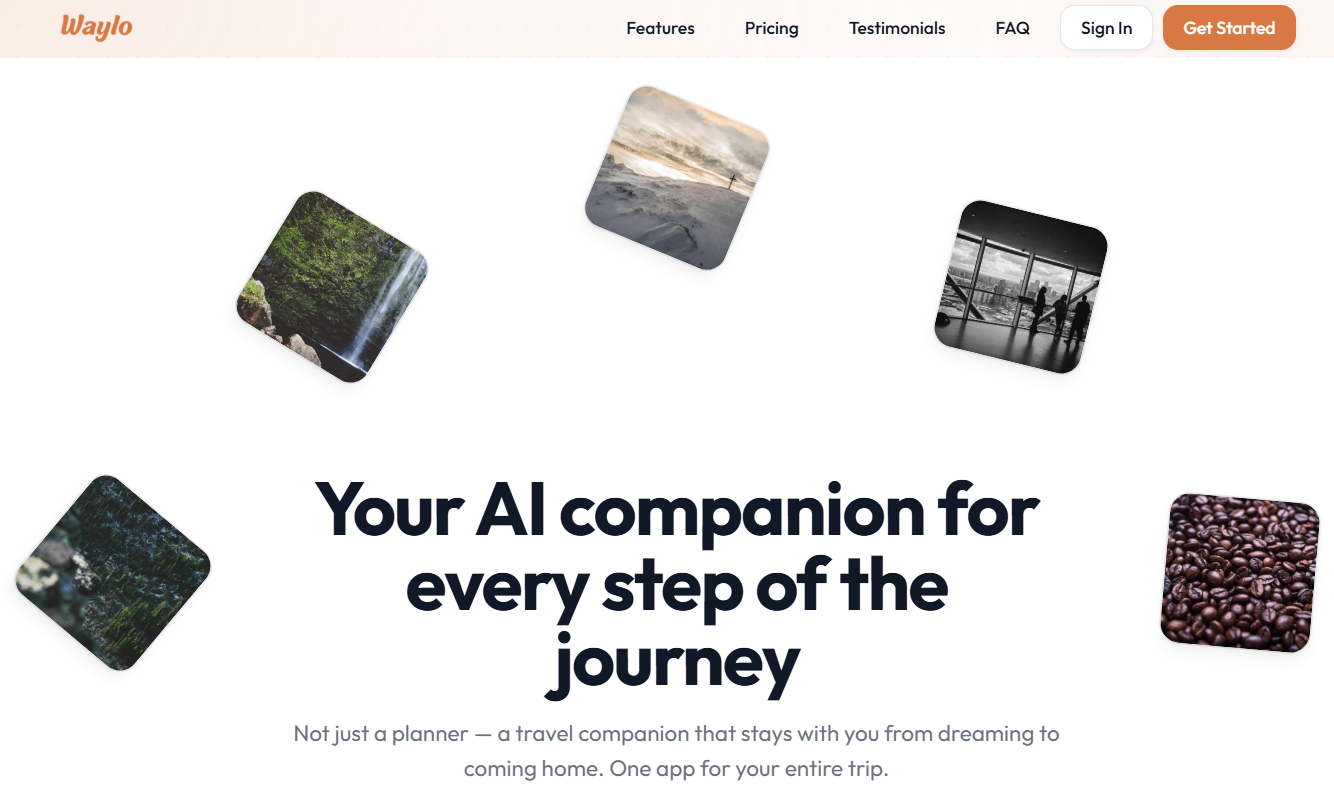 Waylo helps users organize trips, store bookings, and manage travel plans
While many booking platform chatbots concentrate on search and recommendations, Waylo positions the conversational experience as a continuous trip assistant. Users can generate personalized itineraries, organize bookings in one place, store travel documents, and access offline maps during the trip. That shifts the chatbot’s role from a pre-booking helper to a full journey management tool.
GuideGeek takes the concept even further by meeting travelers where they already spend their time, on Instagram DMs. Instead of requiring users to visit a website or download an app, it works as a personal travel assistant right inside a messaging platform. Travelers can ask open-ended questions about destinations, get real-time recommendations, and plan trips through a natural back-and-forth conversation.
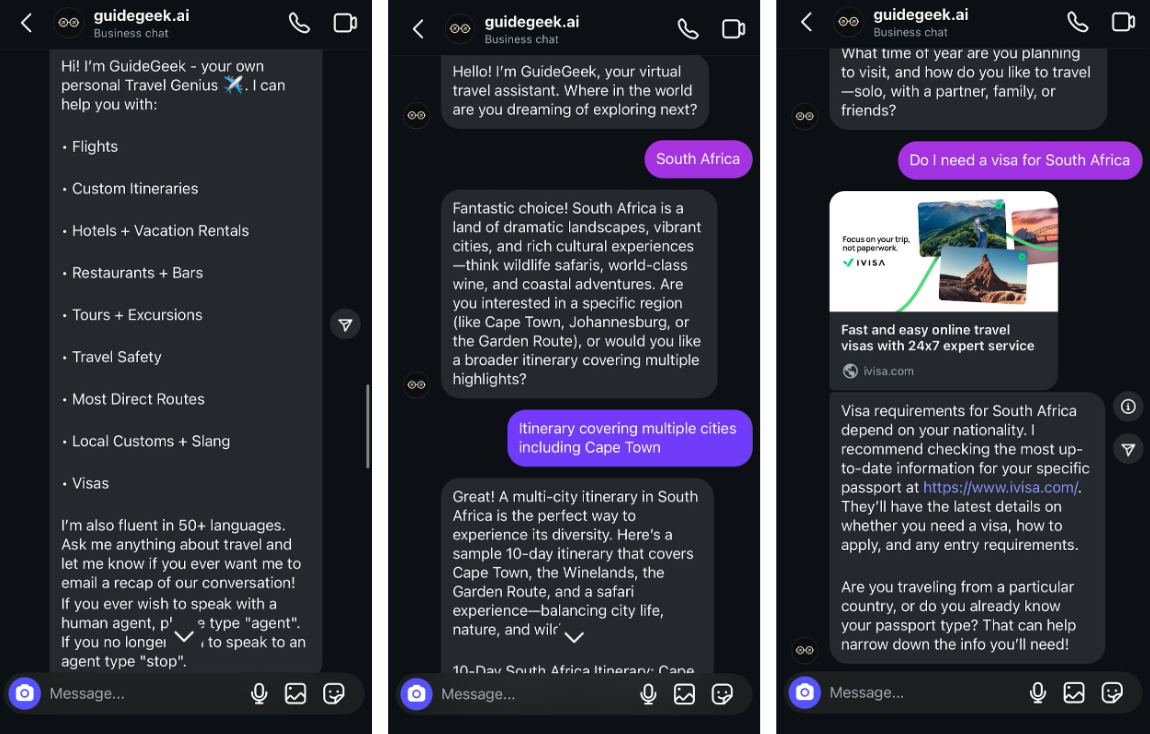 GuideGeek helping a traveler plan a trip via Instagram DMs
What sets it apart is the conversational flexibility. There are no rigid menus or keyword triggers; this AI travel chatbot handles free-form questions and responds with context-aware suggestions tailored to the user’s preferences. It’s a good example of how travel chatbots don’t have to live on a company’s website to be effective.
Tour operator chatbots
For tour operators, chatbot value often starts with qualification. Before answering detailed questions, the business needs to understand who is reaching out and what kind of help they need. This makes chatbots useful for managing inquiries efficiently without sending every conversation straight to a human agent.
A good example is TourRadar, which uses an AI chatbot on its website to handle customer communication in a more structured way. When the chat opens, the bot first asks for the user’s email address and then asks whether the person is a customer or a partner.
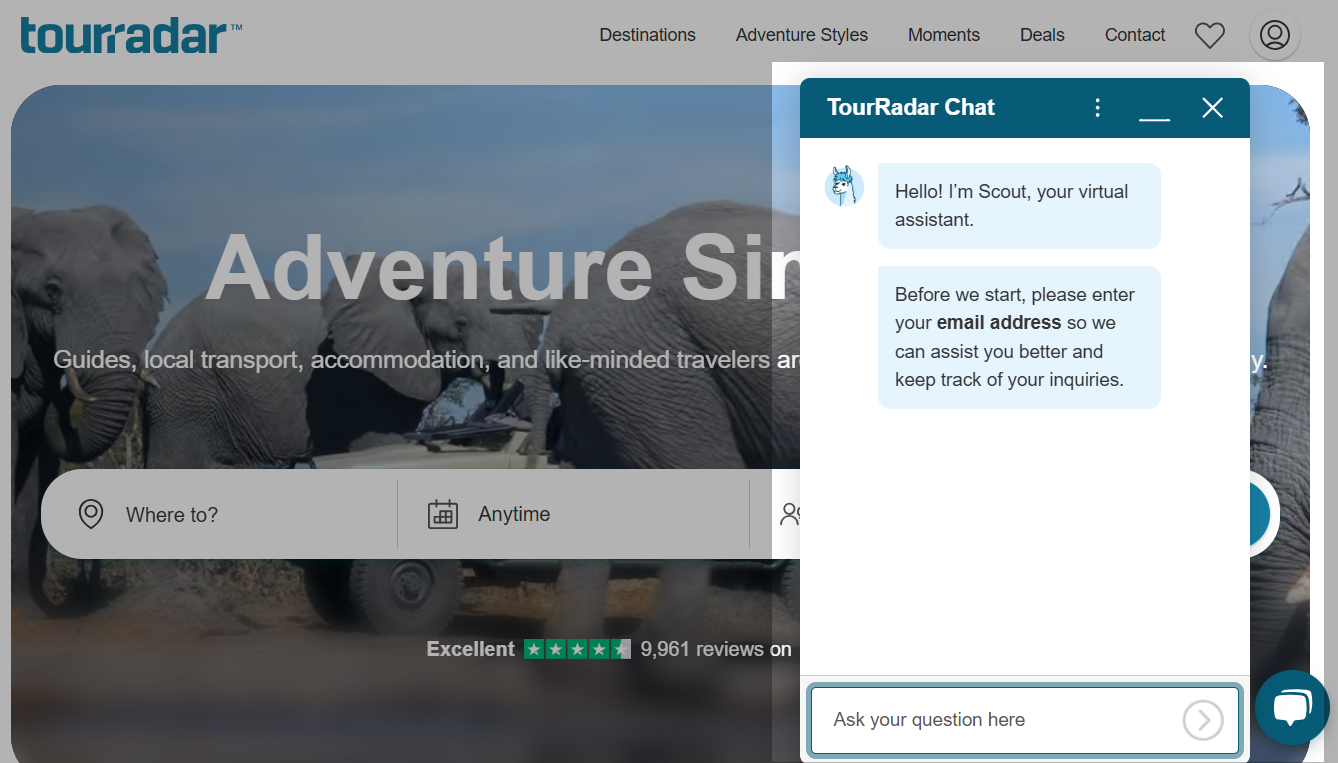 TourRadar travel chatbot collecting user details
After this short qualification step, the user can type their question and receive targeted, detailed answers.
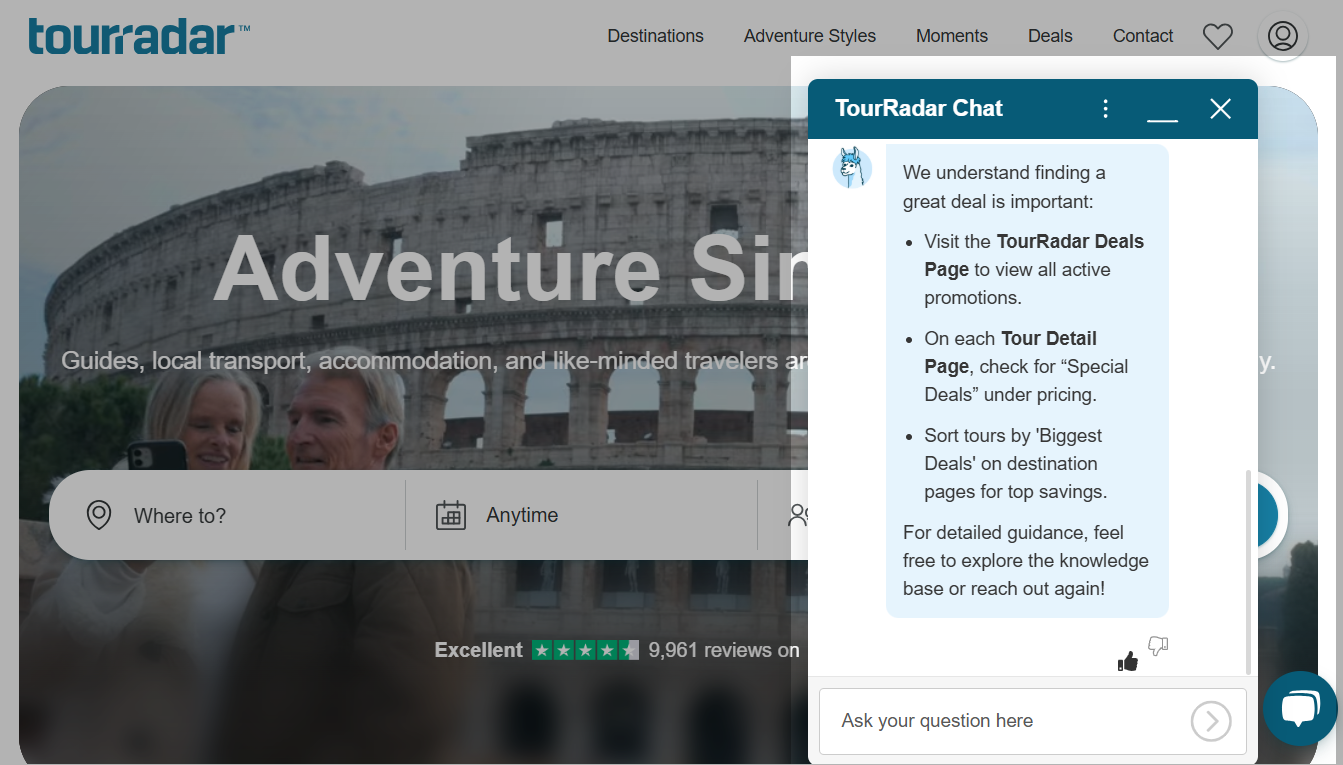 After qualification, the chatbot delivers more relevant and detailed responses
That small upfront step makes a big difference. Instead of jumping to generic replies, the chatbot has just enough context to give relevant answers and route the conversation to the right place. Users can also rate whether the response was helpful, which is a simple but effective feedback loop for improving performance over time.
G Adventures takes a similar approach. Before starting the conversation, users share their name, email, and what their inquiry is about.
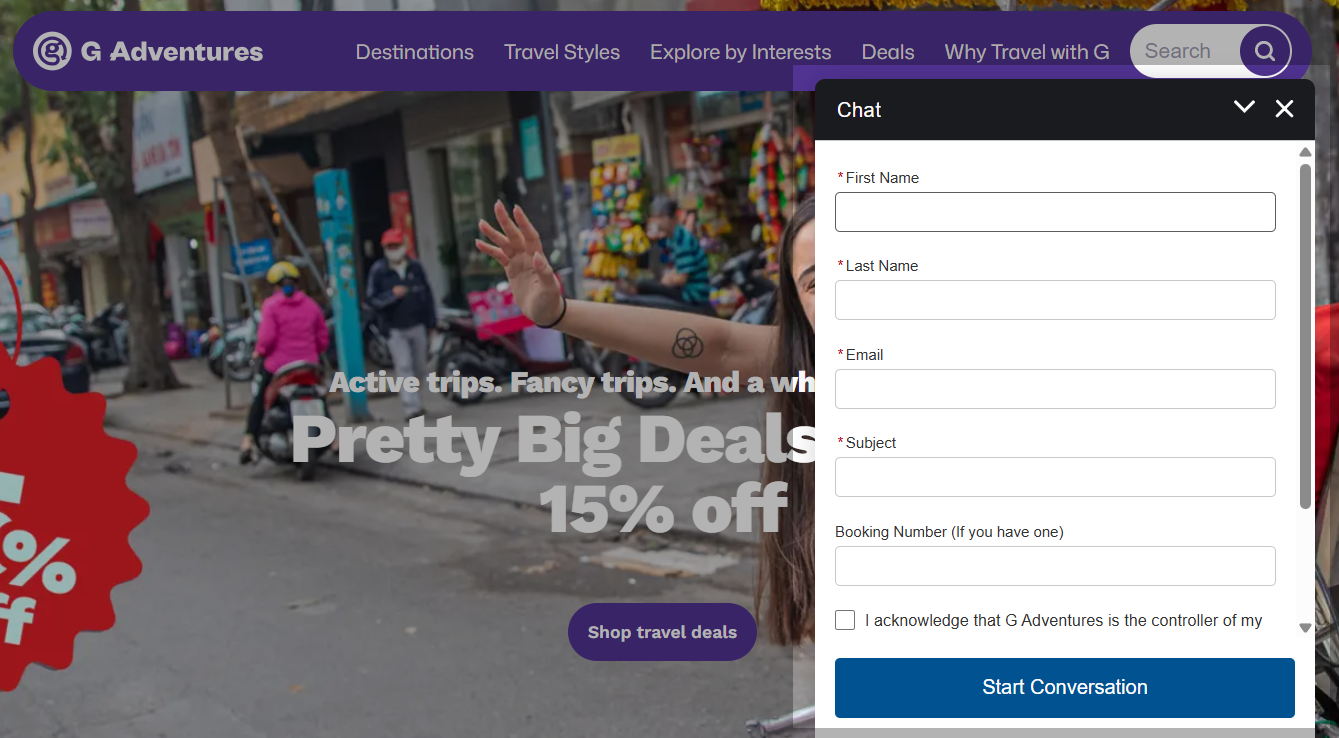 The G Adventures chatbot captures user details
Once inside, the chatbot presents clear options: questions about an existing booking, tour details, general inquiries, or urgent help for travelers already on tour.
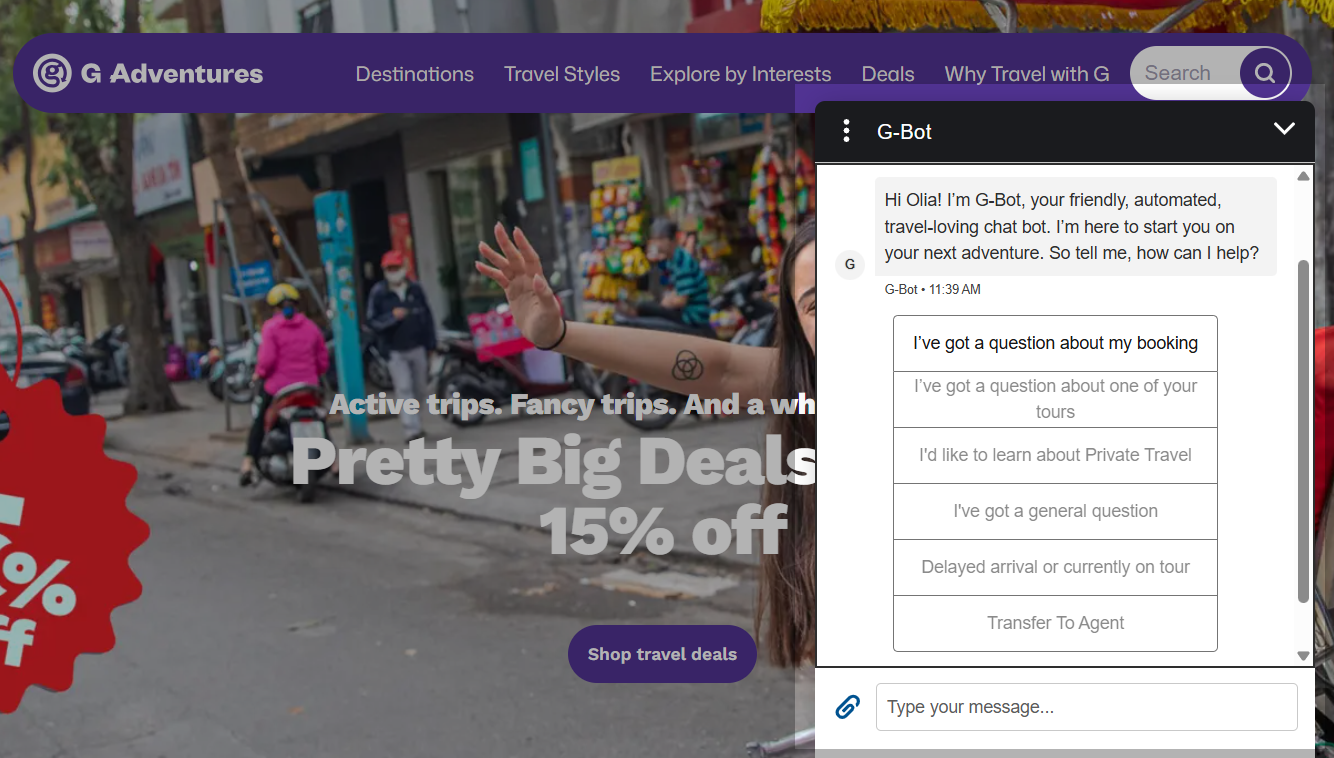 The travel chatbot guides users to the right path with preset options
It’s a clean, menu-driven setup that gets people to the right help fast with no need to type out a long explanation. And for anything too complex to handle automatically, there’s always the option to bring in a human agent.
G Adventures also runs chatbots on social media to connect with travelers earlier in their decision process. On Facebook, the tone is friendlier and more casual, and the bot is upfront about being automated.
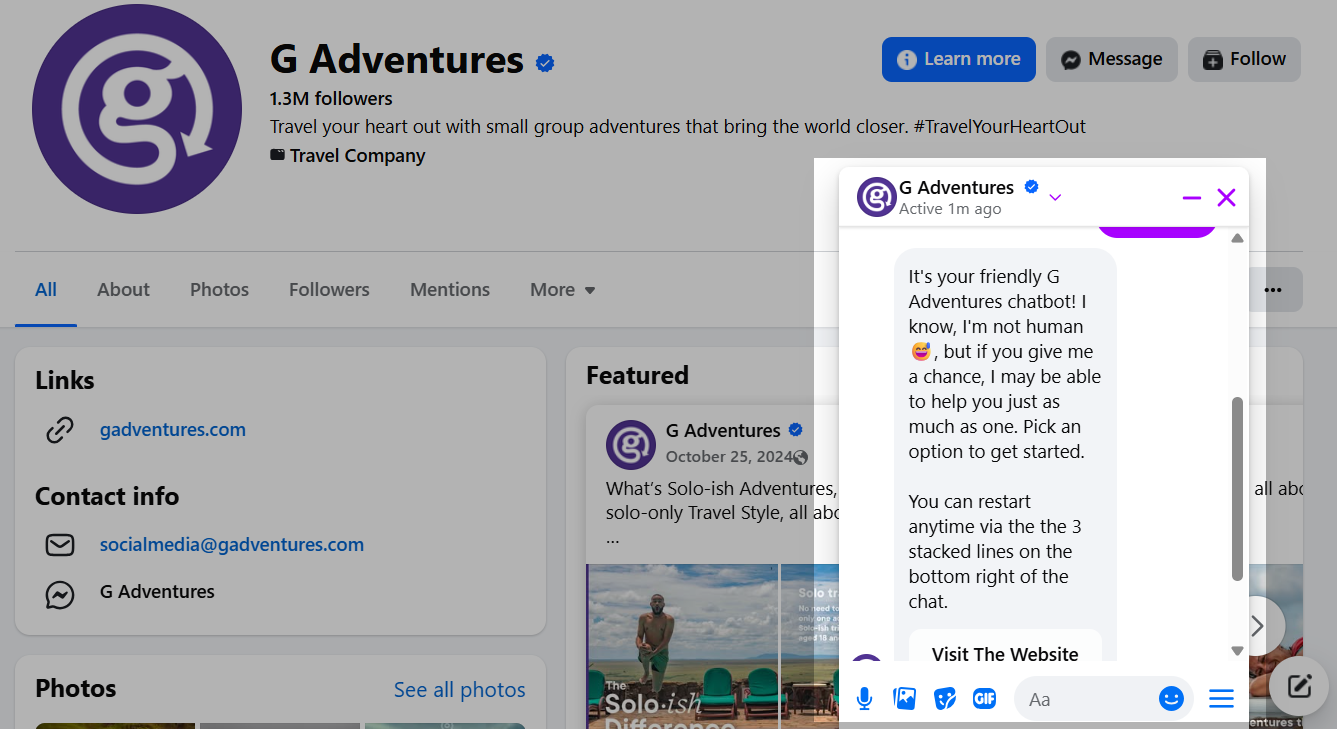 The G Adventures travel chatbot on Facebook offering quick-start options
Users can choose from simple starting options such as visiting the website, asking questions before booking, getting help with an existing tour, or submitting a general inquiry.
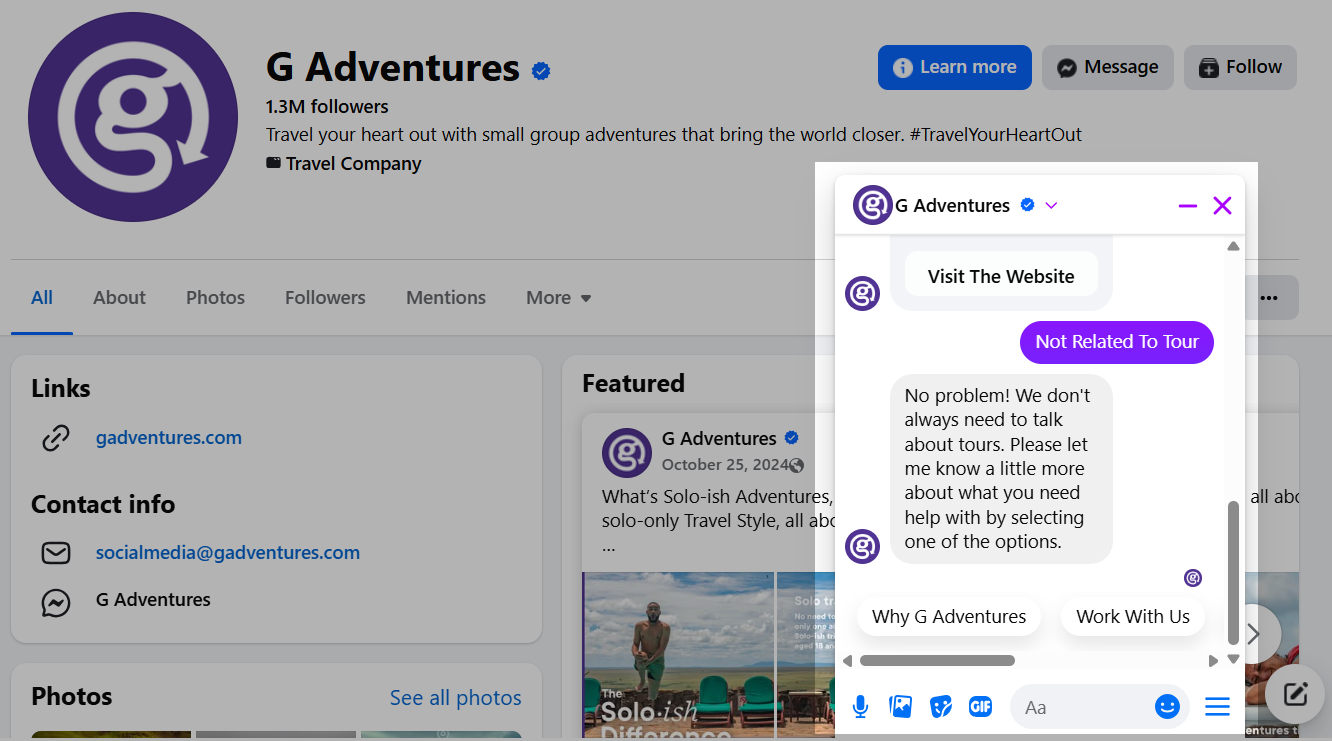 The Facebook travel chatbot continues the conversation with guided responses
This structure makes the conversation easy to enter, especially for travelers who are still exploring. Instead of writing a long message, users can tap a relevant path and receive guided answers as the chat progresses. As the interaction continues, the chatbot suggests responses and next steps based on the selected topic, helping users move toward clearer decisions.
Boost your business with chatbots
Use our drag-and-drop builder to create AI-powered chatbots that sell, support, and connect. Run campaigns, share updates, and convert leads hands-free.
Get started for free
6 steps to create an AI travel chatbot with SendPulse
Building a travel chatbot does not require coding or complex integrations. What matters more is understanding traveler behavior and translating real booking journeys into structured conversational flows. With SendPulse, marketers and travel agency teams can launch chatbots quickly and then refine them as new offers, destinations, and customer needs come up.
Below is a step-by-step approach to creating an AI-powered travel chatbot that supports lead generation, booking assistance, and customer support.
Step 1. Plan your travel chatbot flow
Before opening the builder, define your goals. Do you want to generate tour inquiries, guide users through booking, or reduce support workload?
Map the main conversation paths on paper or in a simple diagram. You might design a “Tour finder” flow, a “Customer support” flow, and a “Promotions” flow, for example. For each path, decide what questions the bot should ask, what answers it should give, and how users can move between options using buttons, keyword triggers, or menu items.
Think in terms of SendPulse chatbot flow elements from the start. Message blocks, quick reply buttons, carousels for showcasing destinations, and filter elements for branching by travel preferences all map directly to things you’ll configure in the builder.
Having destination descriptions, links, visuals, and FAQs ready before you start will make the building process much faster and more focused. You can also use the OpenAI integration inside SendPulse to generate entire flow drafts from a prompt, which can significantly speed up the planning stage.
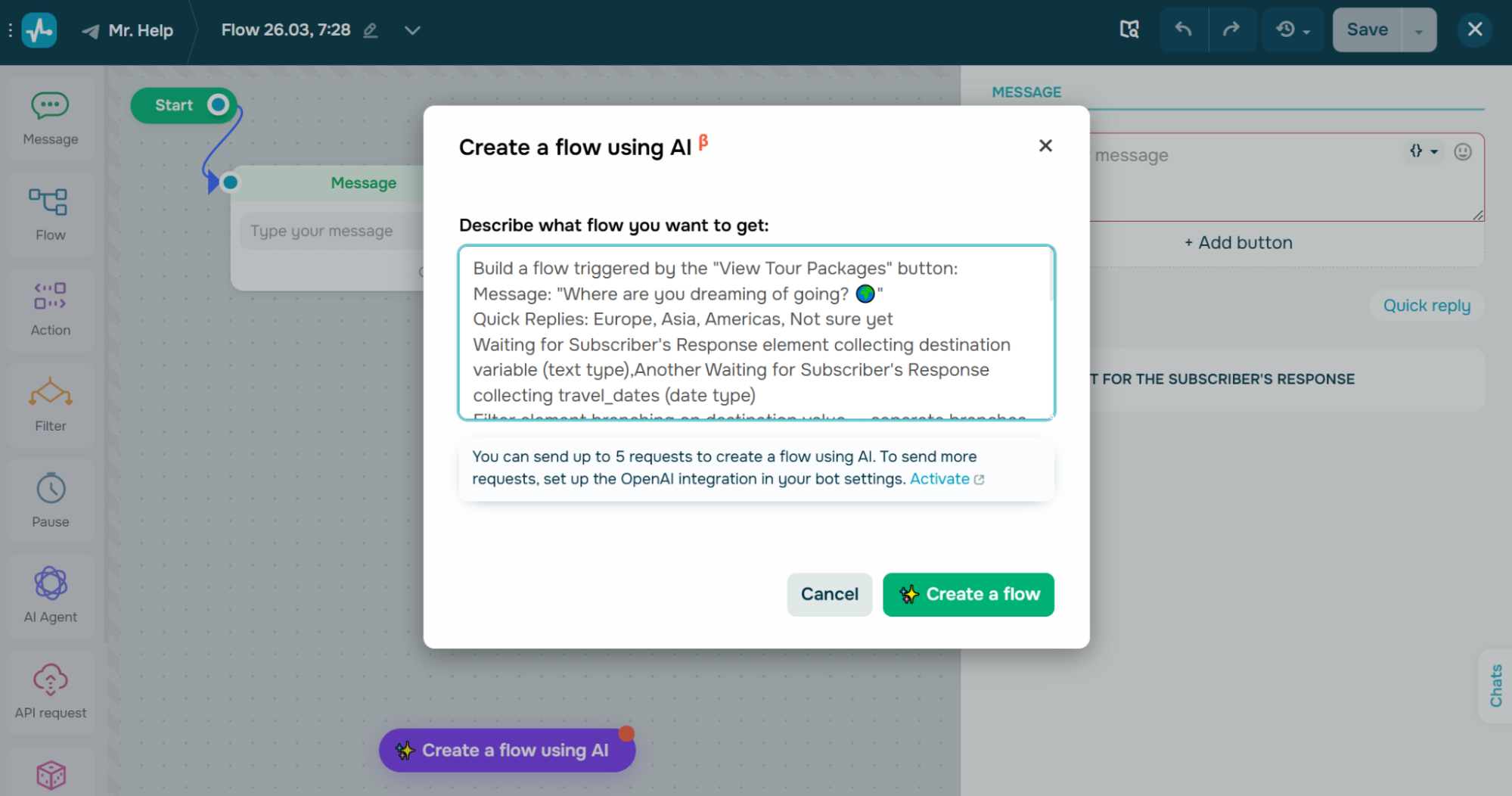 Creating a flow for a travel chatbot using AI
Step 2. Create a welcome message and navigation menu
Before building your welcome flow, choose where your travel chatbot will live. In SendPulse, you can launch chatbots across multiple channels, including:
The right choice depends on where your travelers already communicate with your brand. Instagram tends to work well for inspiration-driven audiences, while WhatsApp or Telegram are better suited for booking conversations and follow-ups.
Once the channel is selected, connect it in your SendPulse account under the “Chatbots” section and open the flow builder to set up your “Welcome” flow – the first message every new subscriber sees. Keep the chatbot welcome message concise: introduce the bot, explain what it can help with, and give users a clear starting point.
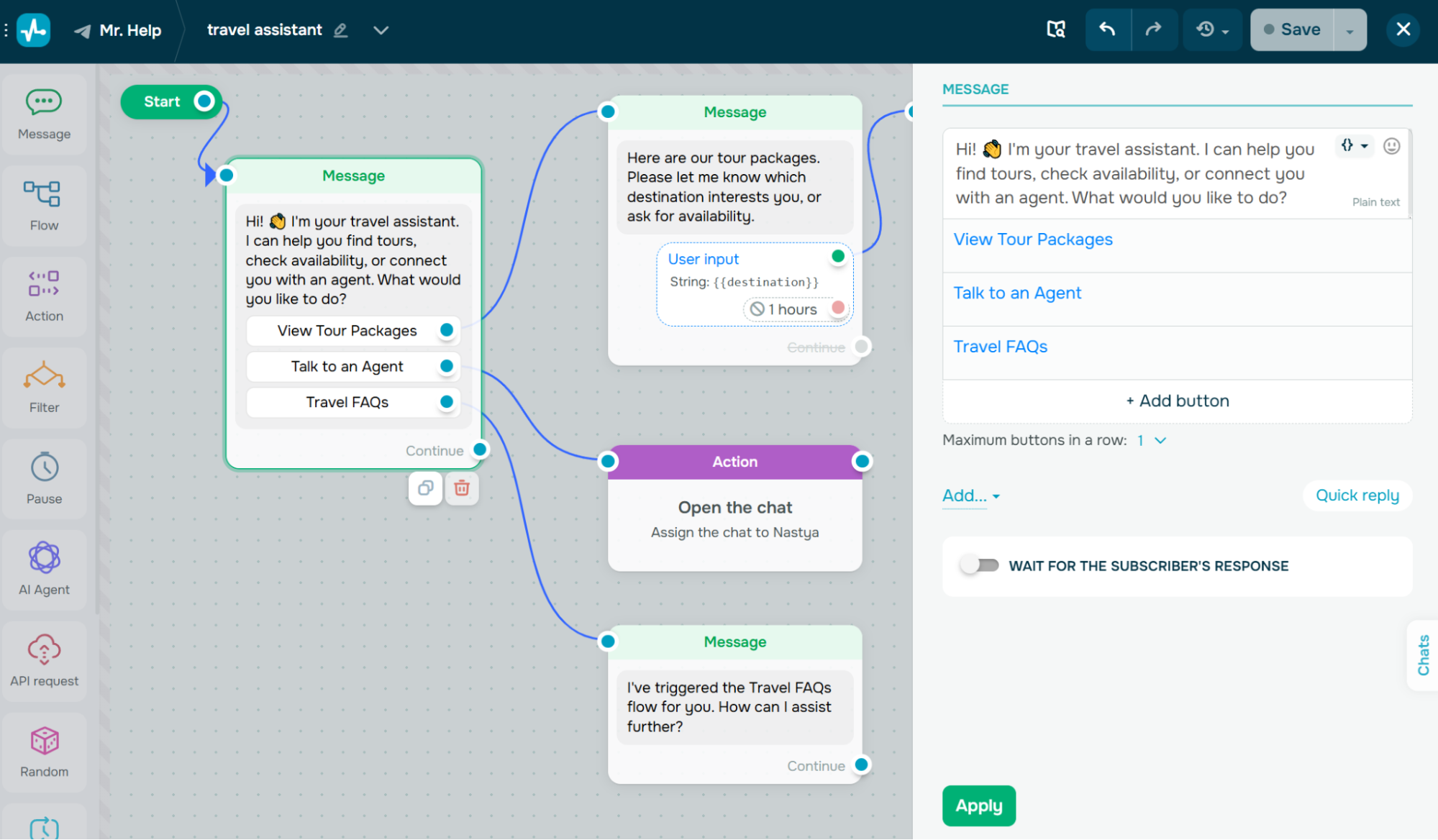 A welcome message for a travel chatbot with quick reply buttons
Quick reply buttons like “View Tour Packages,” “Talk to an Agent,” or “Travel FAQs” help users get started without typing long messages. You can use the dedicated option or set them up using the “Button” element to either continue the flow, open a link, or trigger a payment.
For persistent navigation that users can access at any point in the conversation, set up a bot menu with the same key options so that travelers always have a way to restart or redirect their journey. A good practice is to ensure a human fallback – a “Talk to an Agent” button can trigger the “Open chat” option, which opens a live conversation in your “Conversations” inbox and notifies an assigned team member.
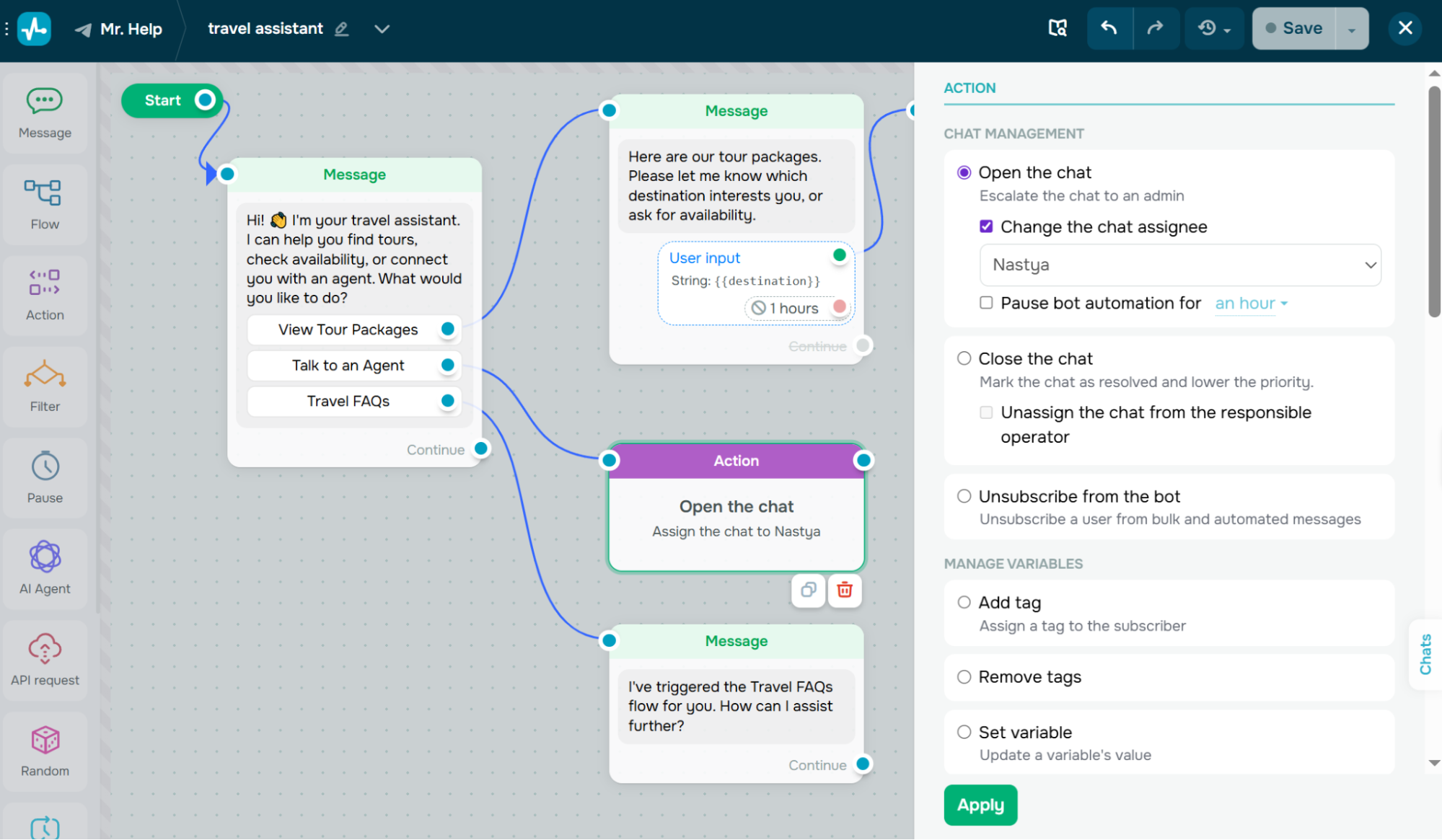 Setting up a human fallback option
Step 3. Build booking and tour finder flows
Using the SendPulse drag-and-drop builder, you can create interactive flows that guide users step by step. Add “Message” blocks, input collection elements, and conditional branches using the “Filter” element to narrow down travel options based on what users tell you.
To give you an idea, when a user selects “Europe,” the chatbot can ask follow-up questions about preferred countries, travel dates, or budget range using the “Waiting for subscriber’s response” toggle to capture their answers as variables.
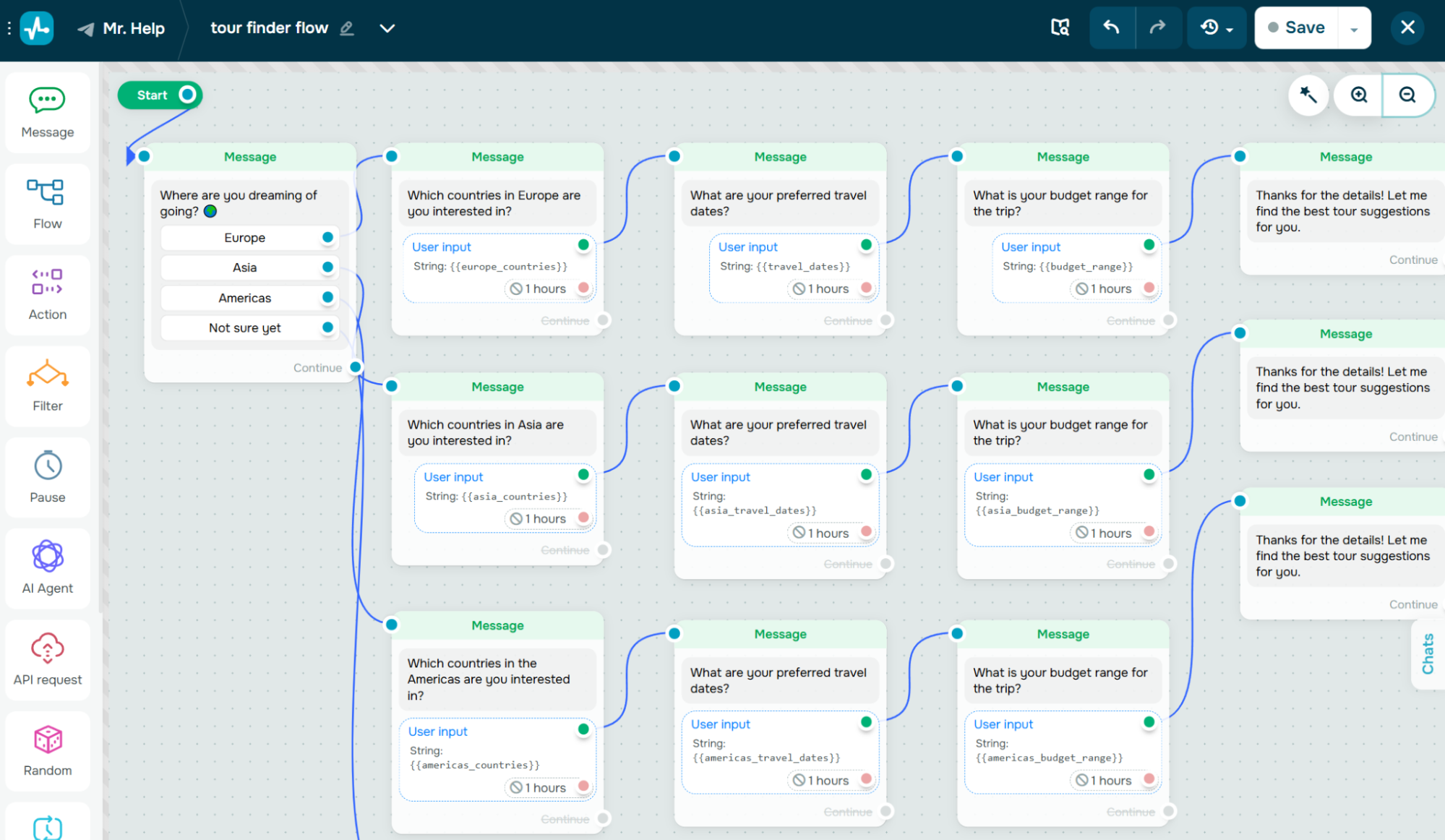 Collecting user inputs as variables
At this stage, you can also turn a regular flow into an AI-powered chatbot by adding the “AI agent” element. You can place it at the beginning, middle, or end of a flow, depending on where AI adds the most value. In the element settings, write a prompt that describes your agency, the destinations you offer, and how the bot should handle open-ended questions.
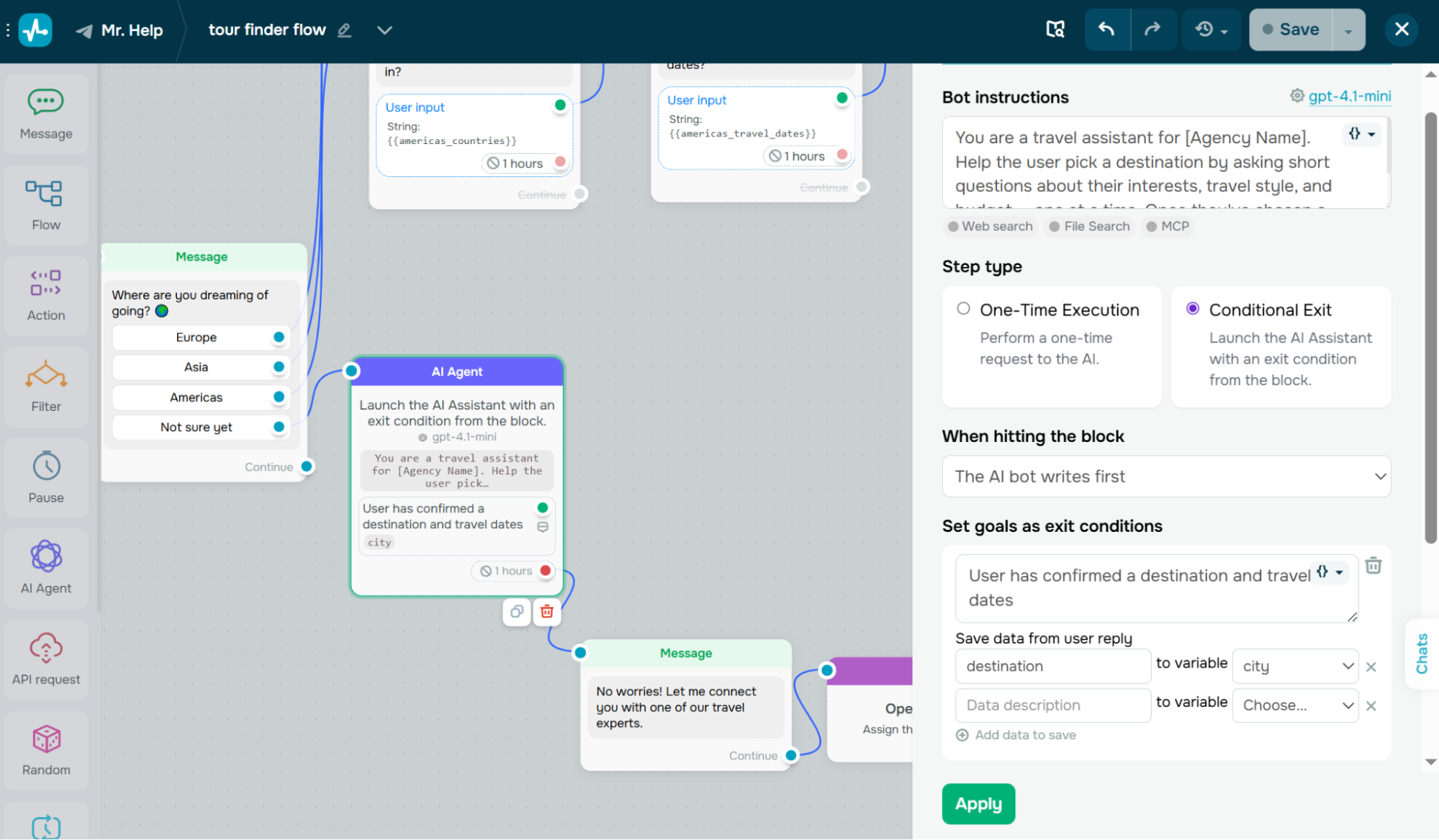 Instructing the AI travel agent
Once connected, the AI agent can analyze traveler intent, detect conversation tone, ask clarifying follow-up questions, and route users down different flow branches based on how the conversation goes.
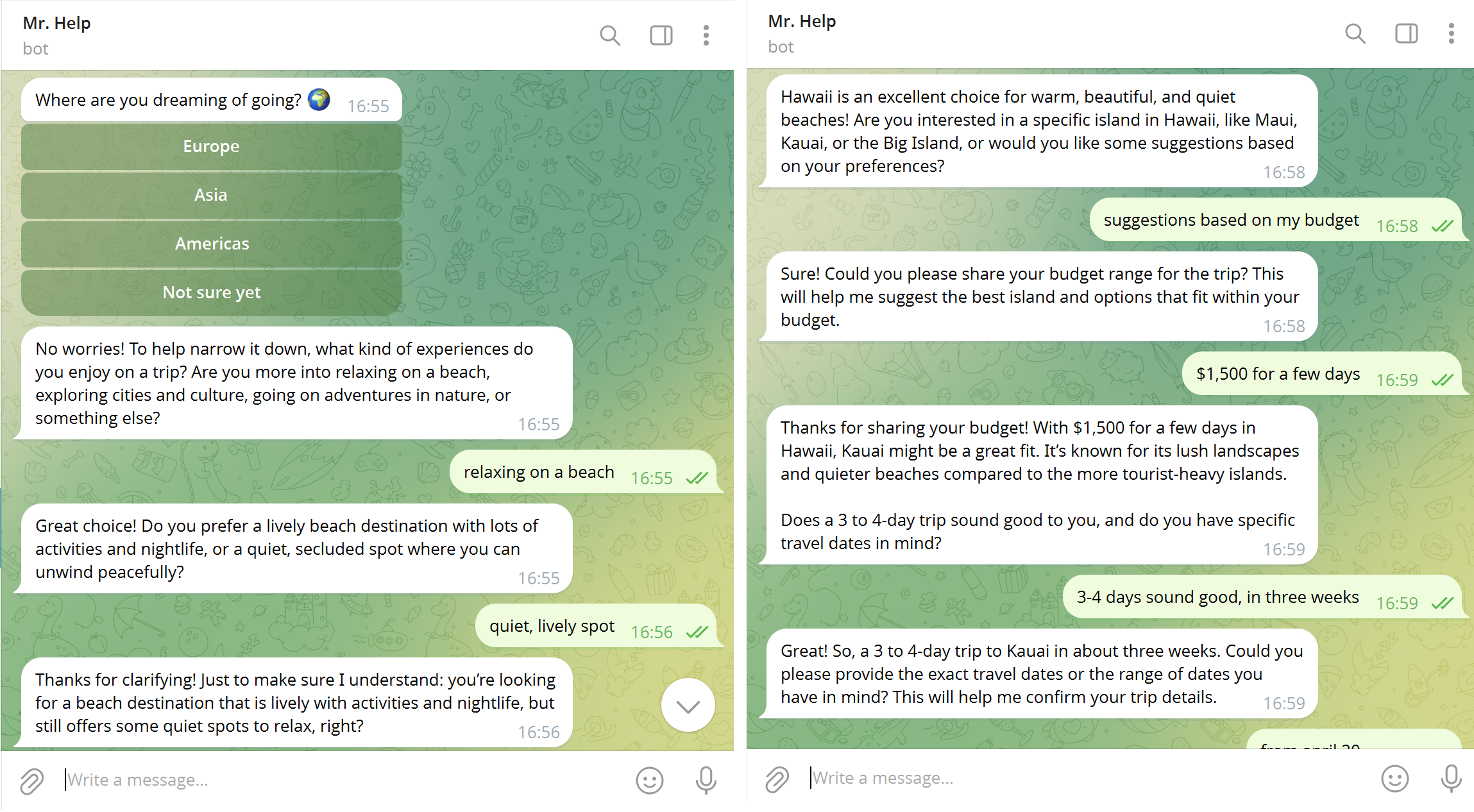 The AI travel agent collecting details from a chatbot subscriber
Say your goal is to collect a destination and travel dates. The AI keeps the conversation going naturally until all pieces of information are captured. Once they are, the flow moves through the green exit point, and from there, an “Action” element can automatically create a CRM deal with all the details the chatbot just gathered.
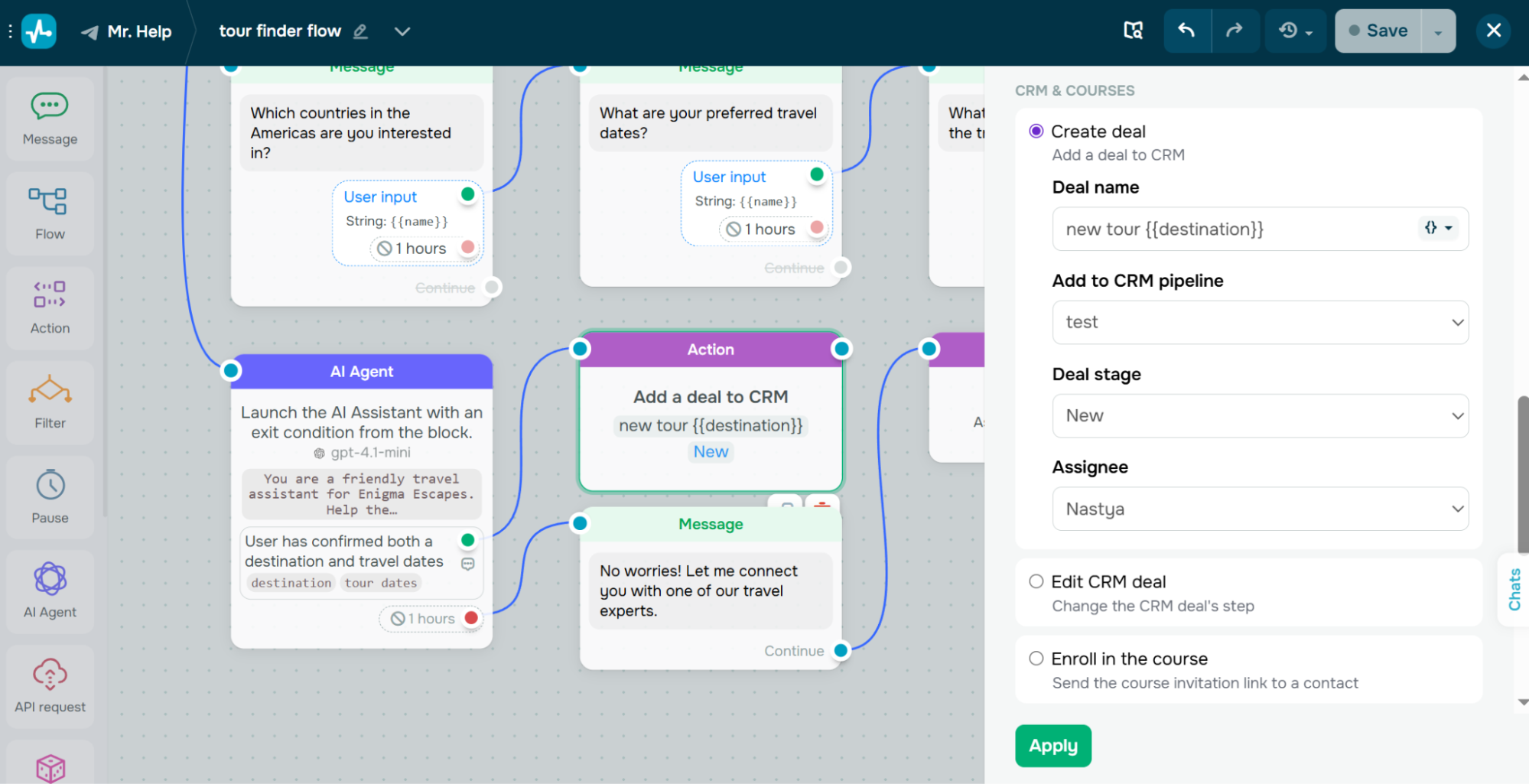 Setting up the “Action” element to create a new deal
And here’s what that looks like on the other end. The deal lands in your pipeline with the destination, dates, and contact info already filled in.
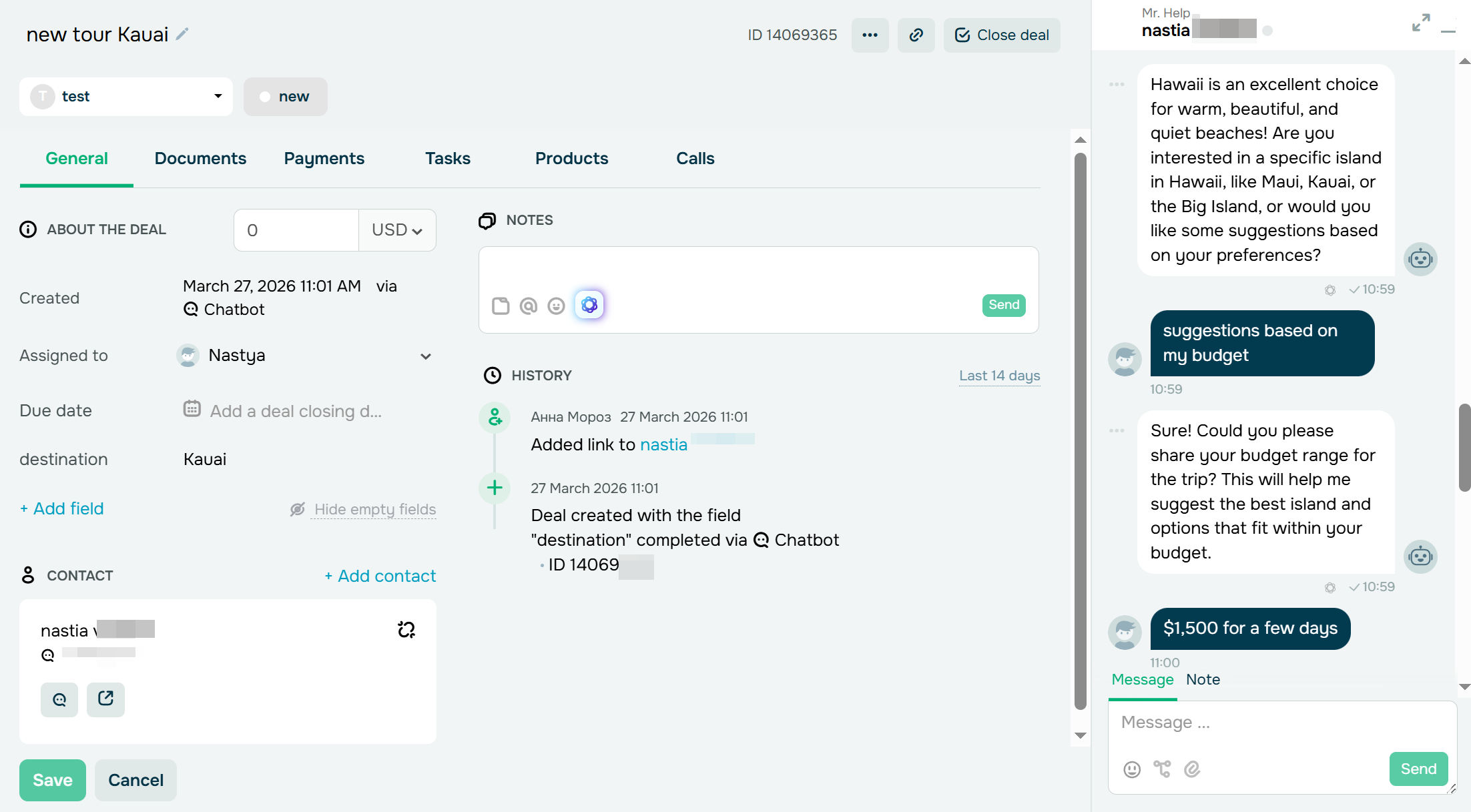 A deal created by the chatbot after the AI collected the info
If the conversation stalls, the red exit point lets you redirect users to a fallback message or a human agent.
Step 4. Add images, links, and booking buttons
Travel decisions are visual. With SendPulse, you can add destination images, tour highlights, downloadable files, and clickable links to any point in the conversation using dedicated media elements – image, file, audio, and carousel (for Telegram, Instagram, and Facebook chatbots) are all available in the flow builder.
When presenting a package, you can show a destination photo using the “Image” element, add a short description as a “Text” block, and attach a “Book Now” URL button that links to your website booking page. For richer presentation, the “Carousel” element lets you display multiple packages side by side, each with its own image, title, and call-to-action button. Map links, promo codes, and activity suggestions can be added too.
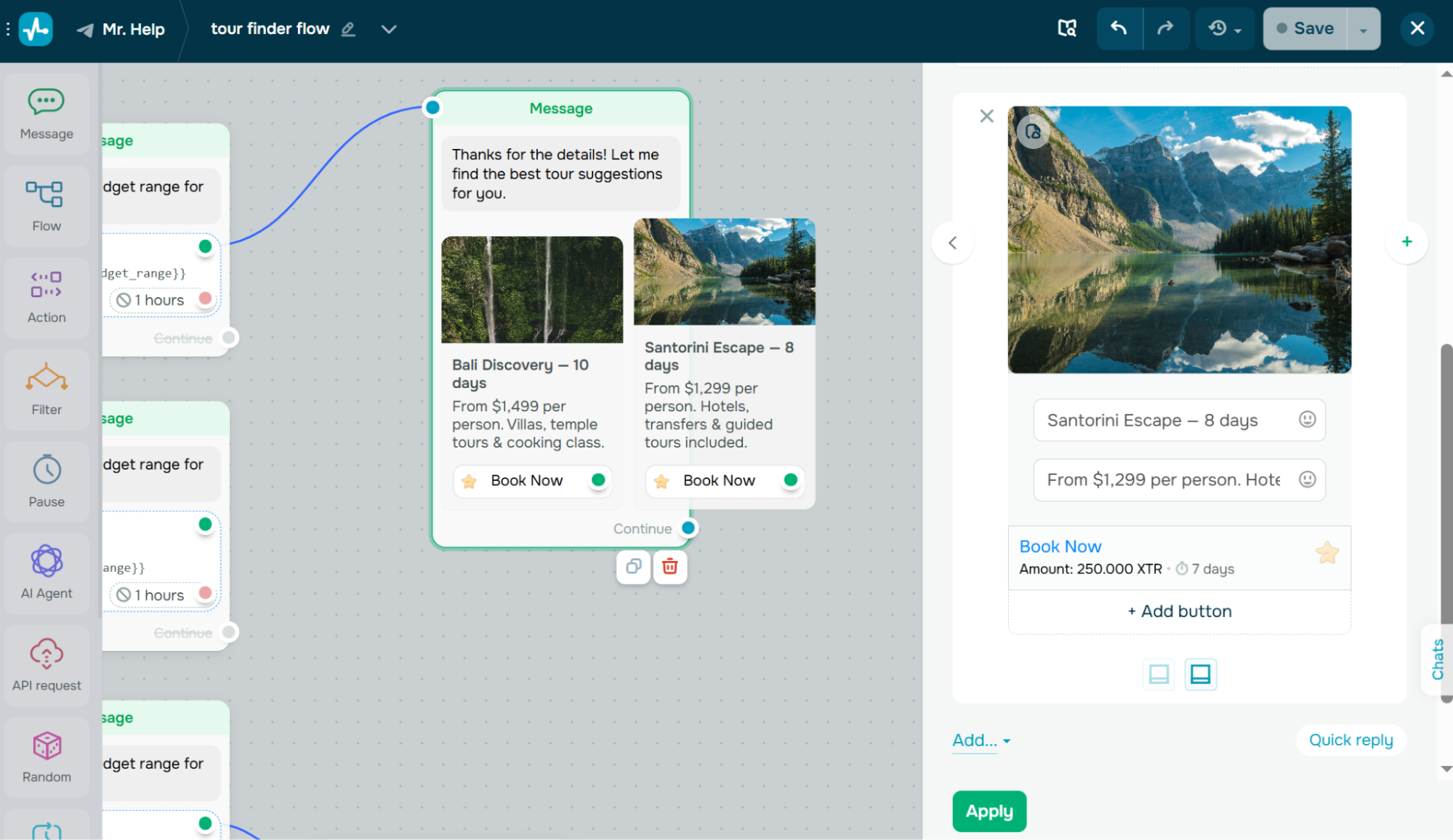 Setting up travel packages using a carousel with payment buttons
You can also use the “CRM product” element to pull product cards from SendPulse’s CRM system directly into the chatbot message, including pricing and payment options, without manually entering the details each time. This turns the chatbot into a compact interactive travel guide that keeps users engaged inside the conversation rather than pushing them to an external page before they’re ready.
Step 5. Capture leads and sync with the CRM system
A travel chatbot becomes truly valuable when it collects structured data. Using the “Waiting for subscriber’s response” function, you can prompt users for their email address, phone number, preferred travel dates, destination interests, and group size, and save each response to a named variable of the appropriate type. Variables are stored in each subscriber’s profile under the “Audience” tab and can be referenced in any future message to personalize the conversation.
To push this data into SendPulse’s built-in CRM system, go to your “Bot settings” and enable the “Automatically transfer contacts to CRM” option. From there, you map chatbot variables to CRM contact fields. Once saved, every new subscriber is automatically added as a CRM contact with their collected data attached.
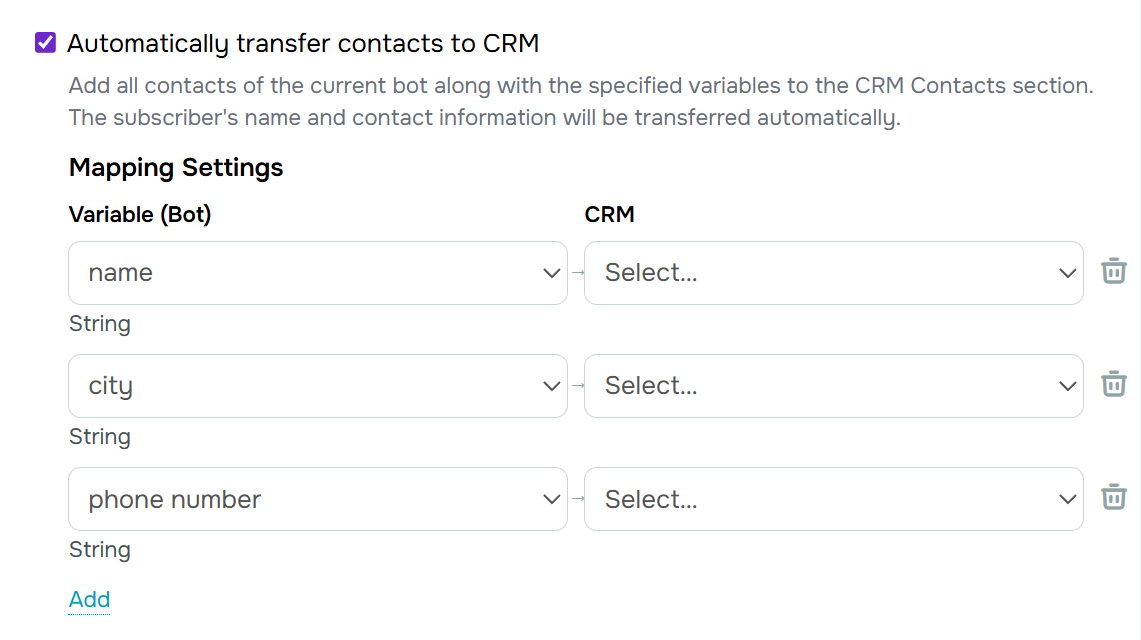 Mapping chatbot variable to CRM fields
For sales pipeline management, use the “Action” element inside your flows. When a user expresses strong intent – say, clicking a “Request a Quote” button – the “Create deal” action can automatically open a deal in your chosen pipeline stage and assign it to a sales team member.
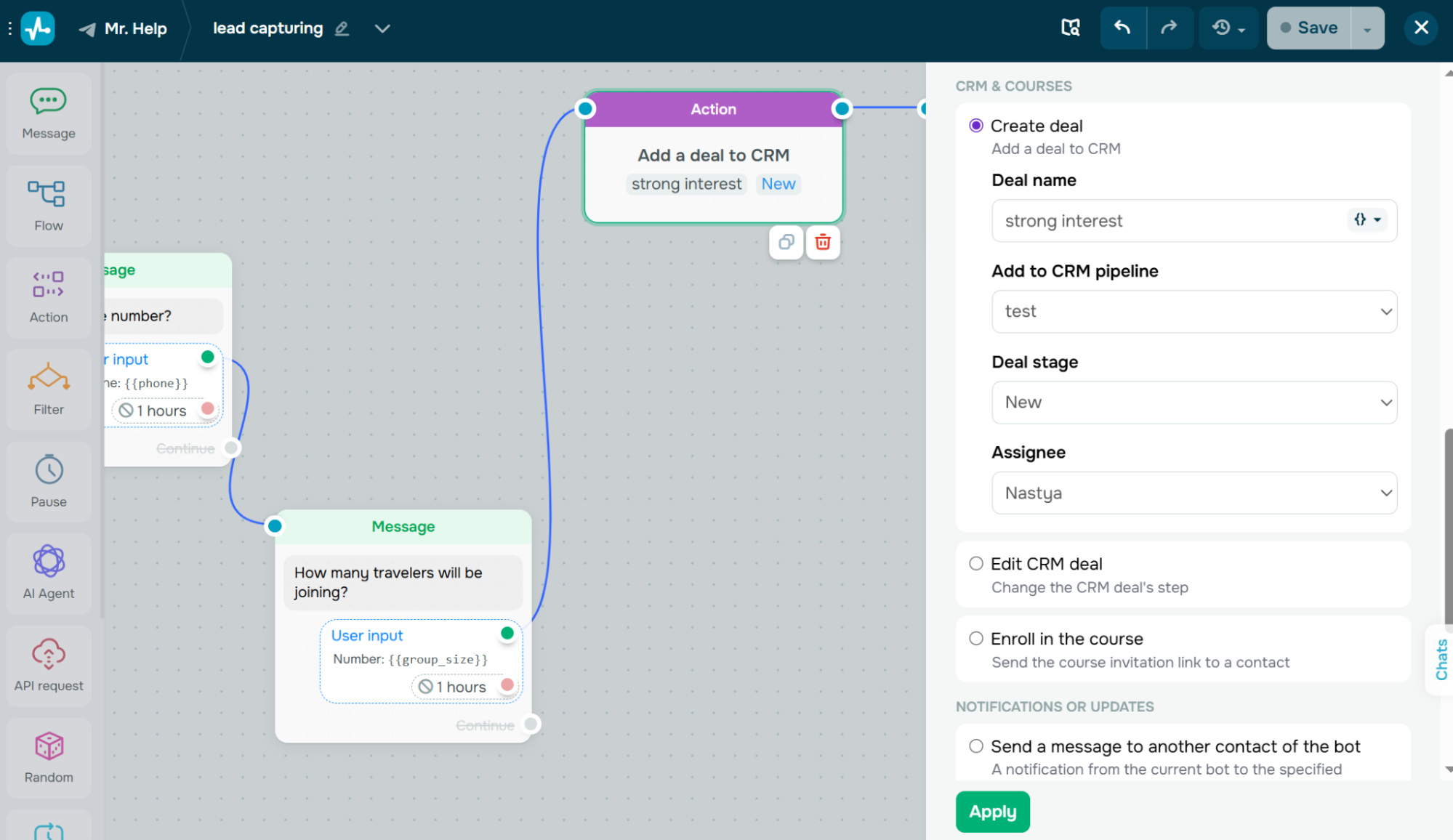 Creating a new CRM deal from the travel chatbot
You can also update CRM deals automatically and push event data to external tools using the “Send webhook” option.
Step 6. Test and optimize your flows before launch
Before publishing your chatbot, test every conversation path. Use the “Send to yourself” option to interact with the chatbot as a real user would, catching logical gaps, awkward transitions, or missing fallback branches before they reach your audience.
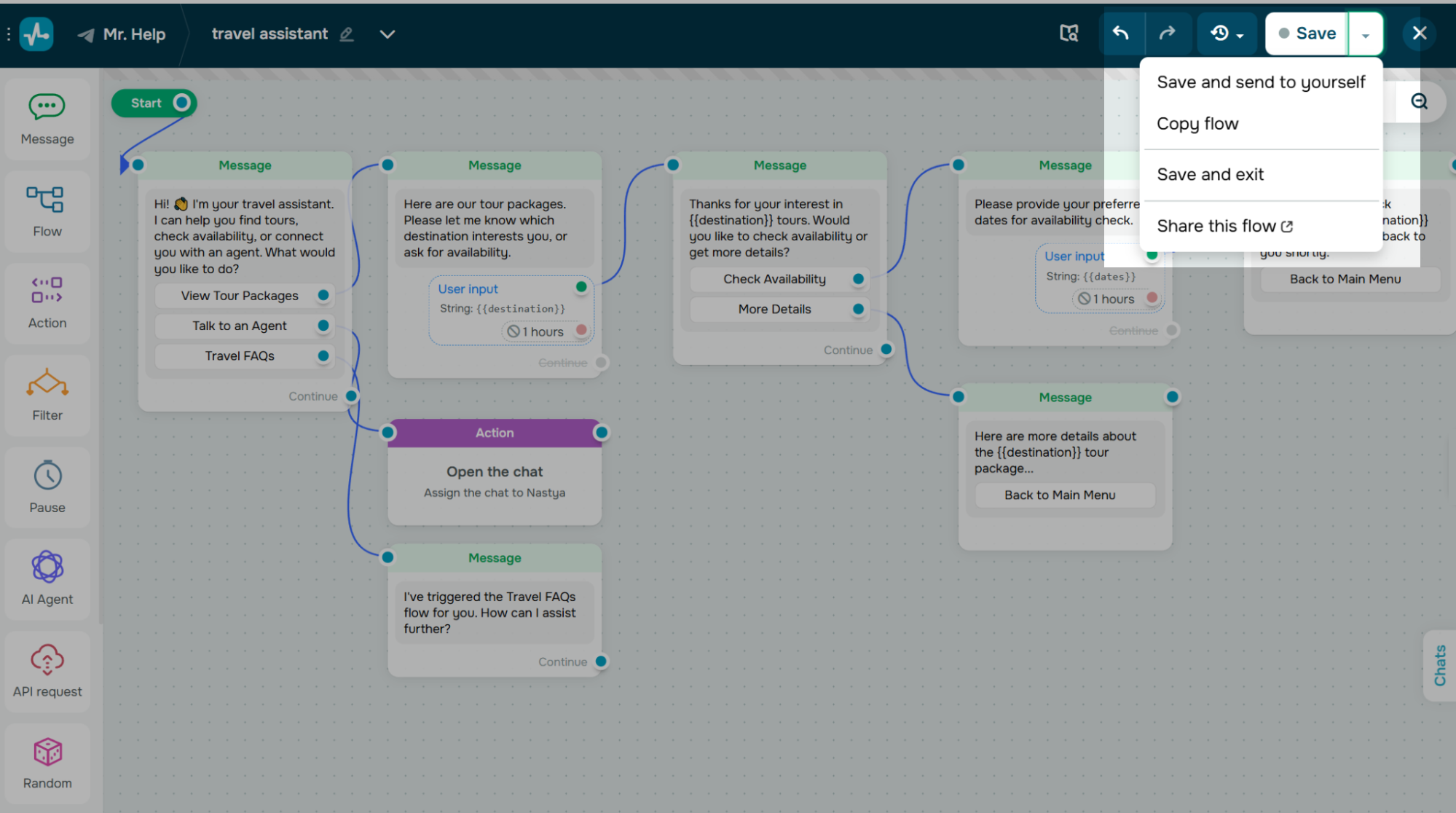 Test the travel chatbot flow before launching it
Make sure to check that every filter branch has a valid exit, verify that the “AI agent” element behaves as expected, confirm that human handoff works smoothly, and that the right team member receives a notification.
Gathering feedback from colleagues or a test group can also help you refine tone, structure, and usability before going live.
Compete faster with AI travel chatbots
Travel chatbots have become a core part of modern travel sales. From answering questions and qualifying leads to guiding bookings and promoting add-ons, they help travel businesses move faster, scale conversations, and cut down on manual work.
A well-designed travel chatbot improves the customer experience at every stage while creating real revenue opportunities through proactive upsells and more effective follow-ups. As traveler expectations continue to shift toward instant, mobile, and conversational interactions, building a tourism chatbot is a practical step toward staying competitive.
If you’re ready to turn conversations into bookings, try the SendPulse chatbot builder. With multi-channel automation, a drag-and-drop interface, AI capabilities, and a built-in CRM system, you can launch your first travel chatbot and start seeing results sooner than you’d expect.