Answering the same questions over and over is one of the biggest drains on any support team. Customers want instant answers about pricing, shipping, returns, and more, and they don’t want to wait for an agent to become available.
Instead of sending visitors to a long FAQ page, an FAQ chatbot delivers the right information in a conversational way, right where customers already are. It may be your website, WhatsApp, Instagram, Facebook Messenger, or other messaging channels. This makes it easier for customers to find answers and frees your team to focus on requests that truly need human attention.
In this guide, you’ll learn what an FAQ chatbot is, why businesses use it, and where it delivers the most value. We’ll also look at real FAQ chatbot examples and show you, step by step, how to build your own FAQ chatbot with SendPulse.
TL;DR Which FAQ chatbot is right for your business
The best FAQ chatbot approach depends on how predictable your customers’ questions are, how complex your knowledge base is, and how much you’re comfortable automating. The comparison below will help you find the right fit.
| Approach |
Best for |
How it answers |
What you need first |
Main upside |
Main risk |
| Static FAQ page |
Low-volume, straightforward questions |
Search or scrolling |
A well-organized FAQ page |
Simple and cheap |
Customers may struggle to find the right answer |
| Rule-based FAQ chatbot |
Repetitive, predictable questions |
Keywords, menus, and quick replies |
Clearly defined questions and scripted answers |
Fast, reliable, and easy to control |
Performs poorly when users ask questions in unexpected ways |
| AI FAQ chatbot |
Natural conversations and large knowledge bases |
Intent recognition and retrieval from a knowledge base (RAG) |
Accurate, well-maintained documentation |
Understands varied phrasing and provides more natural interactions |
Can produce inaccurate answers if the knowledge base is incomplete or outdated |
| Hybrid FAQ chatbot |
Most customer support and pre-sales scenarios |
Combines rules, AI retrieval, and human handoff |
Structured conversation flows, a knowledge base, and escalation rules |
Balances accuracy, flexibility, and automation |
Requires more planning during setup |
| AI agent with actions |
Complex service requests that require system actions |
Answers questions and performs tasks through connected systems |
APIs, permissions, and business workflows |
Can complete actions, not just provide information |
More complex to build, govern, and maintain |
In most cases, you don’t have to choose between a rule-based and an AI FAQ chatbot. The strongest solution combines both, giving customers quick answers while ensuring a human can step in when needed.
Once you know which approach fits, the next question is which platform to build on. Popular FAQ chatbot builders include SendPulse, ManyChat, Chatfuel, Tidio, Chatbase, and others. They differ mainly in the chatbot channels they support, their AI features, and pricing. For a side-by-side look at specific platforms, check out our roundup of the best chatbot builders.
What is an FAQ chatbot?
An FAQ chatbot is a virtual assistant that answers customers’ frequently asked questions in a conversational way. It typically works on your website, in a messaging app, or inside your product, helping people find answers without waiting for a support agent.
Not long ago, FAQ chatbots could only recognize specific keywords or button clicks. If a customer asked the same question in a different way, the conversation often reached a dead end. Today’s FAQ chatbots are much smarter. They can understand what users mean, search a knowledge base for the most relevant information, and respond in natural language instead of relying on rigid scripts.
The most effective FAQ chatbots combine multiple approaches. They use predefined flows for questions with clear answers, AI to understand different ways people ask the same thing, and transfer the conversation to a human agent when a request is too complex or sensitive to automate.

Build chatbots with a visual editor
Create AI-powered chatbots for your website, WhatsApp, Facebook, Instagram, TikTok, and Telegram. Run up to three bots and send 10,000 messages per month for free.
Get started for free
FAQ chatbot vs FAQ page vs knowledge base vs AI agent
Businesses often compare FAQ pages, knowledge bases, FAQ chatbots, and AI agents as if they were competing solutions. In reality, they work best together. Your knowledge base stores the information, while a chatbot for FAQ makes it easy for customers to access it.
FAQ page
An FAQ page is the simplest form of self-service. It presents answers to common questions in a searchable, static format, making it inexpensive and easy to maintain. The downside is that as your business grows, customers may struggle to find the right answer among dozens of articles or categories.
Knowledge base
A knowledge base is a structured library of help articles, guides, and product documentation. It serves as the single source of truth for your business, keeping information organized and consistent. A modern FAQ chatbot relies on this content to deliver accurate answers, so the quality of your knowledge base directly affects the quality of your chatbot.
FAQ chatbot
Instead of asking customers to search through pages, an FAQ chatbot lets them ask questions naturally and receive answers in context. It acts as the first point of contact for your knowledge, delivering the right information on your website, in messaging apps, or inside your product.
AI agent
An AI agent goes beyond answering questions. It can complete tasks by interacting with your business systems, for example, checking an order status or creating a support ticket. While this level of automation is powerful, it’s not always necessary. If your goal is to answer common questions quickly and accurately, an FAQ chatbot is often the simpler and more practical choice.
Which layer solves which problem
Each layer has its own role in a modern support experience.
| Layer |
What it does |
The problem it solves |
What it needs to work |
| FAQ page |
Publishes common answers to read |
“I just need to check the basics.” |
Someone to keep the content up to date |
| Knowledge base |
Stores the complete source of truth |
“Support needs one reliable place for accurate information.” |
Clear structure and content governance |
| FAQ chatbot |
Delivers answers through conversation |
“I don’t want to search through articles to find one answer.” |
A well-maintained knowledge base underneath it |
| AI agent |
Takes action, not just answers questions |
“I need something done, not just explained.” |
APIs, permissions, and connected business systems |
An FAQ chatbot doesn’t replace your FAQ page or knowledge base. It changes how customers access them. Instead of searching for answers themselves, customers simply ask a question and get the information they need in seconds.
Why businesses need an FAQ chatbot
The best FAQ chatbots make every stage of the customer journey smoother. From pre-purchase questions to post-order support, instant answers keep customers moving and reduce the load on your support team. On Instagram, that same job falls to Instagram message automation: predefined answers for the questions you get every day, with an AI agent to catch anything that doesn’t fit the script.
Below are some of the most valuable FAQ chatbot use cases, organized around the moments when customers are most likely to open a chat.
Answer customer questions instantly
Many visitors leave a website simply because they can’t find the information they need to make a decision. Questions like “How much does it cost?” or “Which plan includes this feature?” are perfect for an FAQ chatbot.
Instead of making prospects search through pricing pages or wait for a sales representative, the chatbot provides instant answers, recommends the right plan, and links to relevant resources. If the conversation becomes more specific — say, the customer requests a custom quote — the chatbot can collect contact details and pass the lead to the sales team.
Really Good Emails uses an AI support assistant called Lumi to answer questions about its platform directly from the website.
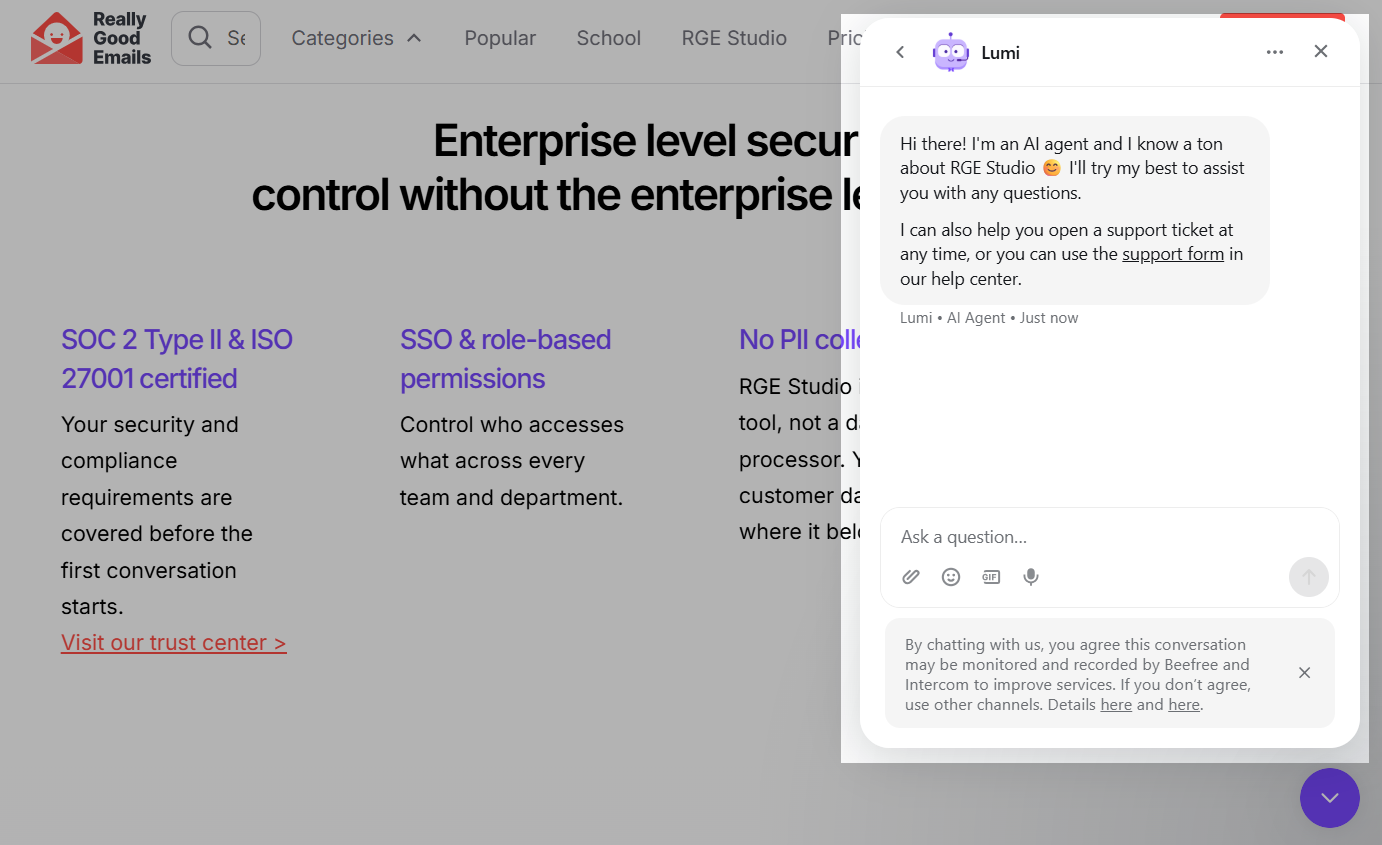 Really Good Emails lets its Lumi assistant answer product questions and open support tickets for visitors
If a question requires personal assistance, the chatbot can seamlessly direct users to the support team or help them open a support ticket.
Reduce repetitive support tickets
Support teams spend a surprising amount of time answering the same questions. Password resets, login issues, and basic troubleshooting are routine requests that an FAQ chatbot can take care of automatically. For tech teams, SendPulse’s IT support chatbot does even more: it asks a few questions to qualify each ticket and sends it to the right specialist.
When a customer asks, “I forgot my password” or “How do I change my email address?”, the chatbot can provide step-by-step instructions or link directly to the relevant help article. This cuts down on support tickets and lets agents focus on cases that require real investigation or a human touch.
To give you an idea, Notion uses AI-powered support assistants to help users resolve common issues on their own before reaching out to an agent.
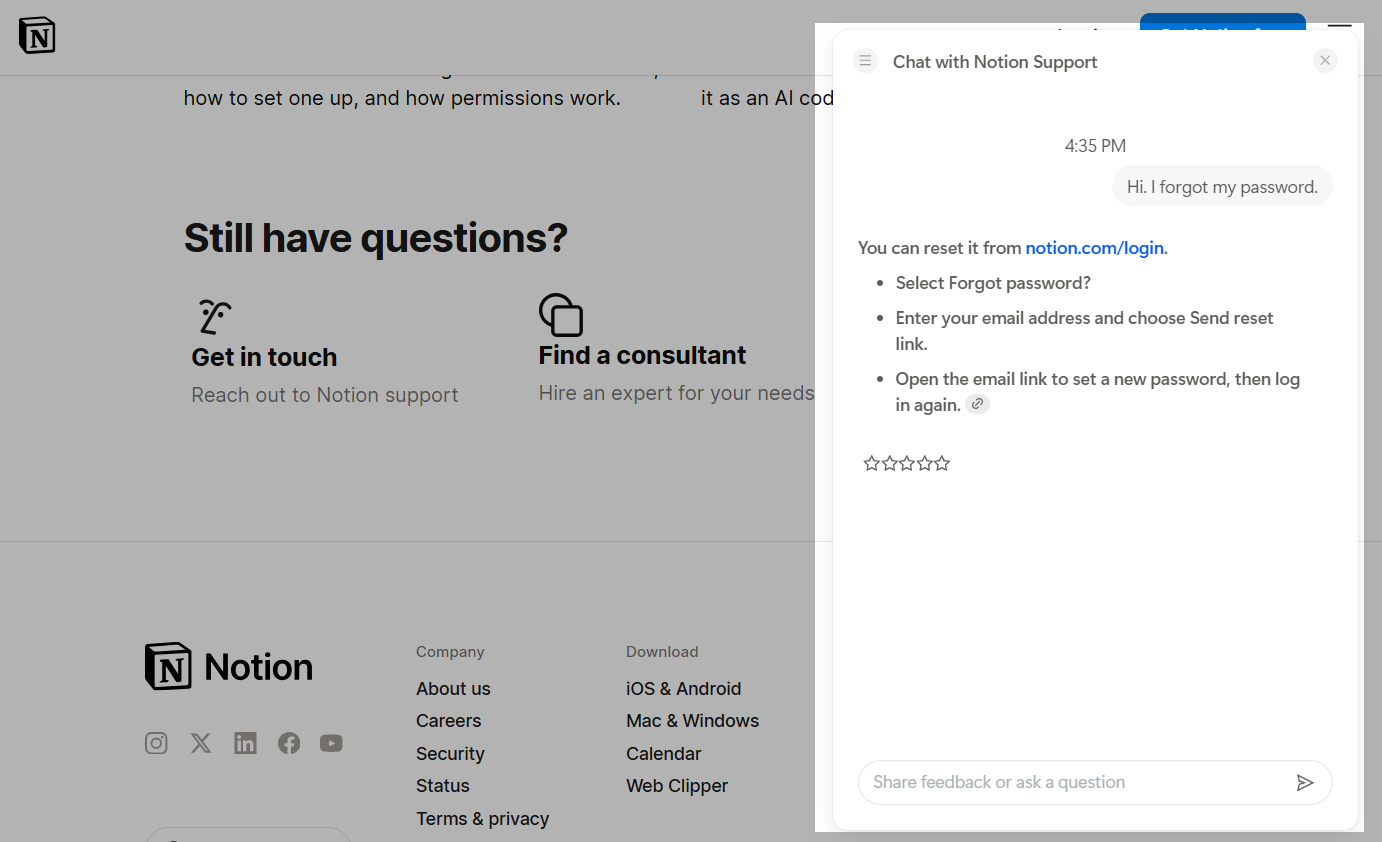 Notion resolves common questions like password resets instantly, before users reach a support agent
Help customers during the buying process
One of the most common eCommerce questions is also one of the easiest to automate: “Where’s my order?”
When connected to your eCommerce platform or CRM system, a chatbot for FAQ can check shipping status, explain delivery times, or walk customers through the return process without involving a support agent.
Case in point: H&M’s AI Assistant answers delivery and return questions directly in the chat. If customers want to track an order, the FAQ-based chatbot asks for their order number and retrieves the latest shipping status, so they don’t have to search the website or contact customer support.
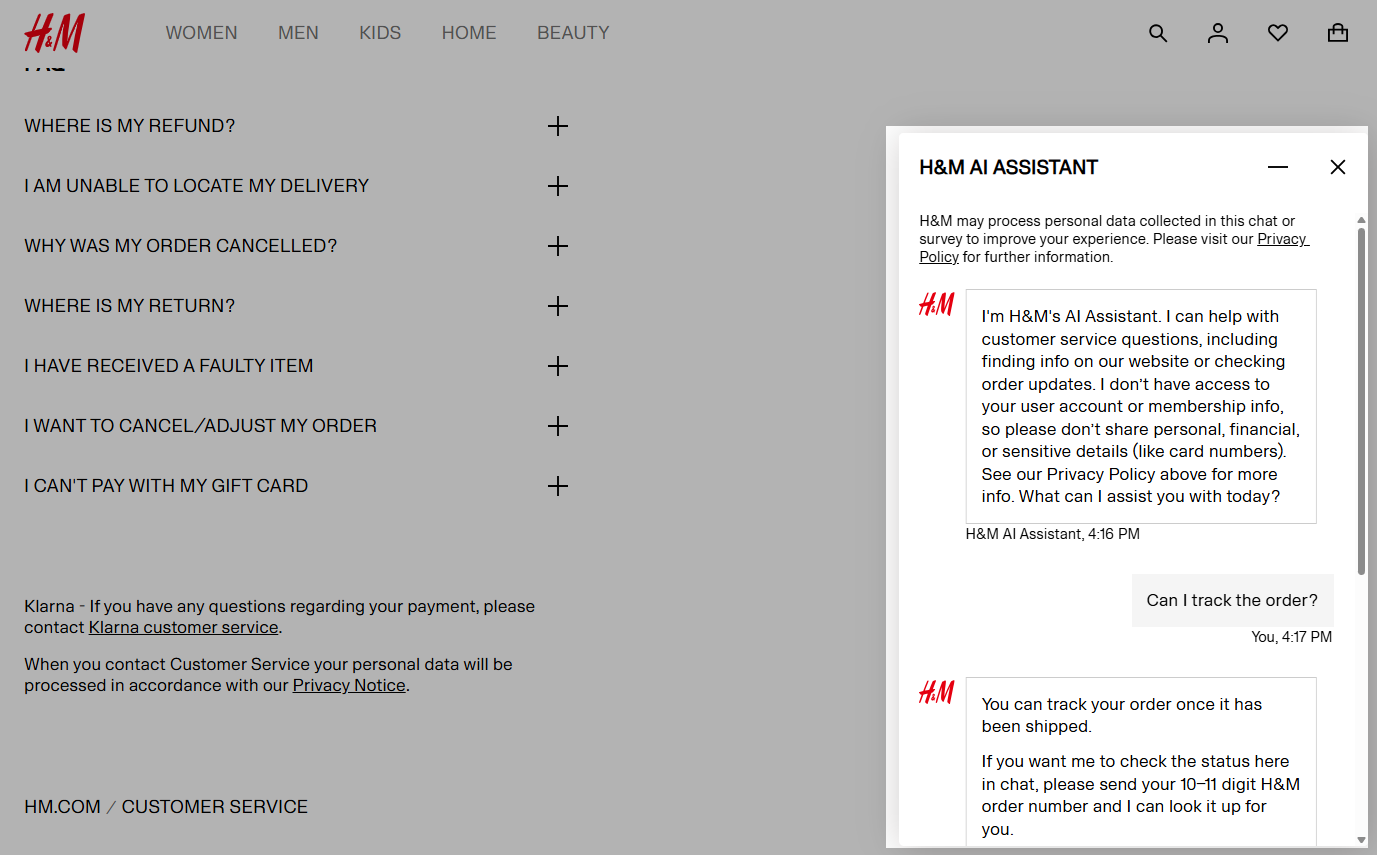 H&M lets shoppers track orders and ask about returns directly in chat instead of contacting support
This makes routine inquiries faster for shoppers while reducing repetitive inquiries for support agents.
Improve onboarding and product adoption
New users often ask the same questions during their first days with a product. Instead of leaving them to search through documentation, an FAQ chatbot can guide them through setup, explain key features, and answer common questions along the way.
This creates a smoother onboarding experience while encouraging customers to discover more of your product on their own.
For example, HubSpot’s AI-powered HubBot helps visitors navigate the platform by answering product questions and offering quick actions such as booking a demo, starting a free trial, chatting with the sales team, or accessing training resources.
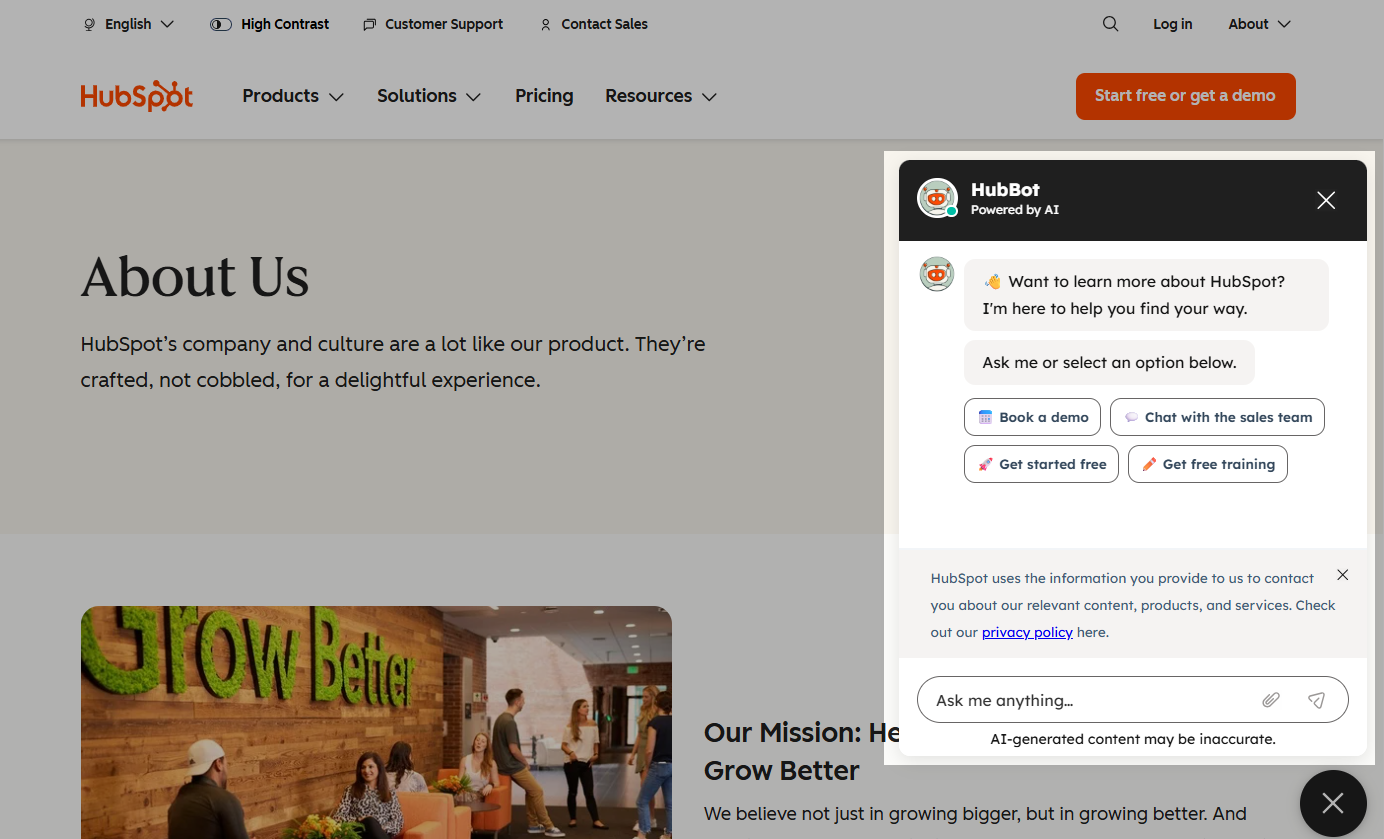 HubSpot uses HubBot to point new users toward demos, trials, and training so they adopt the platform faster
By guiding users to the right information or action in just a few clicks, the chatbot helps customers get value from the platform faster.
Support employees with internal FAQs
FAQ chatbots aren’t just for customers. They can also support employees, job candidates, and HR teams by answering common questions and automating repetitive interactions. Whether someone wants to check a vacation policy, learn about company benefits, or explore career opportunities, an HR recruiting chatbot can provide consistent answers without involving a human colleague.
For instance, Shamrock Foods uses a virtual assistant on its careers website to help candidates and employees navigate hiring-related information.
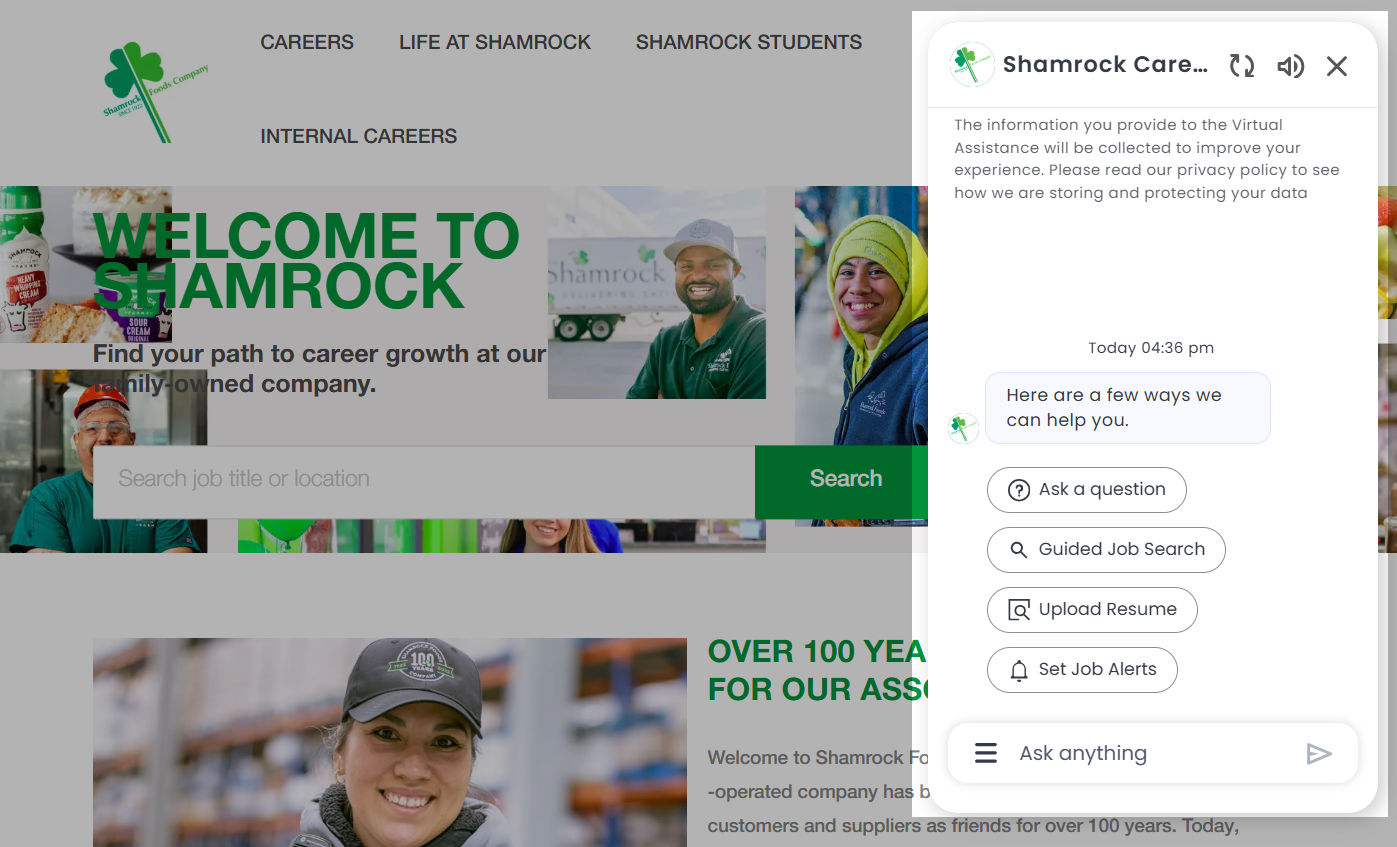 Shamrock Foods helps candidates search roles and get hiring answers from one chat on its careers site
Rather than searching through multiple pages, users can ask questions, search for open positions, or set up job alerts from a single chat interface. This reduces repetitive HR inquiries and makes it easier to find what they need quickly.
FAQ chatbot examples that work
Seeing how other businesses use FAQ chatbots is one of the fastest ways to find ideas for your own.
Casper: start with clear conversation paths
Casper’s AI assistant, Luna, immediately tells visitors what it can help with instead of waiting for them to guess.
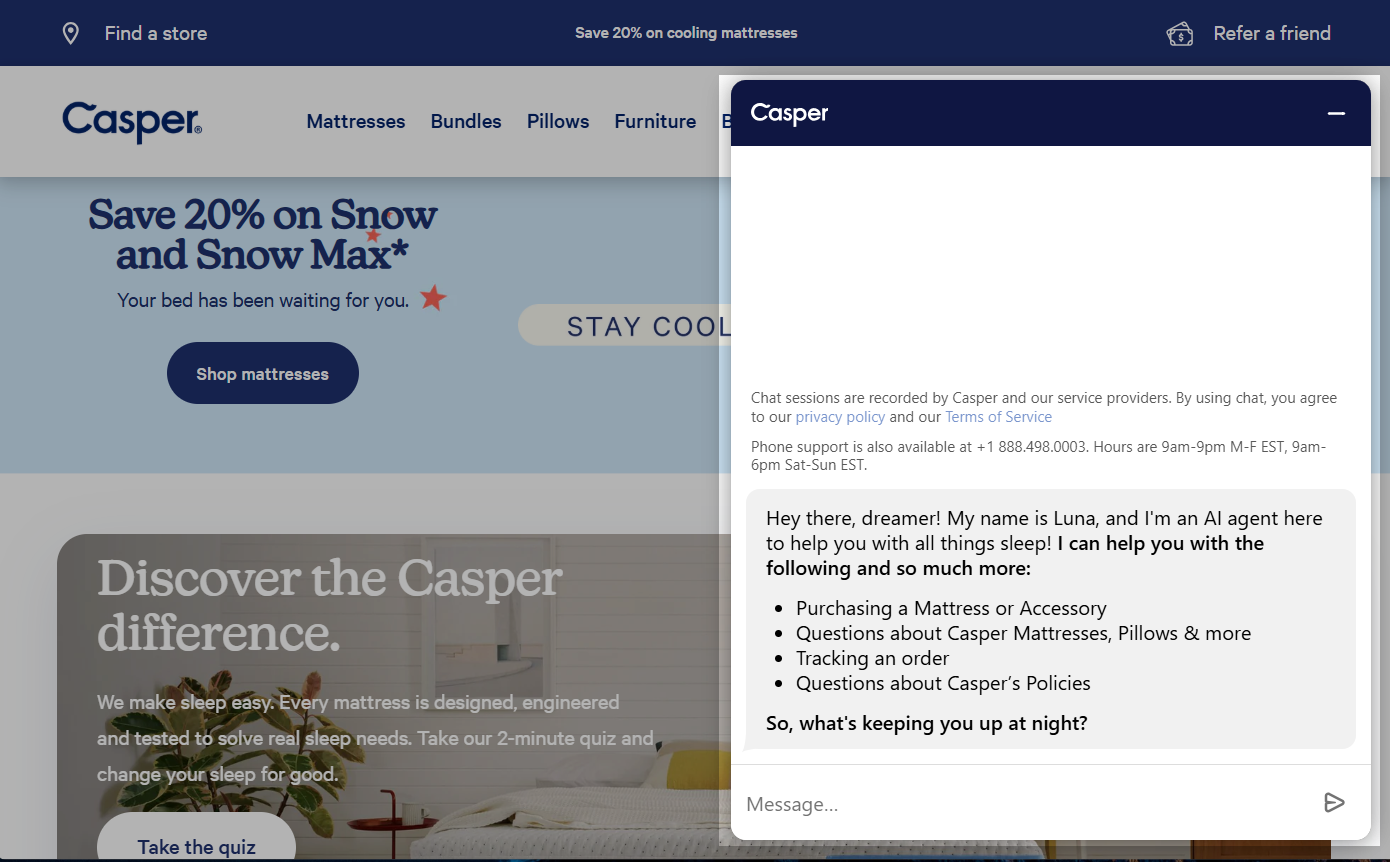 Casper’s Luna opens by listing what it can do, so visitors know exactly where to start
From the welcome message, users can choose common topics such as product recommendations, order tracking, or company policies, making it clear what the chatbot is designed to do.
Once a customer selects a topic, the conversation becomes more specific.
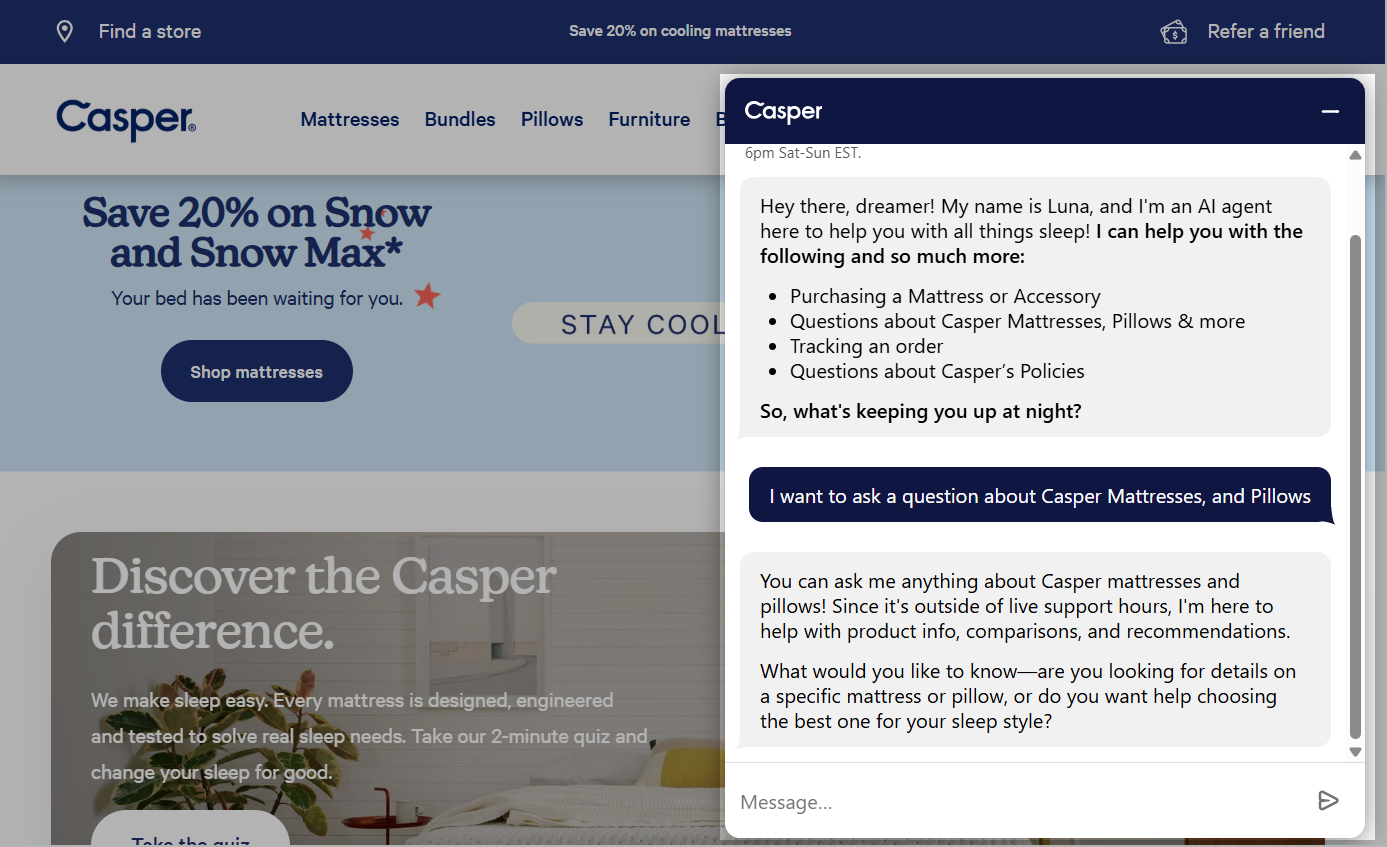 Once a visitor picks a topic, Luna offers tailored product guidance instead of a generic link
If someone asks about mattresses or pillows, for example, Luna offers personalized product guidance and recommendations rather than simply linking to a help article.
What makes this chatbot effective?
✔️ It sets clear expectations by listing its capabilities upfront.
✔️ It combines quick navigation with natural-language conversations.
✔️ It turns product questions into buying opportunities by offering personalized recommendations instead of generic answers.
G2: combine quick answers with open-ended questions
G2’s chatbot strikes a good balance between structure and flexibility.
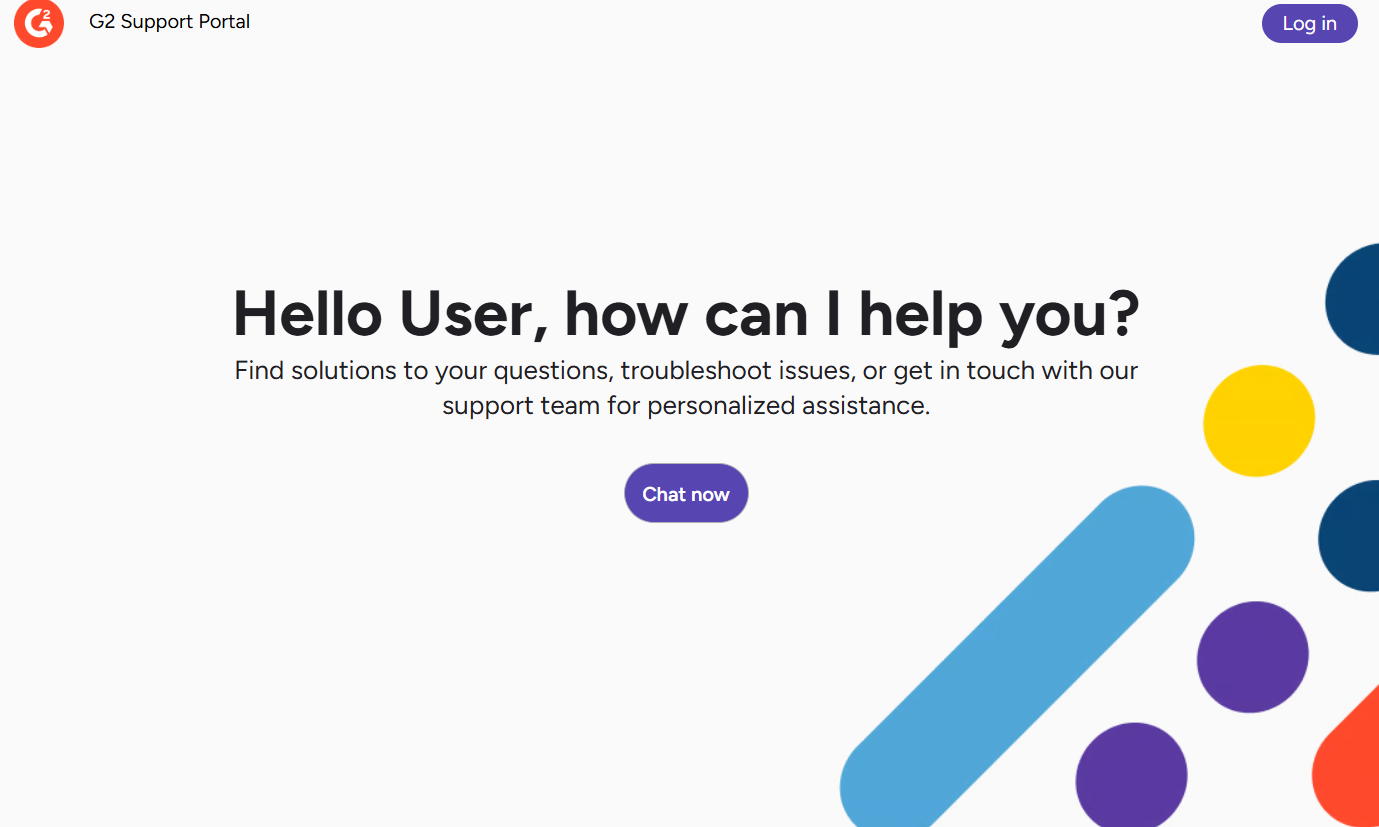 G2 greets users with common support topics so they can skip typing their question
It greets users with a set of common support topics such as account access, product profiles, reviews, and bug reporting. It allows people to quickly choose the issue they’re facing instead of typing from scratch.
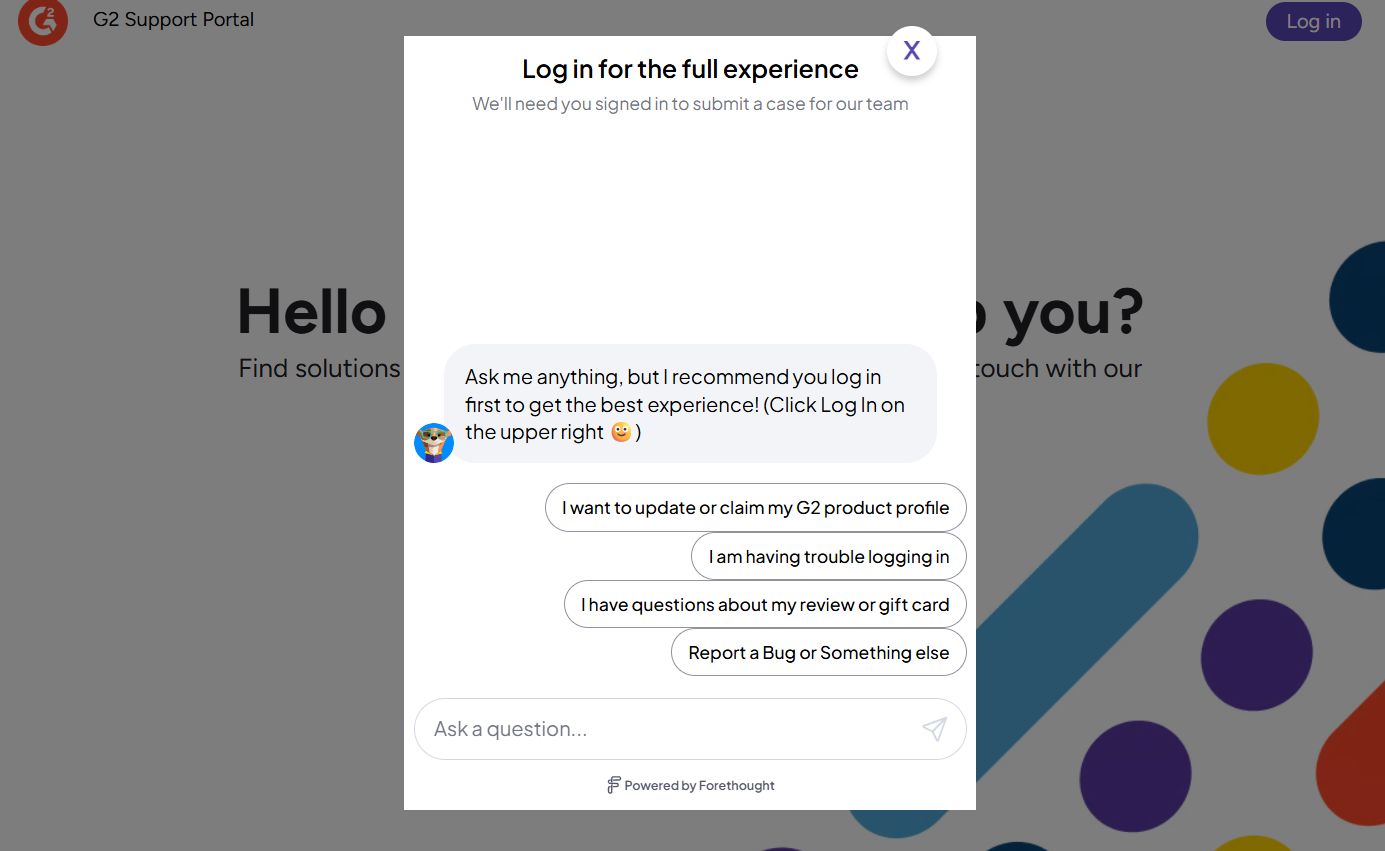 G2 pairs quick reply shortcuts with a free text field, so users can click or type
At the same time, the chatbot includes a free-text input field, allowing users to ask their own questions if none of the suggested options fit.
What makes this chatbot effective?
✔️ It offers FAQ shortcuts to speed up common support requests.
✔️ It lets users type their own questions instead of limiting them to predefined options.
✔️ It combines guided navigation with conversational support, creating a more flexible self-service experience.
Hilton: blend guided navigation with human support
Hilton’s AI Assistant is designed to help guests find answers quickly while ensuring they can always reach a real person if needed.
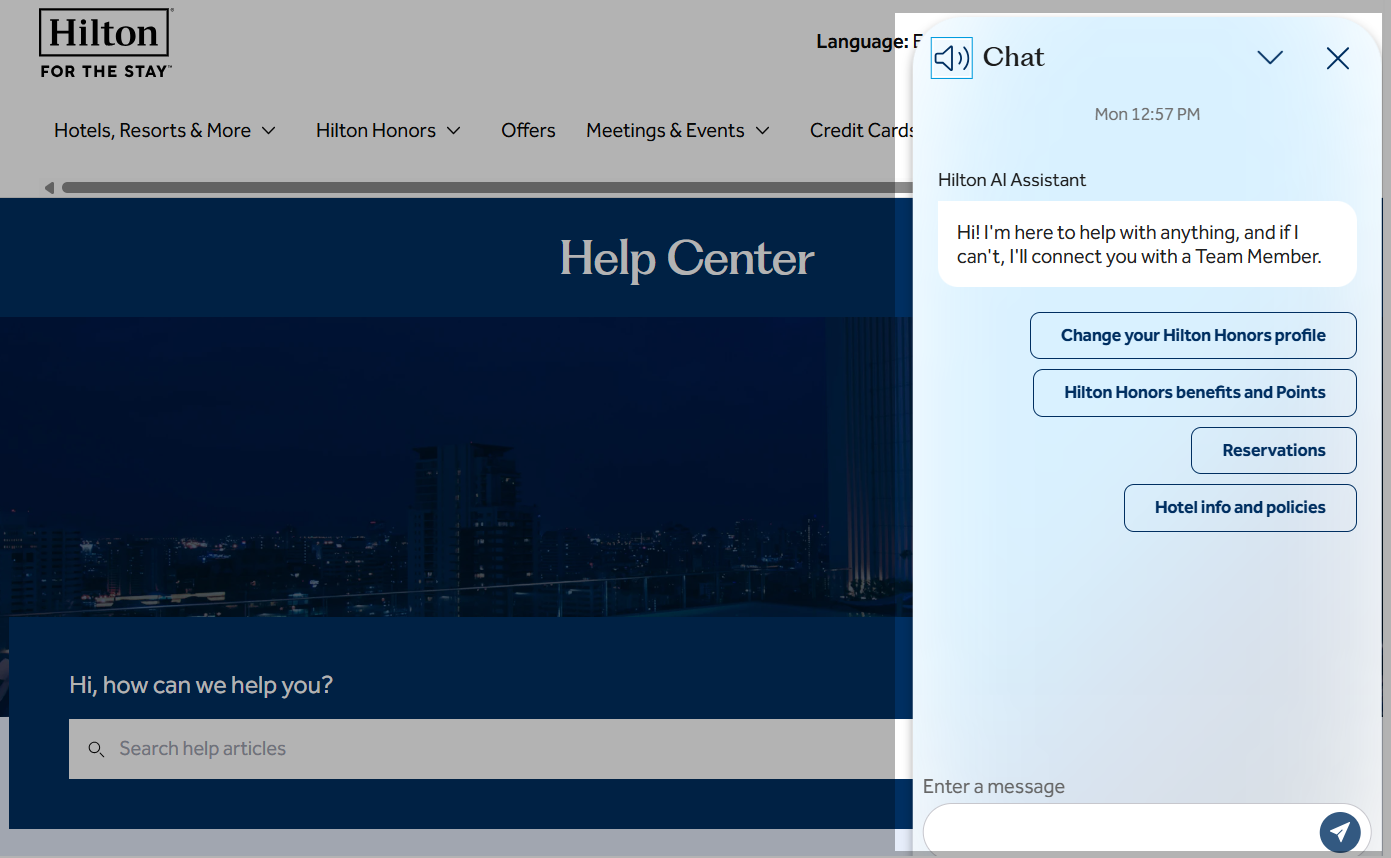 Hilton opens with clickable topics like reservations and Hilton Honors to guide guests quickly
Right from the welcome message, it presents common topics such as reservations, Hilton Honors benefits, and hotel policies, allowing users to navigate the conversation with just a few clicks.
As users select a category, the chatbot narrows the conversation by offering more specific questions and answers.
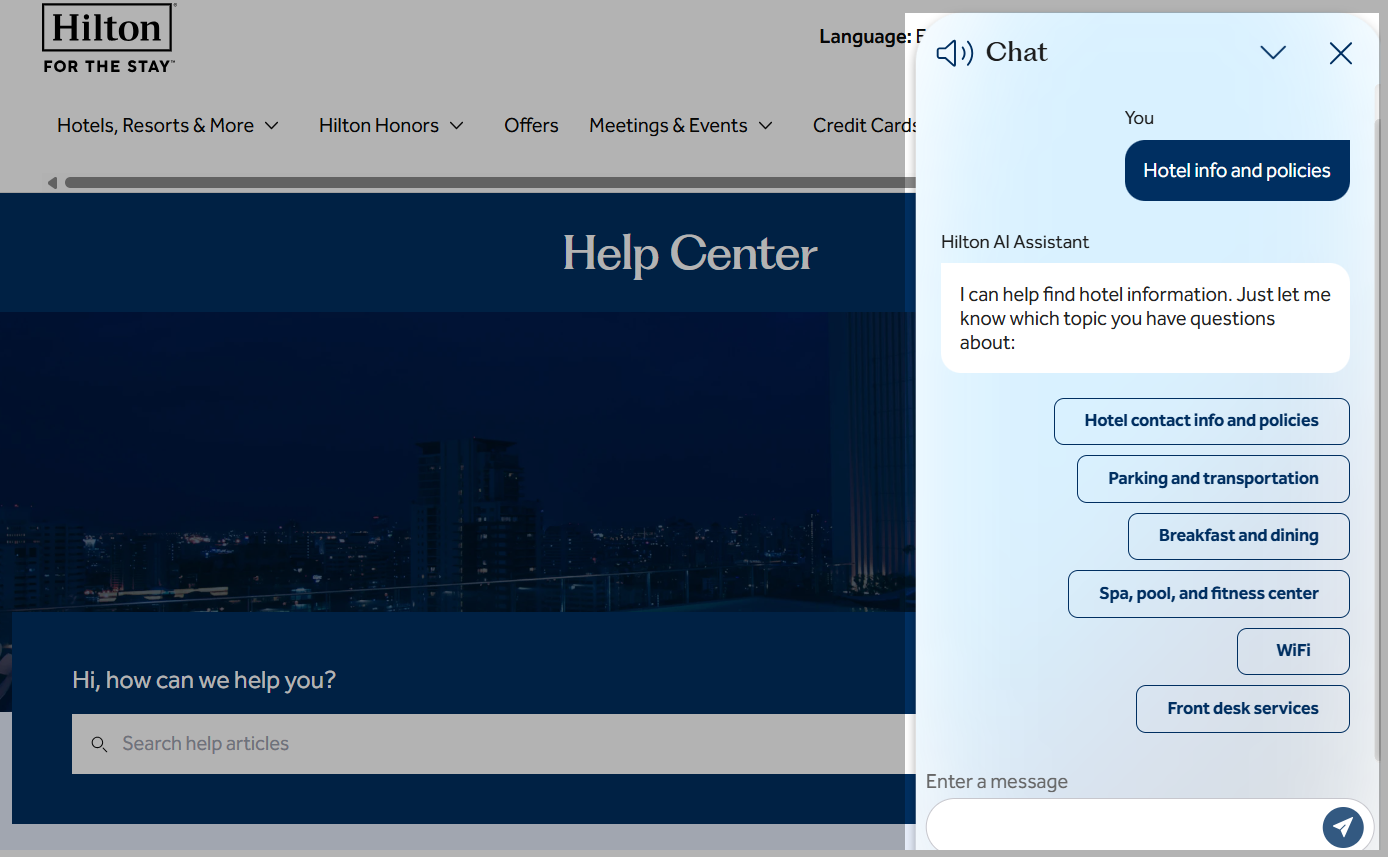 After a guest picks a category, Hilton narrows it into the specific questions it can answer
Guests can also type their own questions at any time instead of relying solely on predefined options. If the FAQ based chatbot can’t resolve the request or if a guest prefers personal assistance, it offers a seamless handoff to a team member.
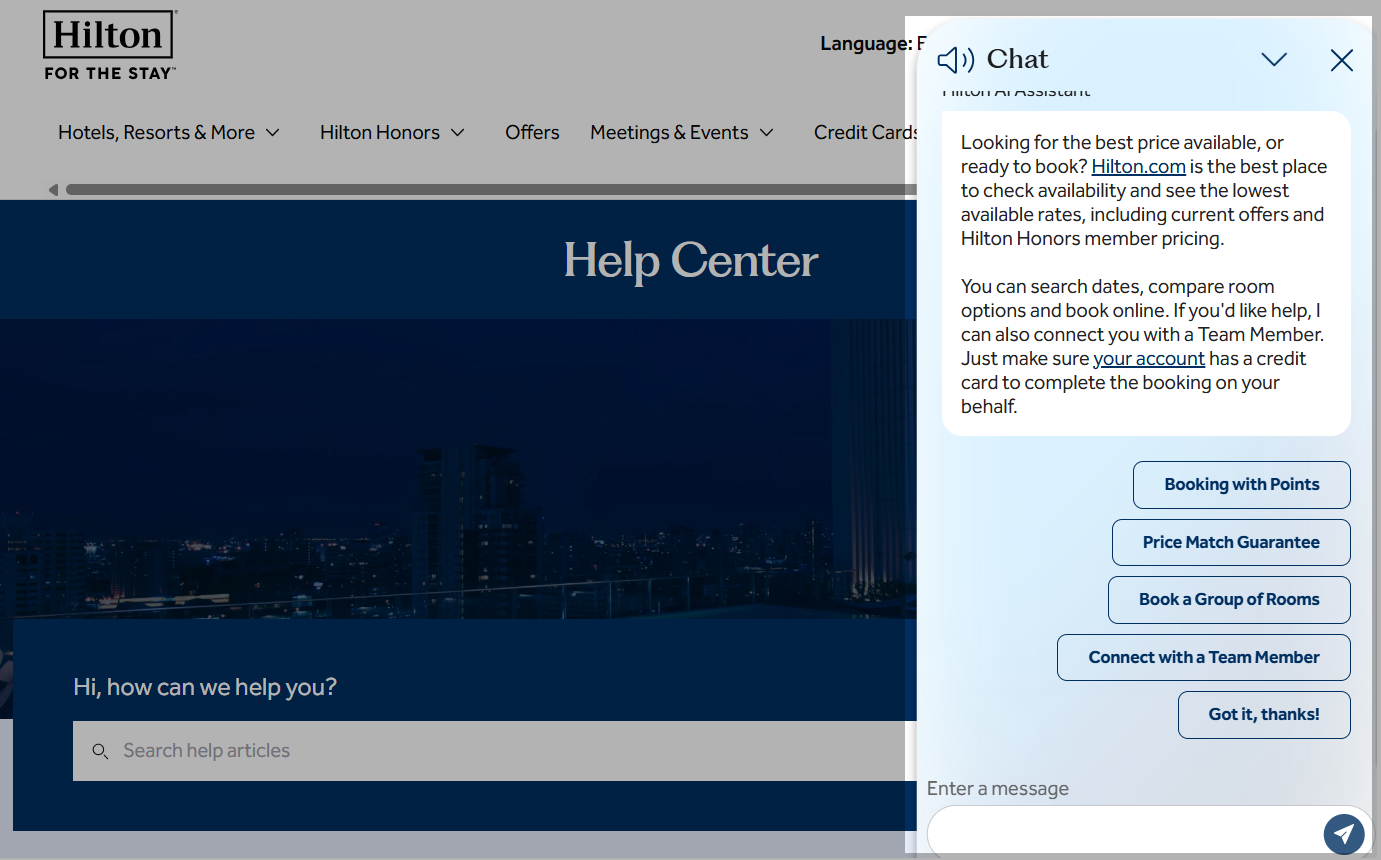 Hilton always offers a “Connect with a Team Member” option, so guests can reach a person anytime
Even at this stage, the chatbot stays useful, surfacing booking shortcuts before it hands the guest to a team member.
What makes this chatbot effective?
✔️ It organizes information into clear, step-by-step conversation paths instead of overwhelming users with long FAQ pages.
✔️ It combines clickable FAQ topics with free-text questions, giving users the flexibility to interact in the way they prefer.
✔️ It makes human support easy to access, so customers never feel trapped in an automated conversation.
When an FAQ chatbot should hand off to a human
FAQ chatbots are excellent at handling repetitive questions, but they shouldn’t replace human expertise in every situation.
Some requests require judgment, empathy, or access to sensitive information. In these cases, a chatbot should recognize its limits and transfer the conversation to a human agent instead of trying to provide an uncertain answer.
Here are a few situations where human support is essential:
- Legal, financial, or medical advice. These questions often require professional expertise and carry significant risks if answered incorrectly.
- Emotionally sensitive conversations. Complaints, service failures, or frustrated customers are usually better handled by a person who can understand the situation and respond with empathy.
- High-stakes account actions. Requests such as changing payment details, closing an account, approving refunds, or accessing personal information should involve identity verification and human oversight.
- Questions outside the chatbot’s knowledge. If the chatbot isn’t confident in its answer, it’s better to admit it and escalate the conversation than risk providing misleading information.
How FAQ chatbots work
Modern FAQ chatbots combine several methods to answer questions accurately while knowing when to ask for human help.
A useful way to think about this is the Resolve, Route, or Record framework:
- Resolve – answer the question automatically.
- Route – transfer the conversation to a human if needed.
- Record – save unanswered questions so you can improve your knowledge base over time.
Good FAQ chatbots constantly move between these three actions, helping customers while making the chatbot smarter with every conversation.
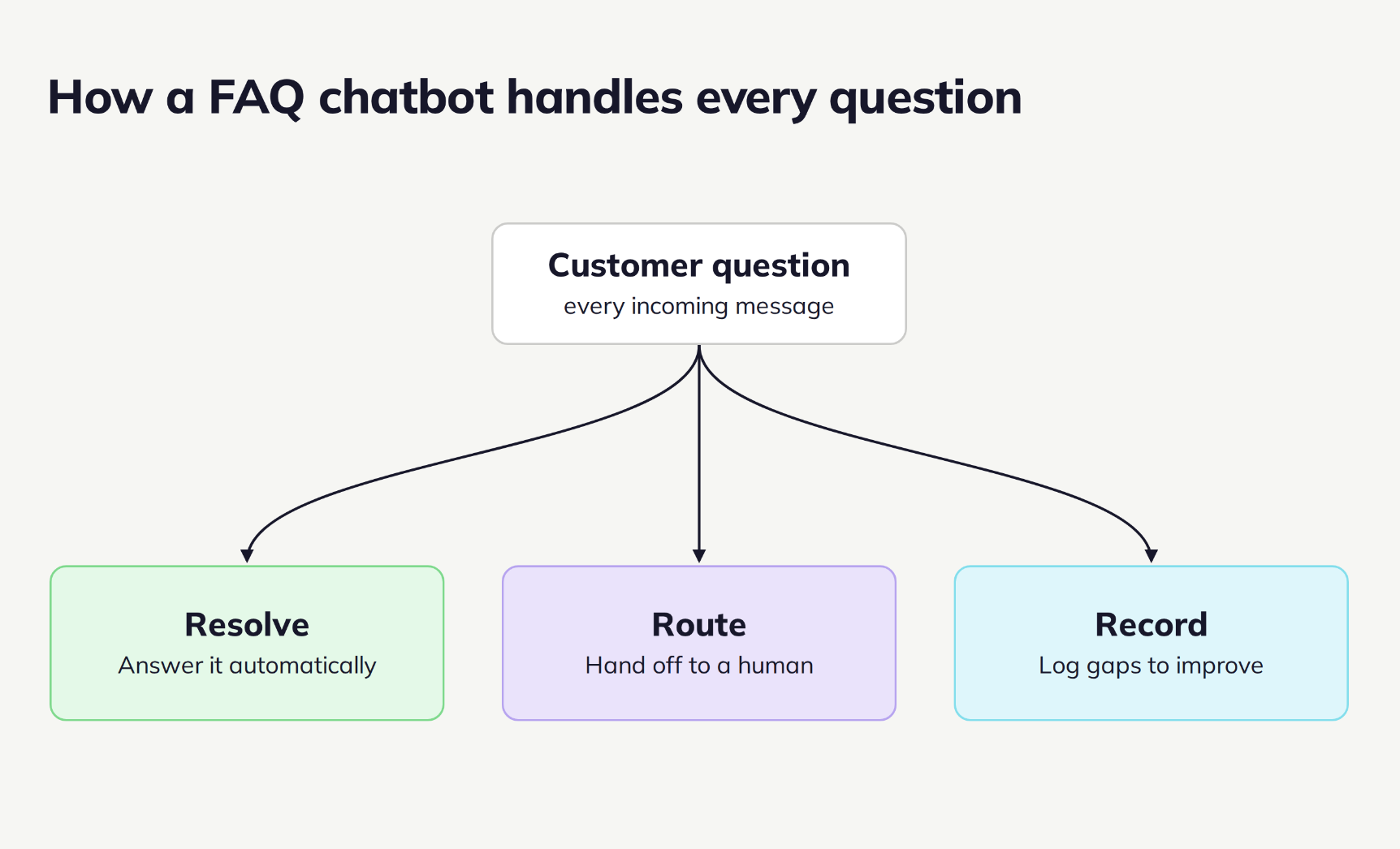 A good FAQ chatbot resolves what it can, routes the rest to a human, and records the gaps to improve
Keyword matching and decision trees
The simplest FAQ chatbots follow predefined conversation paths. They either recognize specific keywords or let users navigate with buttons and menus. Say someone clicks “Shipping;” the chatbot opens a flow about delivery options. If they type “return policy,” it shows the corresponding answer.
This approach is reliable because every response is predefined. However, it works best when customers ask questions in predictable ways. If someone phrases a question differently than expected, the chatbot may fail to understand what they mean.
Intent detection and natural language understanding
Instead of searching for exact keywords, some FAQ chatbots try to understand the user’s intent. For example, these questions all mean roughly the same thing:
- How much does it cost?
- What’s the price?
- How much is it?
Rather than creating separate rules for every possible variation, the chatbot recognizes that the customer wants pricing information and provides the appropriate answer. This means you don’t have to predict every way a customer might phrase a question.
Knowledge base retrieval
Many AI FAQ chatbots now use retrieval-augmented generation (RAG) to answer questions.
Instead of relying only on what the AI already knows, the chatbot first searches for your approved documentation, such as your help center or internal knowledge base. This search works through semantic (vector) matching — it looks at the meaning of a question, so customers don’t need to use the exact words from your documentation. It then uses those sources to generate its answer.
Since every response is drawn from your own content, the chatbot stays accurate and avoids making up information.
However, RAG is only as good as the knowledge behind it. If your documentation is outdated or inaccurate, the chatbot will simply deliver inaccurate answers.
Confidence-based routing and human handoff
If a FAQ chatbot isn’t confident about an answer, detects a sensitive topic, or repeatedly fails to understand the customer, it should stop guessing and transfer the conversation to a human agent.
The handoff can happen automatically based on predefined rules, customer requests, or confidence thresholds.
This means customers receive reliable answers instead of confident-sounding mistakes and your support team only steps in when human judgment is actually needed.
The methods above power most ready-made chatbots, but that isn’t the only route.
Custom builds with the OpenAI API
Some companies choose to build their own FAQ based chatbot using the OpenAI API instead of using a no-code platform.
A typical setup works like this:
- Upload your documentation.
- Convert it into searchable embeddings.
- Store those embeddings in a vector database.
- Retrieve the most relevant content whenever a customer asks a question.
- Ask the language model to generate an answer based only on the retrieved information.
Developers often use frameworks like LangChain or LlamaIndex to connect these pieces and manage the retrieval step.
This approach offers maximum flexibility and lets developers customize every part of the chatbot. However, it also means you’re responsible for maintaining the infrastructure, updating the knowledge base, monitoring costs, and ensuring answer quality.
For most businesses, a no-code chatbot platform delivers the same customer experience without the engineering effort. Unless you have highly specialized requirements, you can get most of the benefits of an AI FAQ chatbot without building the entire architecture yourself.

Power up your business with smart tools
Chatbots, emails, automation, CRM, and more — everything you need to connect with your audience.
Get started for free
How much does an FAQ chatbot cost
The cost of an FAQ chatbot depends less on the chatbot itself and more on how you use it. Pricing typically varies based on the number of conversations, communication channels, AI capabilities, and whether you choose a ready-made platform or build a custom solution from scratch.
Free and freemium plans
If you’re launching your first FAQ chatbot, a free plan is often enough to get started. Many chatbot platforms, including SendPulse, offer a free tier that lets you create a chatbot and test your workflows before upgrading.
Free plans usually include the core chatbot builder, basic automation, and one or more messaging channels. As your audience grows or you need more advanced AI features, you’ll likely move to a paid plan.
Subscription-based pricing
The most common pricing model is a monthly or annual subscription.
Instead of paying for every conversation, you pay for access to the platform and its features. Higher-tier plans typically include larger contact limits, additional communication channels, advanced AI capabilities, and support for larger teams.
This model works well for businesses with predictable support volumes because monthly costs are easier to forecast.
Usage-based pricing
Some providers charge based on how much your chatbot is used, for instance, per conversation or per successfully resolved inquiry.
This approach can be cost-effective if your chatbot handles a relatively small number of questions. However, costs may increase unexpectedly during seasonal campaigns, product launches, or holiday shopping periods when customer inquiries spike.
Before choosing a usage-based plan, estimate how many conversations your business expects each month and consider how that number might grow.
Custom build costs
Some companies prefer to build their own chatbot using the OpenAI API or another AI model.
In this case, your costs go beyond API requests. You’ll also need infrastructure to store and retrieve your knowledge base, monitor performance, and maintain the system over time. Depending on your architecture, this may include embeddings, vector databases, hosting, and engineering resources.
A custom-built chatbot offers maximum flexibility, but it’s rarely the least expensive option once development and maintenance are taken into account.
Hidden costs
The biggest ongoing expense isn’t usually the chatbot software; it’s keeping your information accurate.
An FAQ chatbot is only as reliable as the content it draws information from. Product updates, pricing changes, new policies, and revised documentation all need to be reflected in your knowledge base. Otherwise, even the most advanced AI chatbot will provide outdated answers.
When planning your budget, think beyond the subscription fee. Set aside time and resources to review, update, and expand your content regularly. That’s what keeps your FAQ chatbot useful long after it’s launched.
How to build an FAQ chatbot in SendPulse
The quality of your FAQ chatbot depends less on the AI model you choose and more on three things: accurate content, clear conversation flows, and knowing when to hand customers over to a human.
Before opening the builder, gather your most common customer questions, write concise answers, and decide which requests should always go to a support agent.
A simple writing rule will make every answer better:
| Before |
After |
| “Shipping depends on several factors. Let me explain how it works…” |
“Standard shipping is free on orders over $50 and takes 3-5 business days. Express shipping takes 1-2 days and costs $15.” |
Lead with the answer, add context second, and offer the next step last. This format is easier for customers to read and easier for AI to retrieve accurately.
The examples in this section use a fictional hair-care brand, HAIR TO CARE, but the same steps apply to any business. Swap in the topics, tags, and questions your own customers actually ask.
Step 1. Connect a chatbot channel and set up triggers
Start by connecting the communication channel where customers contact you most often, such as your website, WhatsApp, Facebook Messenger, Instagram, Telegram, or TikTok. Then configure the chatbot’s key triggers.
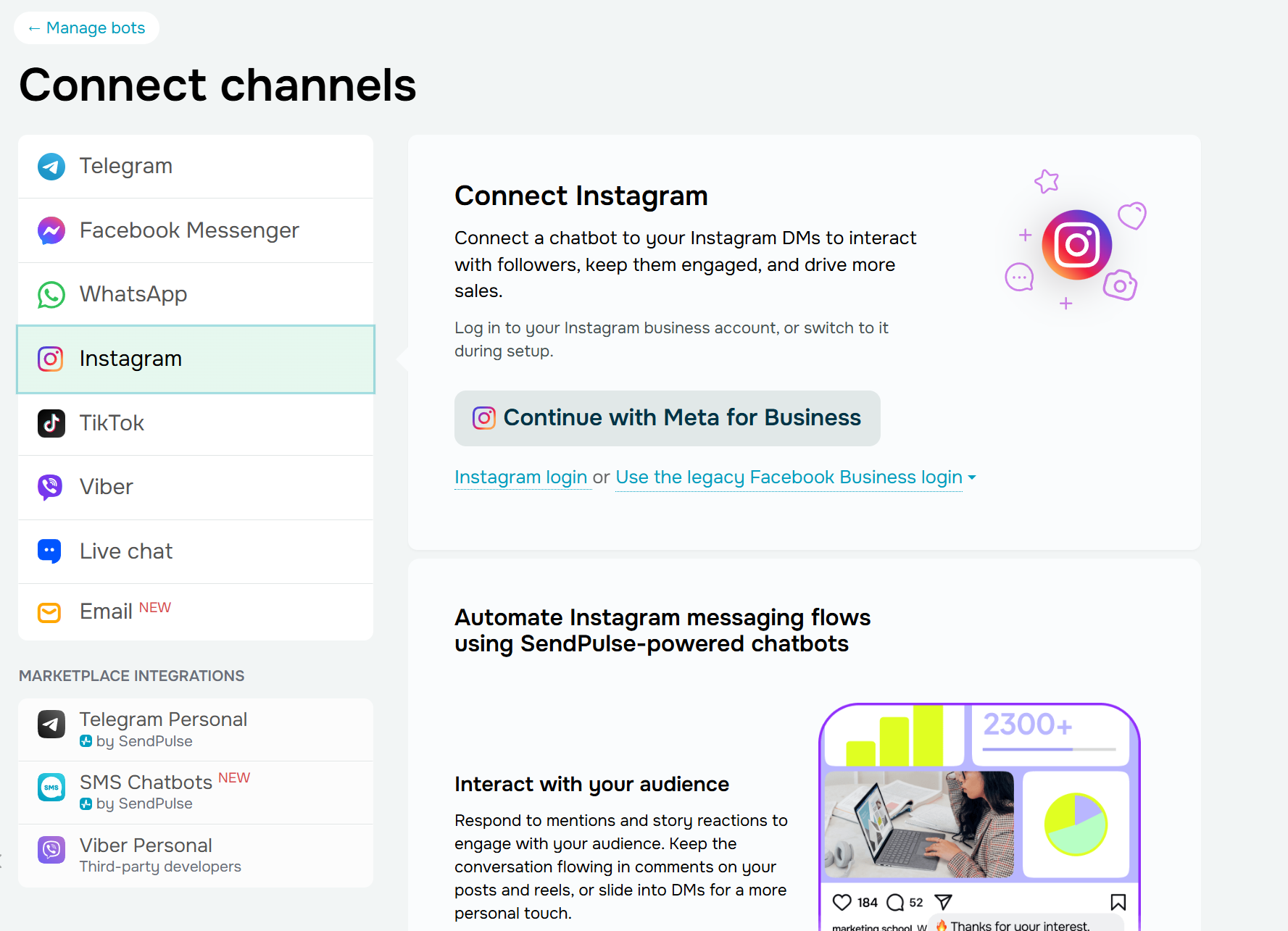 Connecting a chatbot channel in the SendPulse account
Every SendPulse-powered chatbot includes three default triggers:
Besides these default triggers, you can create your own to launch chatbot flows in different situations. Open the bot tab, click “Create a new trigger,” and choose the event that should start the conversation.
Depending on the communication channel, you can trigger a flow when a user sends a message with a specific keyword, comments on a post or reel, replies to a story, triggers a website pixel event, or performs another supported action. We’ll take an Instagram chatbot as an example.
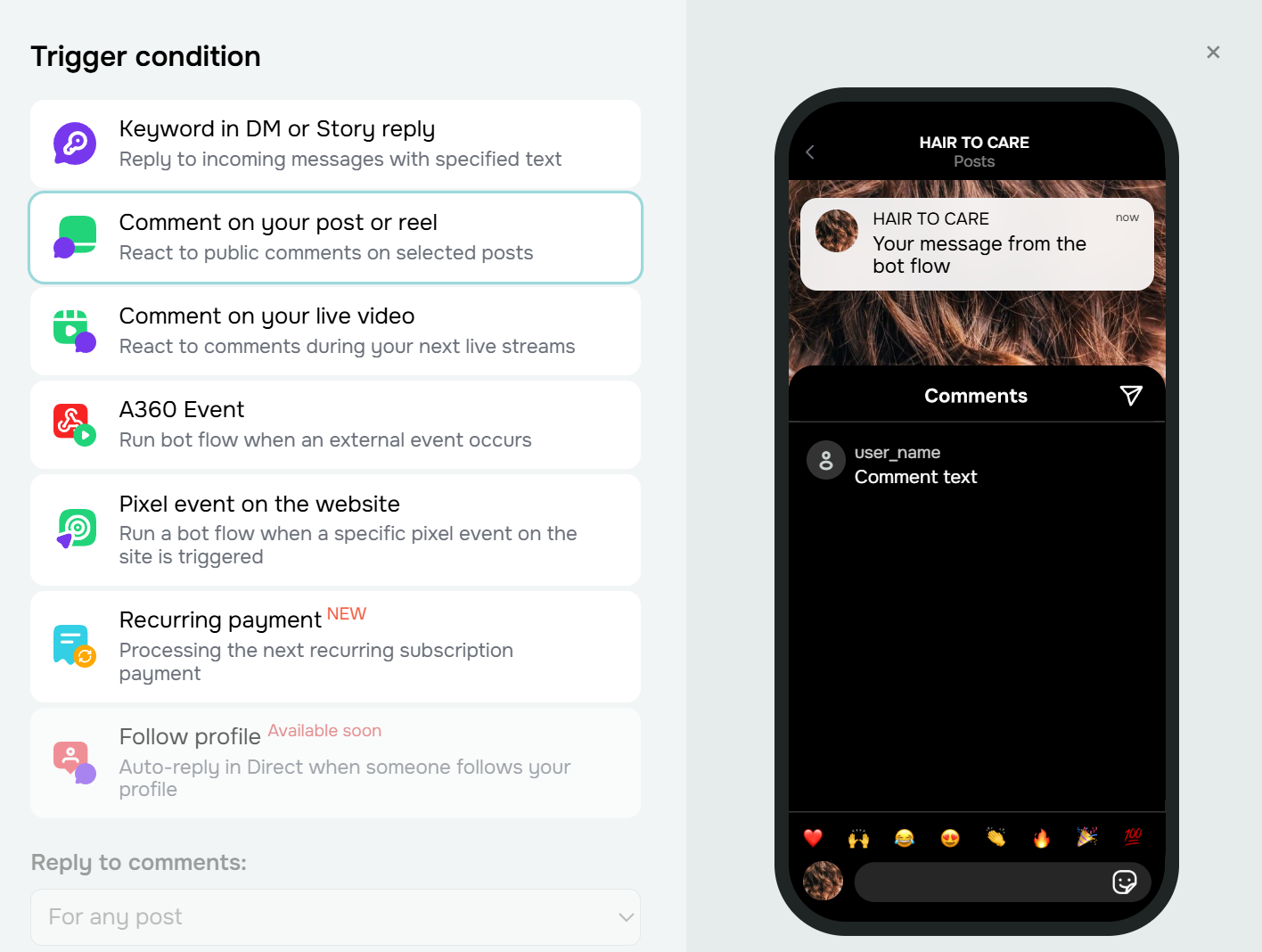 Looking through trigger conditions for an Instagram chatbot
For an FAQ chatbot, keyword triggers are especially useful. Create separate triggers for your most common questions, such as pricing, shipping, returns, or business hours.
Set the match type to “Contains” rather than an exact match, so the trigger fires whether someone types “pricing,” “what’s your pricing,” or “how much does it cost.” It’s worth turning on “Ignore repeated triggers” too, which stops the same keyword from launching the flow again if a customer sends it a few times in a row.
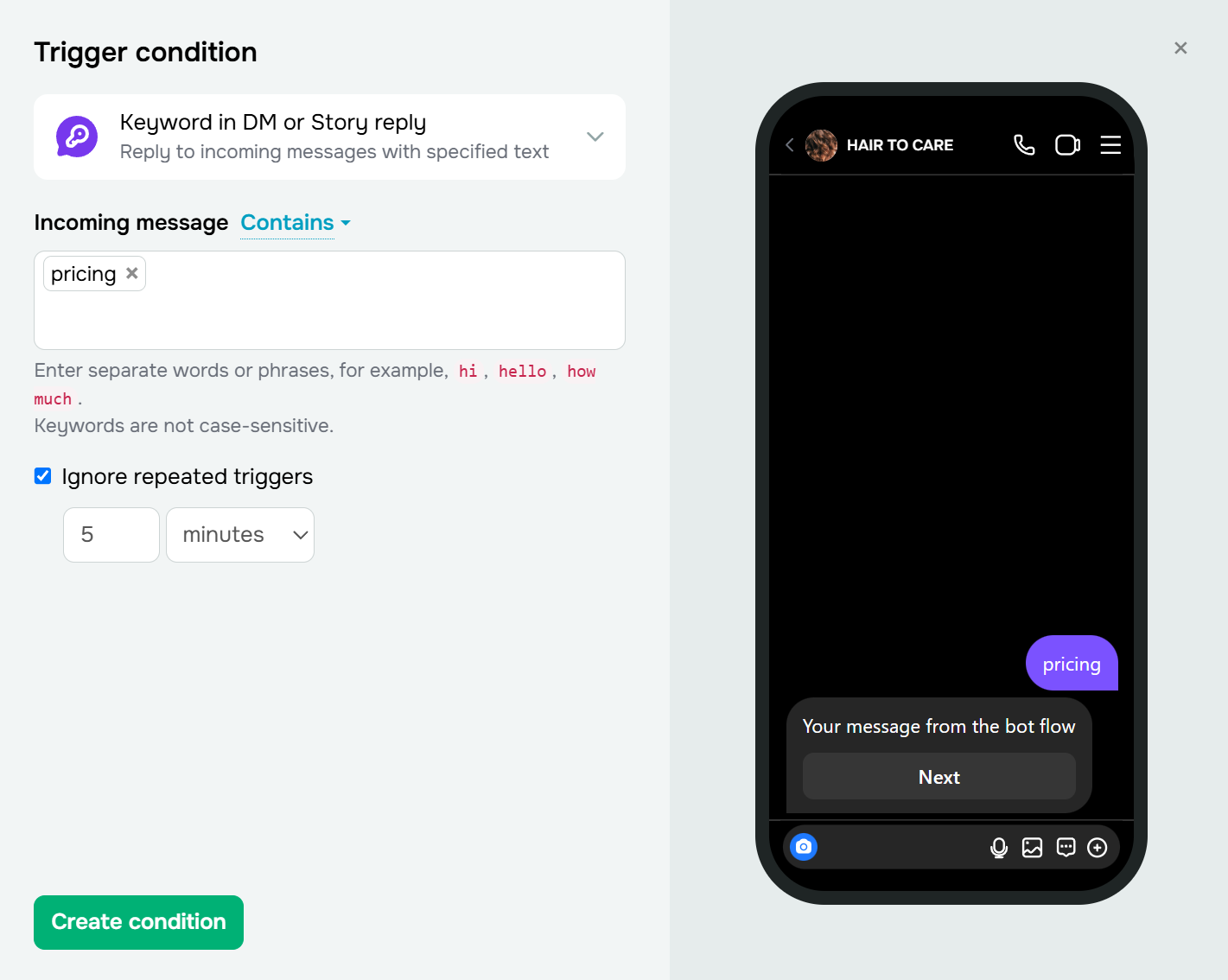 Defining a trigger condition for the Instagram chatbot
These high-volume requests can then be routed to predefined answers, ensuring customers receive fast and consistent information every time.
Step 2. Build your welcome flow
Once you’ve created your triggers, it’s time to design the first conversation your customers will see.
Open the “Welcome message” trigger to access the visual flow builder. Start with a short greeting that explains what the chatbot can help with, then add a “Quick replies” or “Buttons” element so visitors can choose a topic instead of typing their question.
Say, your menu might include:
This gives customers an easy starting point while guiding them toward the information they’re looking for.
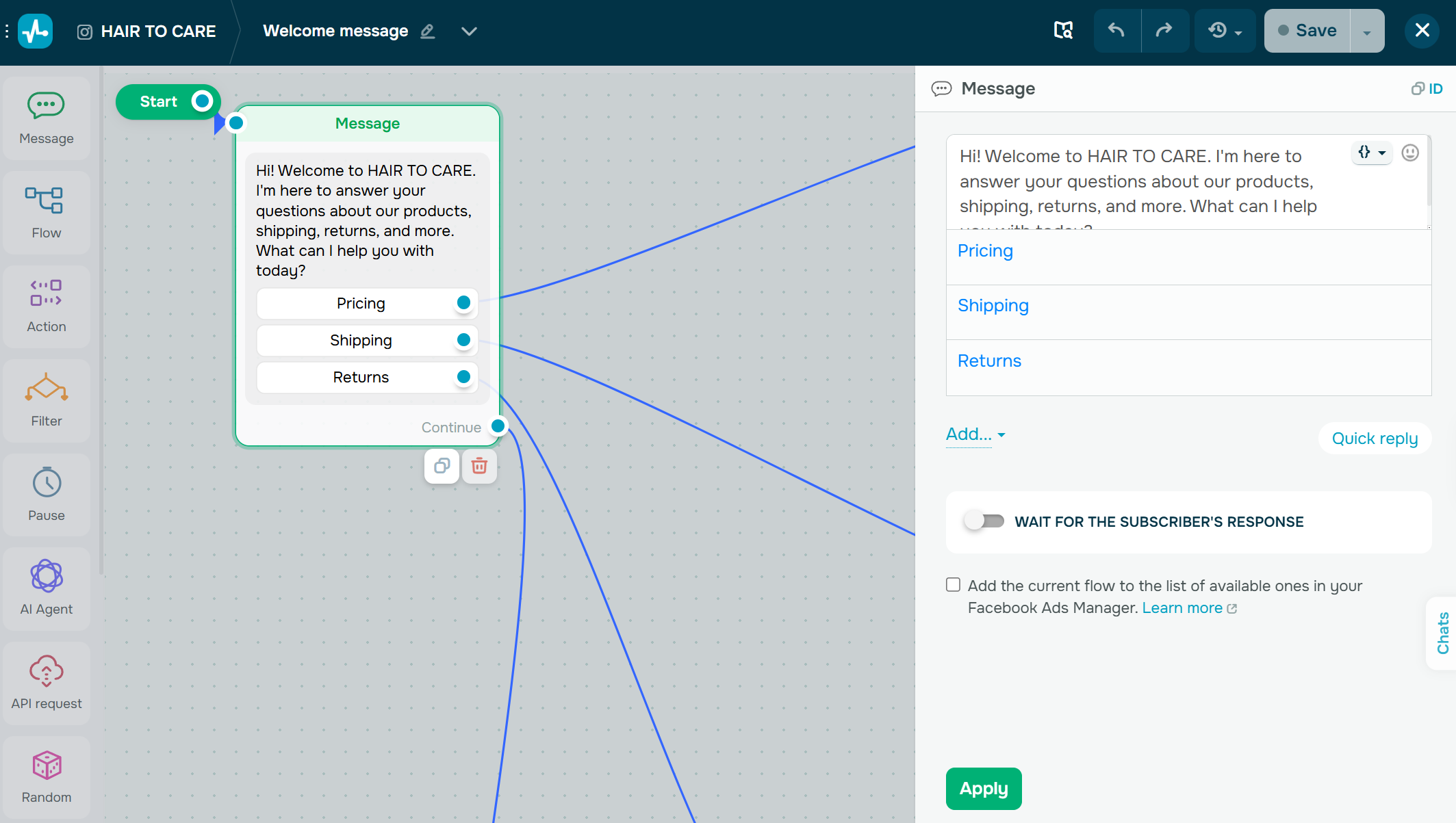 The welcome flow greets customers and offers topic buttons so they can choose instead of typing
Step 3. Create your FAQ answers
Next, build a separate branch for each FAQ topic. Connect every button or quick reply to a “Message” element containing the answer to that question.
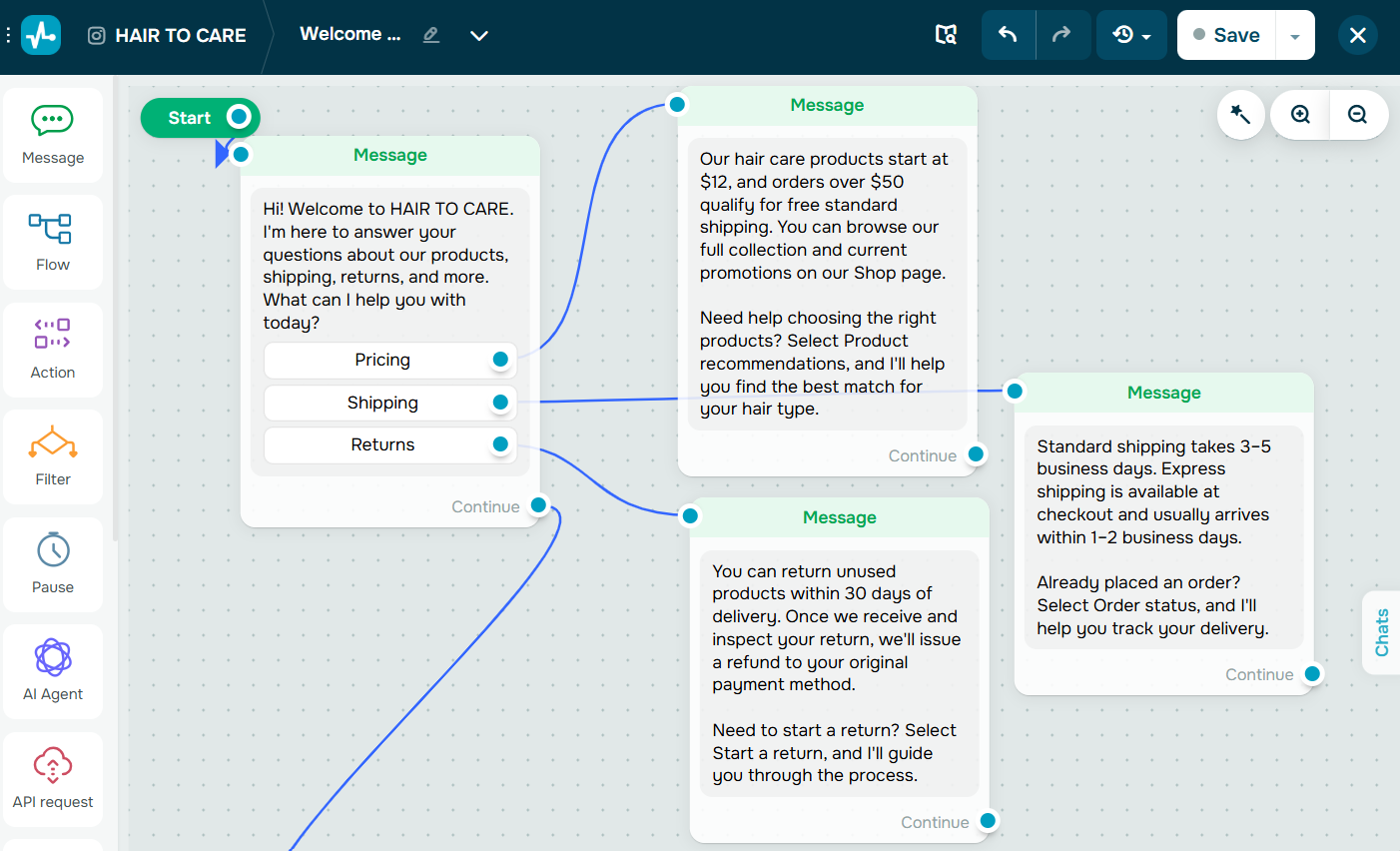 Each menu button connects to a “Message” that answers that specific topic
For instance, a “Shipping” branch could answer delivery times and costs before asking, “Would you like to check your order status?” Likewise, a “Pricing” branch can share product prices and offer a button to browse the shop or get a recommendation.
Step 4. Let the AI handle open-ended questions
No matter how detailed your FAQ is, customers will eventually ask something you didn’t predict.
That’s where the AI Agent can help. Connect the “AI Agent” element to your “Message” elements so any message that doesn’t match a keyword flows to the AI.
Set the step type to “Conditional exit” and give it an exit condition written in plain language, such as “AI couldn’t find the answer.” The model reads that condition and decides for itself when it’s met, then leaves the block through that exit. This is what lets the AI try to help first and hand off only when it’s genuinely stuck.
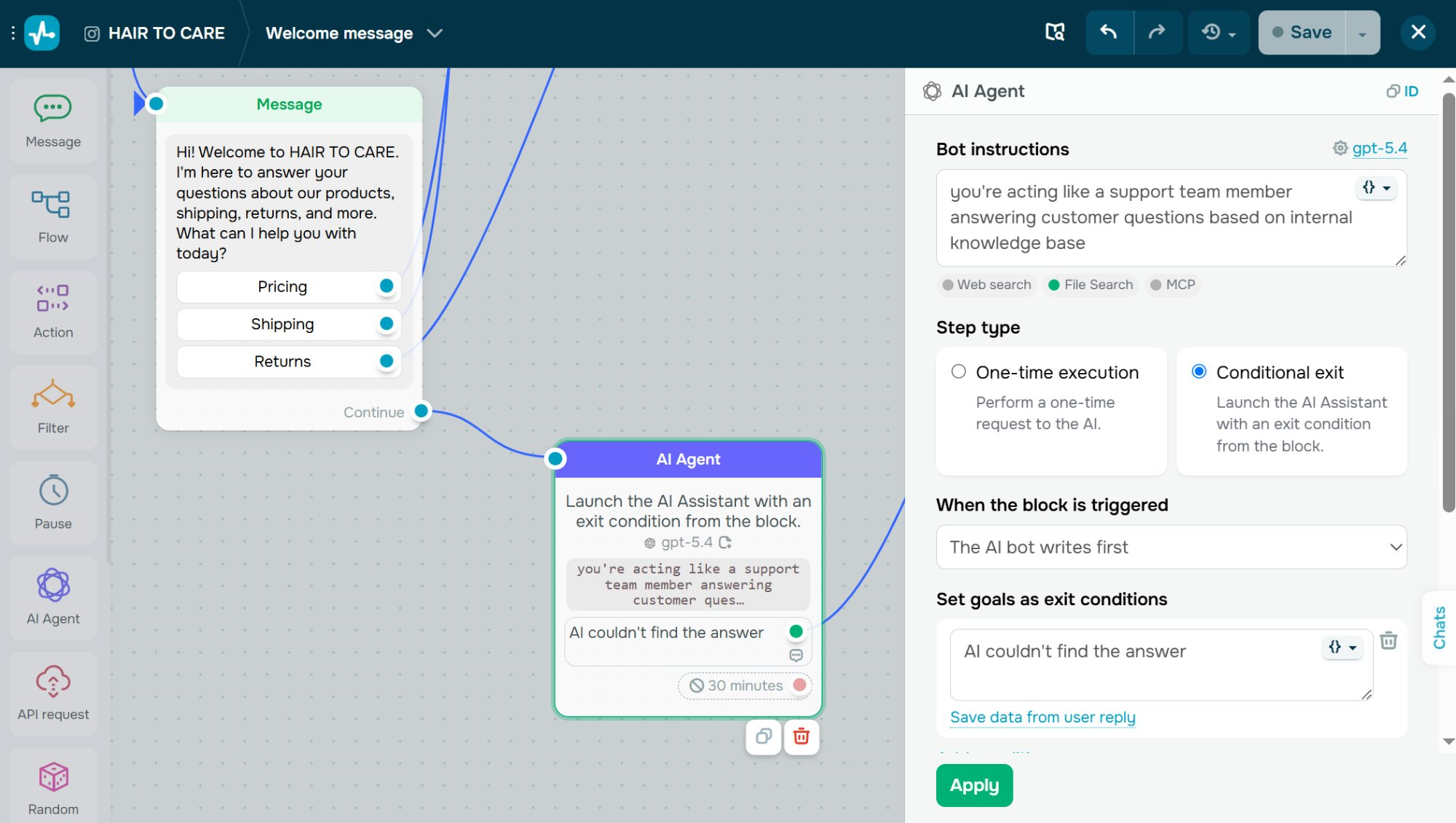 The AI Agent catches any question that doesn’t match a keyword branch
Select the “AI Agent” element, click the model name in the upper-right corner, and turn on the “File search” toggle so the model answers from your uploaded FAQ or help files rather than from its general training. Keep in mind that file search queries are billed separately from regular token usage, so it pays to keep your knowledge base focused instead of uploading everything.
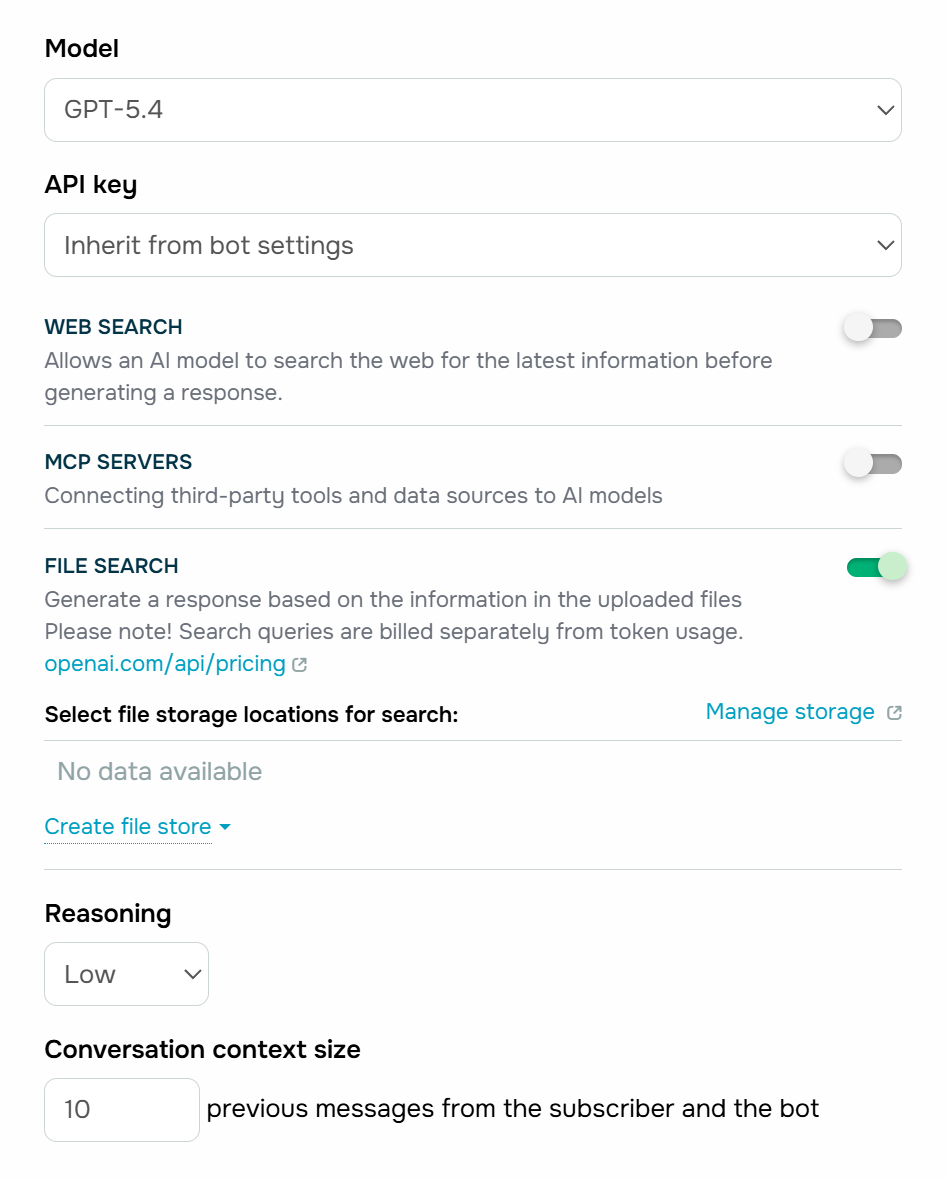 File search grounds the AI’s answers in your uploaded files instead of its general training
Select the file storage location that holds your content. This is the single most important AI setting, as the bot is only ever as accurate as the file behind it.
The “Conversation context size” controls how many previous messages the AI can see, which is what lets it follow a back-and-forth instead of treating every message as brand new. Around ten messages is a good balance between understanding follow-up questions and keeping each request efficient.
For the best results:
- set “Reasoning” to low for fast, consistent answers;
- instruct the AI to admit when it doesn’t know something;
- keep the bot grounded in your files, so it answers only from your content and never from general training;
- tell it to transfer complex requests to a human.
Step 5. Set up variables and tags
Now, you can make your FAQ flow smarter by storing information about each conversation.
Use the “Action” element to add variables that capture customer data, such as the topic they’re interested in or their most recent question.
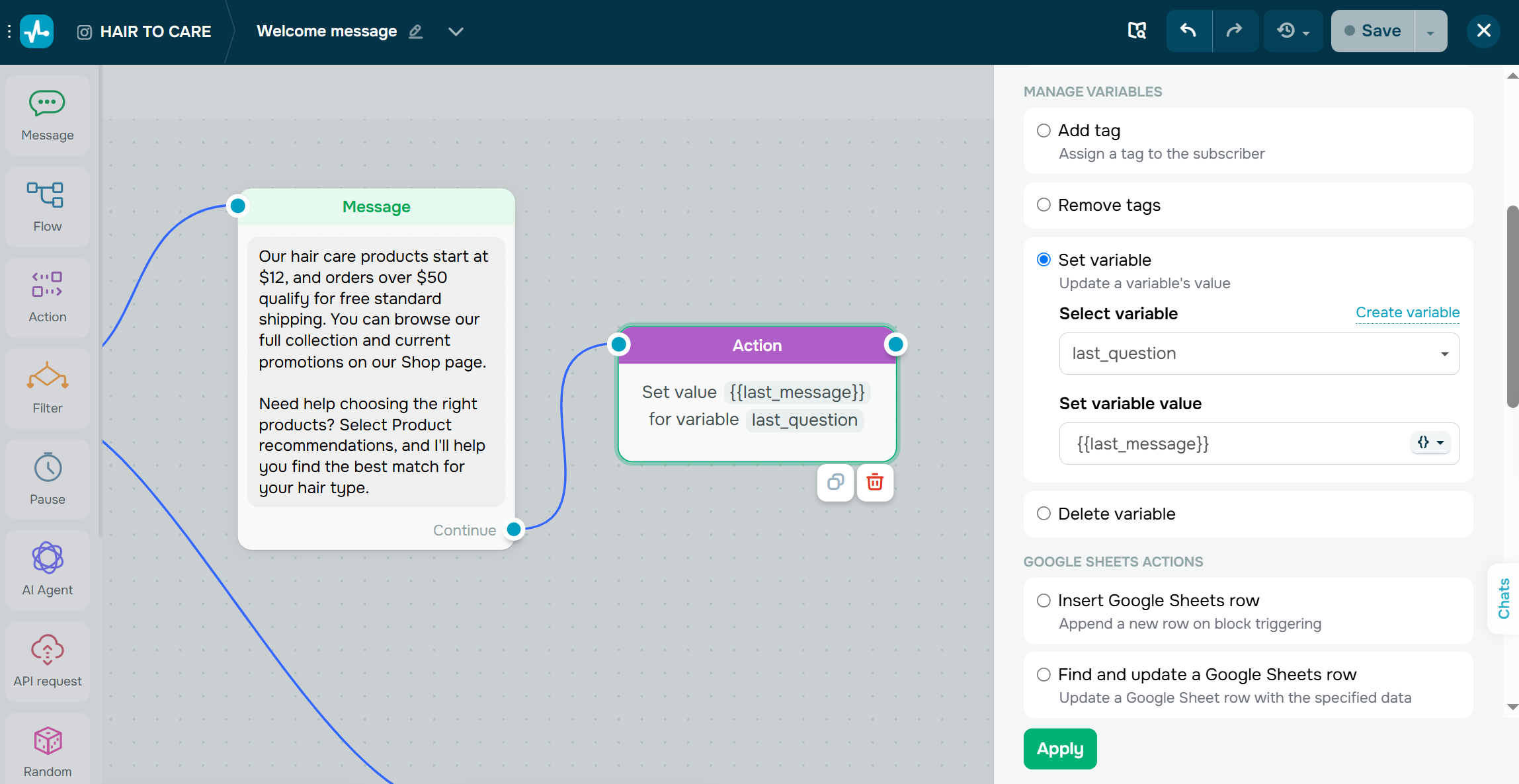 Saving the customer’s last question to a variable with the “Action” element
For example, you could create variables like:
- faq_topic — the FAQ category the customer selected;
- last_question — the latest question they asked.
SendPulse includes built-in system variables, and you can create custom ones to fit your FAQ based chatbot.
Next, use tags to label subscribers based on their actions. For instance, you might add tags such as asked_pricing, needs_human, or wants_demo. If a customer’s situation changes, you can also remove tags automatically later in the flow.
Variables and tags help you personalize conversations by greeting customers by name or remembering what they asked about. They also make it easier to segment your audience for future chatbot, email, or other campaigns.
Step 6. Add clarifying questions and human handoff
If a request is unclear or requires human judgment, it’s better to ask a follow-up question or transfer the conversation to a support agent.
To give you an idea, if a customer asks about a payment issue, your chatbot could respond with a clarifying question such as, “Do you need help with billing or a refund?” A simple quick reply can often get the conversation back on track without involving your team.
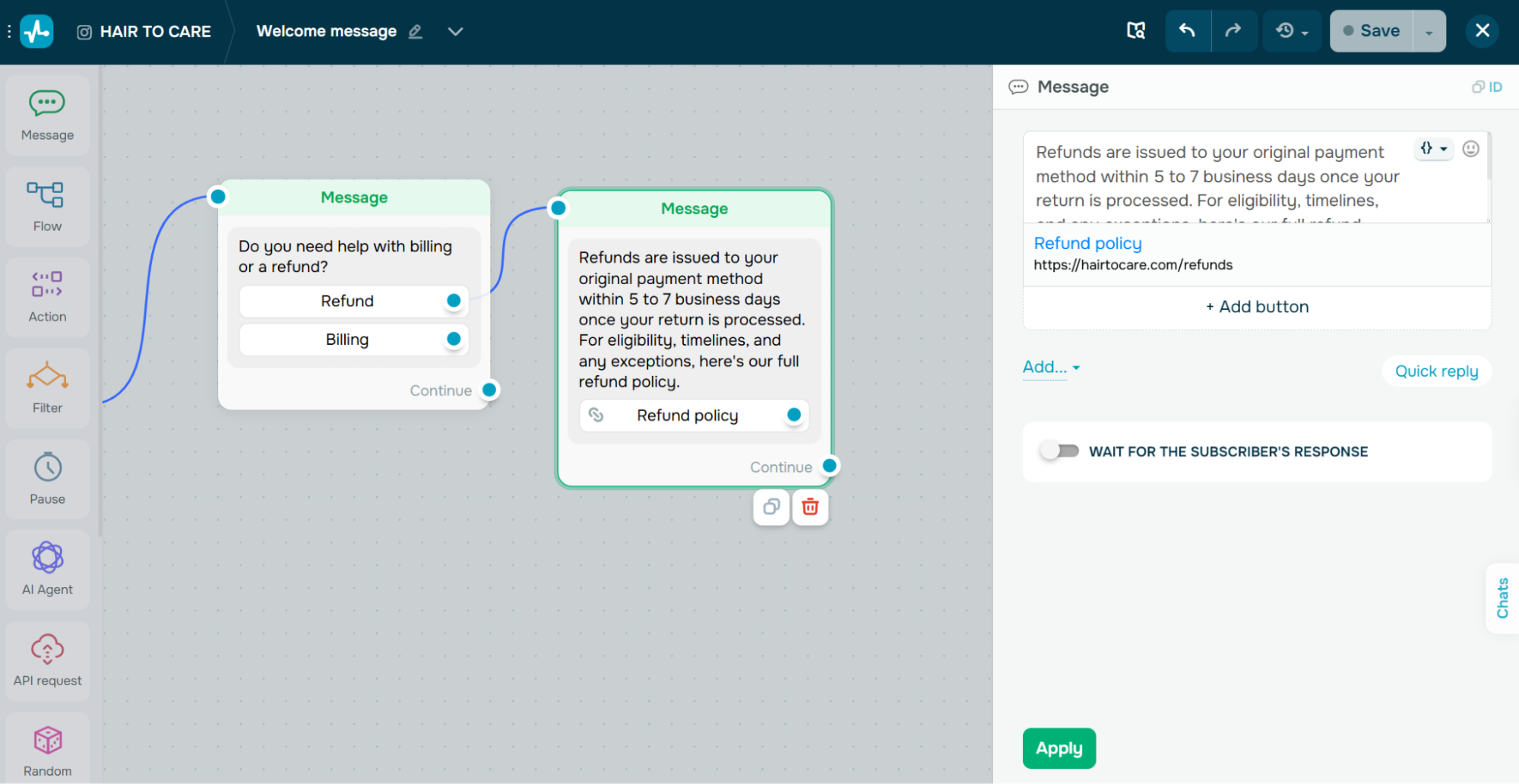 A clarifying question routes the customer to the right answer before your team gets involved
When human assistance is needed, use the “Open the chat” action in the “Action” element to transfer the conversation to the “Conversations” section, where an agent can continue it manually. You can route it to a specific person with “Change the chat assignee,” and turn on “Pause bot automation” so the chatbot stops replying while the handoff is in progress. Setting it to a few hours gives your team a comfortable window to respond without the automation talking over them.
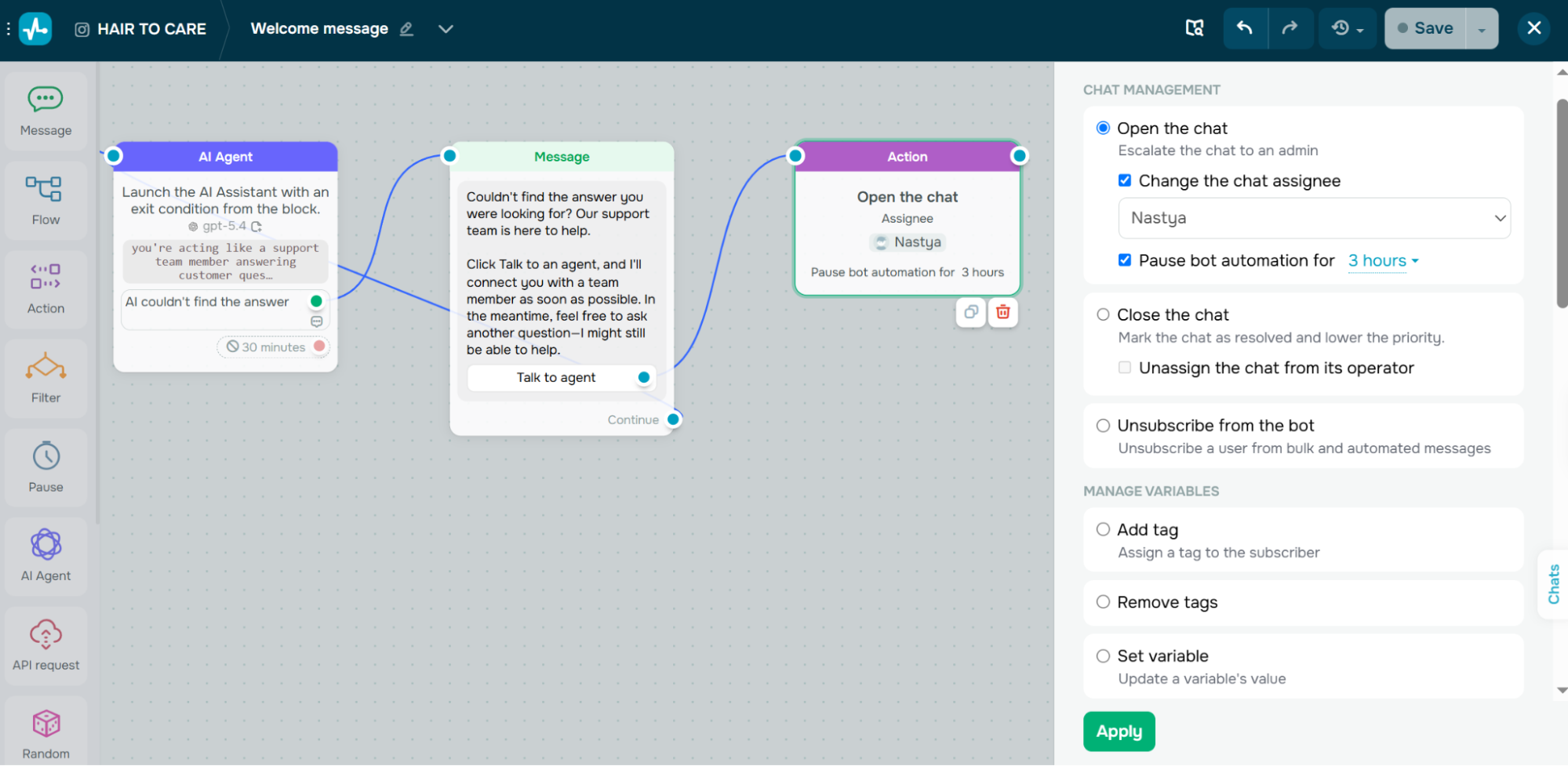 The AI Agent escalates to a human with the “Open the chat” action when it can’t resolve a question
To make the handoff seamless, you can also:
- use “Notify me” to alert your team about the new conversation;
- add an internal note with the customer’s question or selected FAQ topic;
- apply a tag, such as
needs_human, to help route the conversation to the right team;
- send a short message like “I’m connecting you with one of our specialists. Please wait a moment.” so customers know what to expect.
Step 7. Connect external systems (optional)
Some questions can’t be answered with static information. Requests like “Where’s my order?”, “What’s my account balance?”, or “Has my refund been processed?” require real-time data.
In these cases, add an “API request” element to your chatbot flow.
As one example, after collecting an order number with the “Waiting for subscriber’s response” element, you can send a request to your eCommerce platform or CRM system, save the returned information to a variable, and display it in the next message.
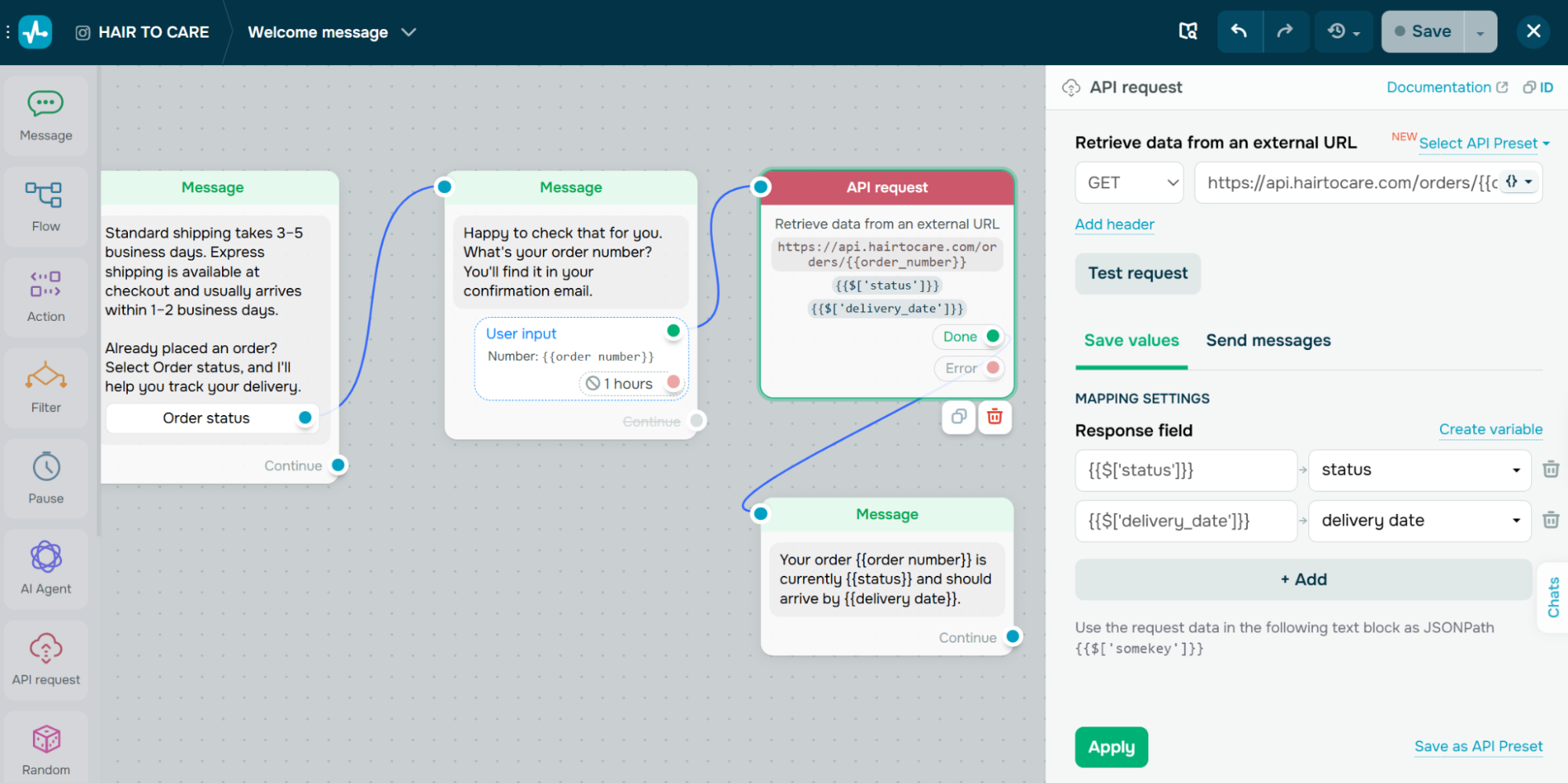 Use the “API request” element to pull real-time order data from your store and show it right in the chat
Instead of sending customers to another page or asking them to contact support, your chatbot can retrieve personalized information and display it instantly within the conversation.
Step 8. Test, measure, and improve
Before you launch, check your chatbot’s accuracy: run your 20–30 most common questions through it and confirm it answers from your files instead of guessing. Testing doesn’t stop there. Once your FAQ chatbot is live, keep watching how customers phrase their questions to discover new ones, improve existing answers, and automate more conversations.
Use the “Statistics” section to monitor how your chatbot performs.
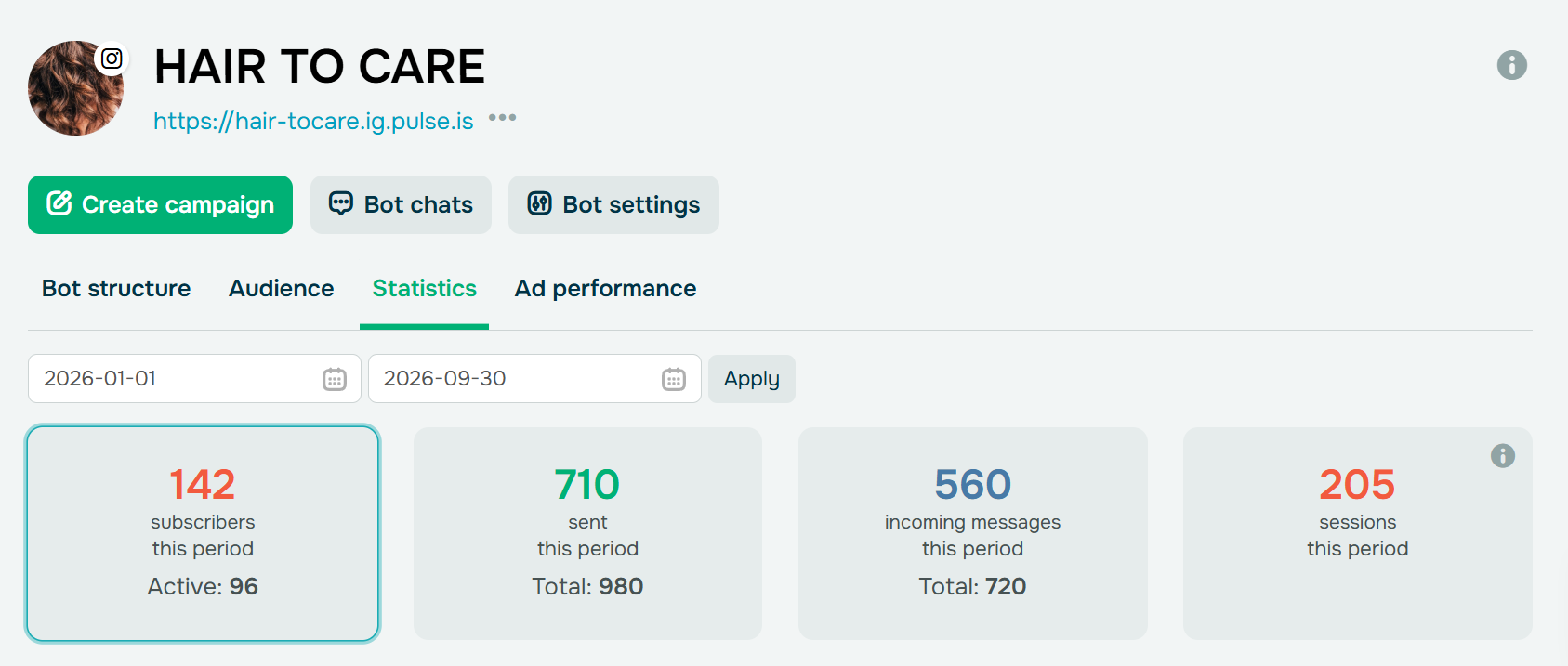 The “Statistics” tab shows subscribers, messages, and sessions for any date range you choose
Track metrics such as incoming messages, active subscribers, and more. You can also use the “Goal” element to measure important outcomes, such as resolved questions or completed purchases. If you run Instagram or Facebook ads that send people to your chatbot, the “Goal” element can pass those conversions back to Meta Ads Manager, so you can see which ads actually lead to resolved conversations and sales.
Pay special attention to conversations your chatbot couldn’t resolve. If customers repeatedly ask the same unanswered question, it’s a sign that you should either create a new FAQ flow, expand your knowledge base, or improve your AI instructions.
Build an FAQ chatbot that actually helps customers
A good FAQ chatbot isn’t a digital version of your FAQ page. It’s a self-service layer that helps customers get answers quickly while knowing when to involve a human. By combining predefined flows for common questions, AI for open-ended conversations, and seamless human handoff, you can handle routine interactions without sacrificing the customer experience.
It’s important to find the right balance. Automate repetitive questions, keep your knowledge base accurate, and let your support team focus on conversations where their expertise makes the biggest difference.
Your FAQ chatbot doesn’t have to work on its own. SendPulse is an AI-driven marketing platform that helps businesses automate both email and chatbot conversations from a single place. Build your chatbot with a no-code visual builder, let AI answer open-ended questions, and connect every conversation to a built-in CRM system that captures, nurtures, and converts leads. It’s how you move from simply answering questions to creating personalized experiences that drive sales.