
An email subscription is an option on a website that allows visitors to receive updates via email by providing their email addresses in a subscription form. Email subscription is a core component and a starting point for any email marketing strategy.
Watch this video to create a multichannel subscription form using the SendPulse visual form builder.
In this article, we’ll explore the importance of subscriptions and their key components, guide you through setting up an email subscription on your website, and share best practices. We’ll also highlight common mistakes to avoid and provide examples for inspiration.
Why are subscriptions important?
Businesses have many reasons to use subscriptions, including direct interaction with their target audience after obtaining consent and insights into customer behavior. We’ll talk about these and more reasons for you to consider a subscription below.
- Direct communication with prospects. Unlike social media, email marketing allows your messages to reach subscribers’ inboxes without any restrictions or algorithms. If you have already received consent from people to send promotional emails, you can share your special offers, product updates, and information about sales, ensuring that they reach the intended recipients.
- Trust and customer loyalty. When people subscribe to your email newsletter, they demonstrate interest in your company and seek updates. This is the ideal time for you to share valuable content, enticing offers, and informative emails that encourage them to remain with your brand. If they notice that your company stands out among many others, they will trust you and stay loyal, leading to repeat purchases.
- Higher conversion rates. Being a channel with one of the highest returns on investment (ROI), email marketing can drive more sales to your business. The right strategy and techniques will help you effectively promote product launches, sales, and exclusive offers and reach your primary goals. Consistency and personalization are key to converting prospects into customers. By sharing relevant content according to the schedule, you’ll be able to grab subscribers’ attention and encourage them to explore interesting offers.
- Customer insights. Using a specialized email marketing service allows you to monitor key metrics, including open rates, click-through rates, conversions, and evaluate the performance of your email campaigns. These metrics are essential for understanding what subscribers want and improving subject lines, content, offers, etc. With analytics at hand, you’ll be able to constantly monitor and optimize your email marketing strategy.
- Cost-effectiveness. Email marketing is an affordable marketing channel enabling you to connect with your audience at any time after they opt in. You can take advantage of personalization, segmentation, and automation without overpaying for them. These allow you to craft your messages based on recipients’ preferences, needs, purchasing behavior, and browsing habits, making them feel more connected and driving conversions.
- Long-term relationships with subscribers. By sharing content regularly, you can build trusting relationships with your audience. They will be familiar with all the details about your company, including available products, offers, sales, and exclusive promotions. These customers will remain loyal to your brand, thereby increasing customer lifetime value, which is crucial for your overall business success.
Now that you know about the importance of subscriptions, it’s time to proceed to the legal side. In the next section, we’ll discuss email laws and regulations. You should adhere to them to prevent potential issues with sender reputation and email deliverability.
Email Laws and Regulations
Understanding laws and regulations is crucial for successful and compliant email marketing. This will help you avoid any penalties and negative impact on your brand. Let’s explore the main regulations for delivering emails that ensure subscribers’ privacy.
- CAN-SPAM Act. If you are operating in the US or want to send promotional emails to US residents, it’s crucial to add valid headers and appropriate subject lines. Such emails should be marked as ads and include physical addresses. According to the law, companies must provide an easy unsubscribe option and process requests within 10 business days.
- General Data Protection Regulation (GDPR). This regulation applies to businesses engaging with their European and UK audiences. Regardless of the company’s country, business owners should obtain explicit, opt-in consent before sending any type of commercial email to these individuals. They need to provide all the necessary information regarding data processing. GDPR also secures the process of unsubscribing. Whenever people decide to opt out, they should be able to do it seamlessly.
- Canada’s Anti-Spam Legislation (CASL). This law applies to emails delivered to residents of Canada. Before sending email campaigns, businesses must receive recipients’ consent first. They should also provide all the details about the sender and the company. If subscribers want to opt out, there should be an easy option to do so. Additionally, businesses should include valid mailing addresses and contact information in their messages.
Now that you have some basic understanding of the laws and regulations, let’s discover the difference between single opt-in and double opt-in to decide which one is better for your business.
Single Opt-in and Double Opt-in
You can use single opt-in and double opt-in to add email subscribers to your mailing list. However, they differ in the way you verify recipients’ identities. We’ll talk about this and more in this section.
Single opt-in is a signup process in which users subscribe to a company’s newsletter and are immediately added to the mailing list. They don’t need to confirm their email addresses before opting in. The sign-up is fast and easy, allowing companies to collect more subscribers. If businesses don’t require confirmations from subscribers, they have fewer drop-offs. However, it carries different drawbacks, including fake, misspelled, or bot-generated emails, spam complaints, and deliverability problems.
Double opt-in is a signup process in which, after submitting their email addresses, users must confirm their email addresses before completing the sign-up. This email allows companies to verify email addresses. Although the mailing list doesn’t grow rapidly, the company complies with legal regulations, achieves higher engagement, receives fewer spam complaints, and experiences lower bounce rates.
Now that the difference is clear, it’s time to explore the elements of email subscription. So let’s dive in.
Email Subscription Elements
When creating email subscriptions, several crucial elements must be included. They will help you effectively attain your business goals. These are a lead magnet, a subscription form, and a confirmation email. Let’s review each of them in detail.
Lead magnet
A lead magnet is a type of incentive offered to potential customers in exchange for their email address, phone number, or other form of contact information. Marketers may offer various types of lead magnets, such as eBooks, video tutorials, and PDF checklists. An incentive is a great way to make your customers feel rewarded, and it also adds value to the whole business-customer interaction.

Subscription form
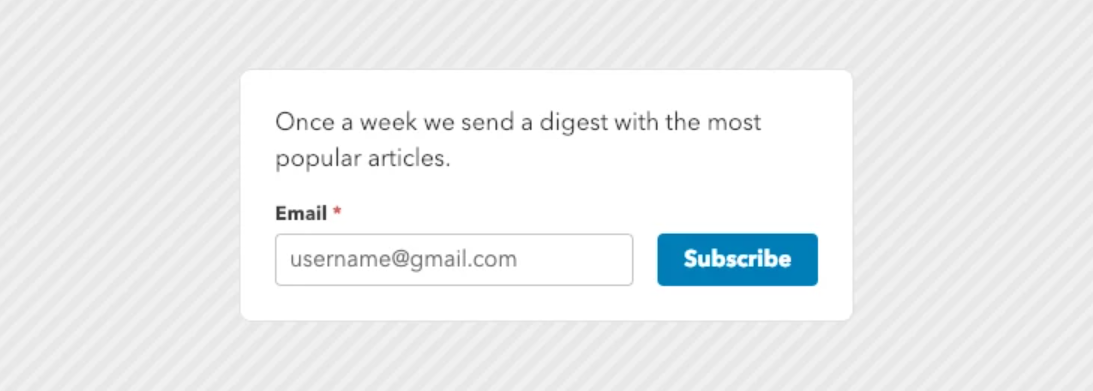
A subscription form is a set of fields that users fill in to subscribe to a newsletter from a website or blog that interests them. Subscription forms provide a straightforward and effective way to expand your mailing list. Lead magnets are useful for motivating subscriptions.
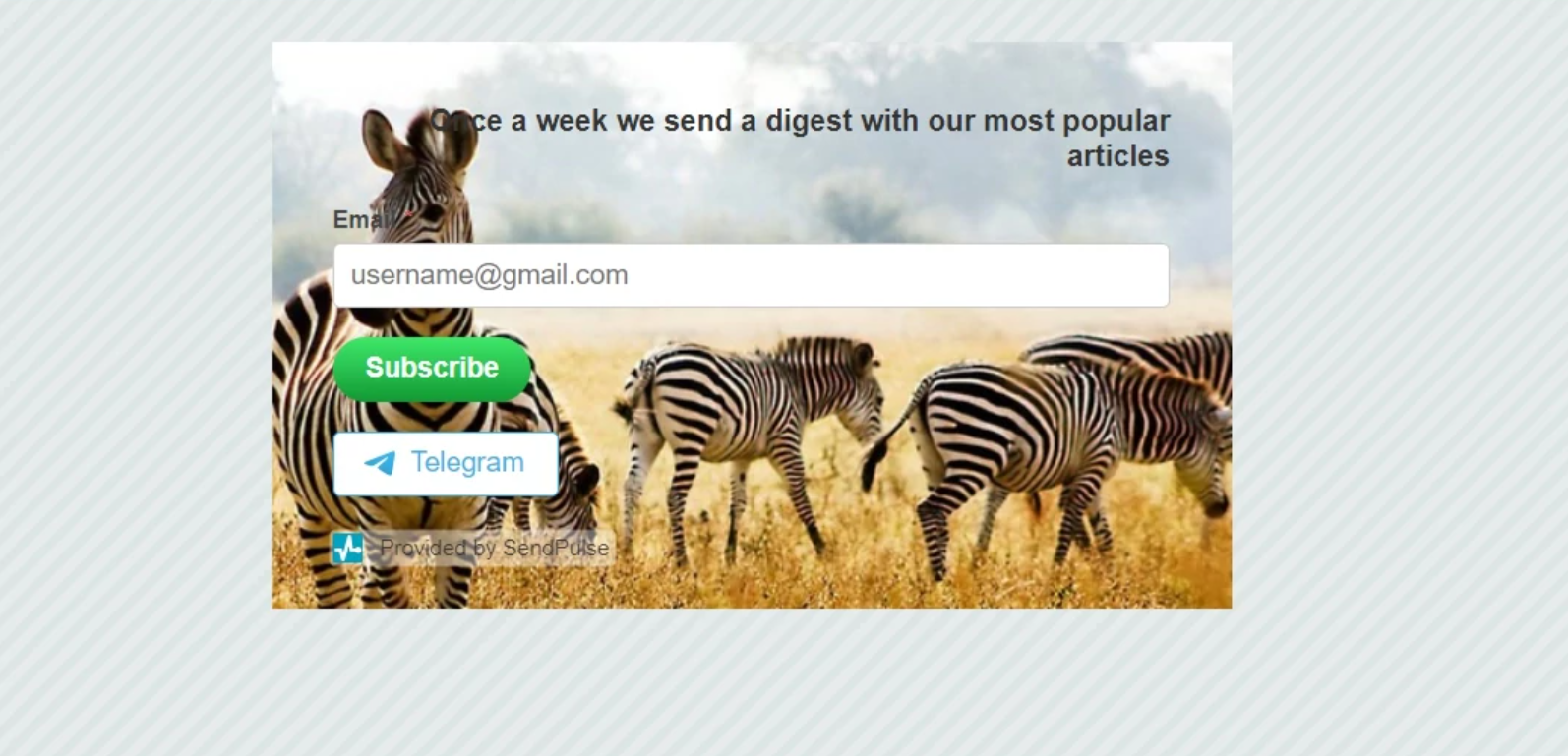
SendPulse allows users to create multichannel forms by adding links to their chatbots in Facebook Messenger, Telegram, Instagram, WhatsApp. This way, you can significantly grow your audience. With our subscription form builder, you only need to drag the icon of the necessary channel to your form.
Confirmation email
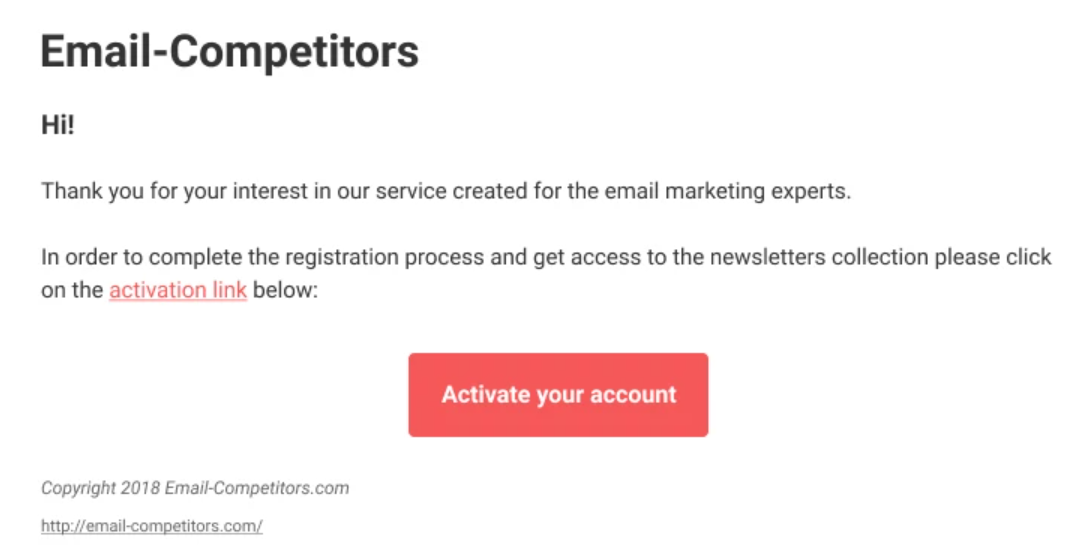
A confirmation email is an automated email sent to users to verify their consent to receive emails from a website. It helps verify users’ identities during the double opt-in process. With GDPR rules now in effect, a double opt-in feature is an excellent way to keep your emails out of spam boxes.
Now that you are familiar with the elements, it’s time to learn how to set up an email subscription form on your website. Below you’ll find a short guide.
How to Set Up an Email Subscription Form on Your Website
After registering with SendPulse, you’ll have access to loads of features like email automation, segmentation, A/B testing, statistics, and more to empower your email marketing efforts. Building a mailing list is a crucial step if you want to promote your product or content on your website. Here are six simple steps to set up an email subscription on your site.
- Get a free SendPulse account.
- Go to "Subscription forms" and click "Create."
- Choose a pre-designed form or create your own with the help of our form builder.
- Play with the form options and configure it to your liking.
- Add the generated code to your website.
- Confirm all the changes, and you are good to go.
If you want to have more details on a setup process, you can explore our guide for additional information. Now let’s proceed to the next section to explore email subscription steps.
Email Subscription Steps
You have excellent content on your website, and users don’t want to miss any updates. This is where email subscription comes into play.
- A user fills in all the necessary fields on your subscription form and agrees to your privacy policy.
- An automated subscription confirmation email is compiled and sent to the user’s email address.
- In the email, the user is asked to complete their subscription by clicking on the link (with a double-opt-in feature).
- The link takes the user to a subscription confirmation page.
- The user’s email address is added to your mailing list.
After exploring the steps for email subscription, you may wonder about the strategies that will help you make your email subscription successful. Here are the main best practices for you to consider.
Email Subscription Best Practices
Email subscription is an opportunity to drive traffic to your site and nurture leads. If you play your cards right, you can see some outstanding results from your email campaigns. Take a look at these ten tips to get you inspired.
- Make it easy to subscribe. Using an embedded or pop-up subscription form on your site or blog, with a clear call-to-action (CTA), is a good starting point. Keep your subscription form as simple as possible to minimize the time it takes to complete the process.
- Use lead magnets. The lead magnet, also known as an incentive, is a great way to motivate your customers to share their personal information. Reports, infographics, special discounts, or free courses will encourage users to provide their email addresses, thereby increasing the likelihood of engagement.
- Go with double opt-in. It’s a sure way to have a good mailing list that consists of an engaged audience. Double opt-in lets you confirm that the provided email addresses are valid and belong to your subscribers. This allows you to create high-quality mailing lists.
- Be mobile-friendly. Use responsive sign-up forms, as many people access content on the internet using their smartphones or tablets. This will increase the number of signups, improve user experience, and boost customer satisfaction.
- Provide newsletter frequency options. Let your subscribers choose how often they want to hear from you. If you provide information on the frequency, subscribers will know when to expect your emails and engage more actively.
- Be recognizable. Design your emails using your brand colors and styles to increase user awareness. With their help, you’ll be able to make your emails stand out more easily.
- Take the sender's name and subject line seriously. Make your sender name recognizable and personalize a subject line for better email open rates. Consider the catchy subject line that accurately reflects the content of your email.
- Run tests and make changes. A/B tests are a great way to see which email works best. By comparing different email options, you can determine which one resonates most with your target audience.
- Consider drip campaigns. Lead your prospective customers down the sales funnel with carefully designed sets of emails sent at strategic intervals. Segment them to meet each subscriber's needs.
- Use triggered emails. Emails are sent to your clients in response to their actions. Registration — welcome email, purchase — ‘people also buy’ email, client leaves a shopping cart — abandoned cart email, etc. Automation 360 by SendPulse combines functionality and simplicity in a single package.
Now that you know the best practices, let’s explore the things you should avoid for better performance.
Common Email Signup Mistakes to Avoid
To maintain a high-quality mailing list with engaged subscribers, it's essential to avoid common email signup mistakes.
- No consent or confirmation. Including people in your mailing lists without obtaining their prior permission is a poor marketing practice. Avoid auto-subscribing customers after they make a purchase from your brand. You'd better take advantage of single or double opt-in to receive consent first.
- Using misleading sign-up forms. Sign-up forms with vague statements that don’t provide a clear understanding of what subscribers will receive aren’t something you should use. To comply with the laws and regulations, it’s better to be specific. Always inform subscribers of the type of content they will receive after opting in.
- Not sending a welcome email. Sending a welcome email after users subscribe is a must rather than a recommendation. It helps you confirm the subscription and establish initial contact with your new subscribers. You can utilize Automation 360 to send automated welcome emails and begin building relationships with new users.
- Not making forms mobile-friendly. As more people switch to smartphones to access their inboxes, it’s a mistake not to optimize opt-in forms. Consider using responsive design to ensure that subscription forms can be easily accessed on all screen sizes, including small ones.
- Making a form complicated. Having signup forms with too many fields might be overwhelming for users. It’s better to create simple opt-in forms. It’s a good idea to start with an email address and then gather all the necessary information using various communication channels.
Now that you know the common mistakes, let’s proceed to the examples. They will help you figure out how to create effective email subscription forms.
Examples of Converting Subscription Forms
Subscription forms are widely used by businesses, so you can find lots of successful examples. We’ll share some of them for you to draw inspiration from.
Rhode
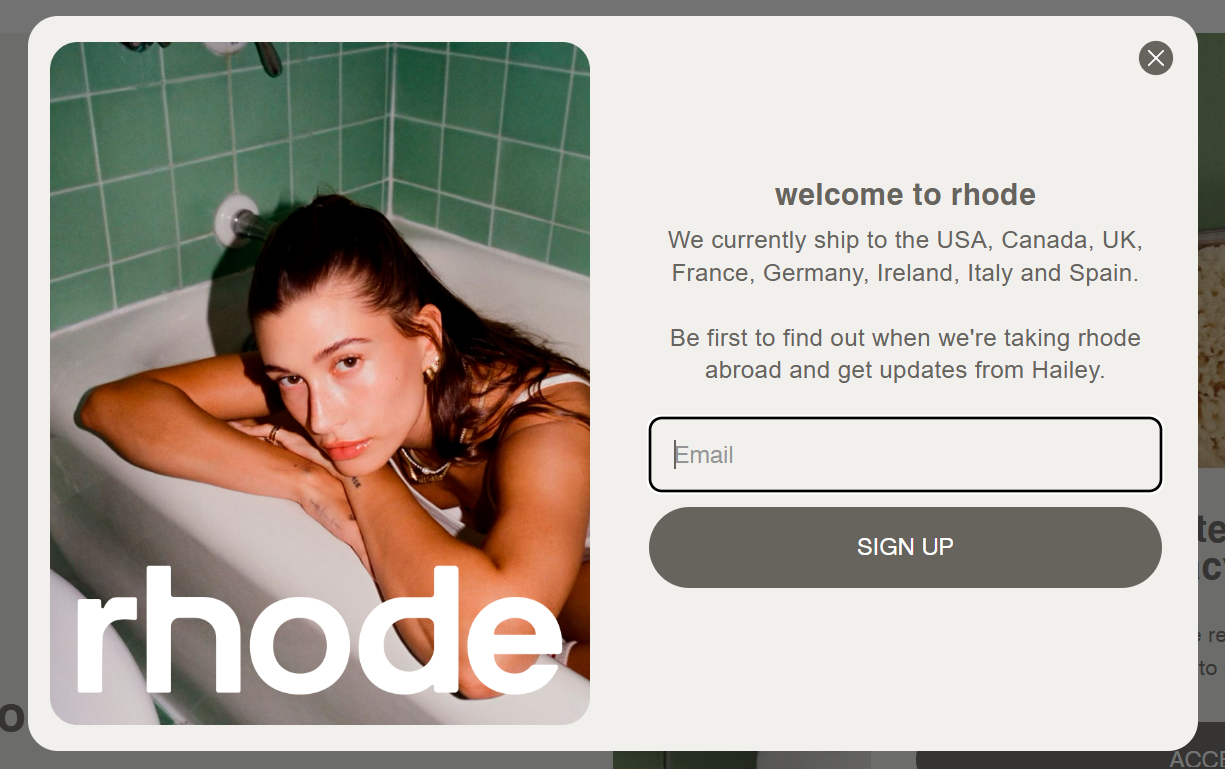
Rhode’s subscription form invites users to sign up for its latest updates, product releases, and special offers. The brand utilizes exit-intent pop-up forms to capture attention and encourage users to sign up. This subscription form is concise and straightforward, requiring minimal information to complete. Users only need to provide their email addresses to receive all the updates.
HubSpot Academy
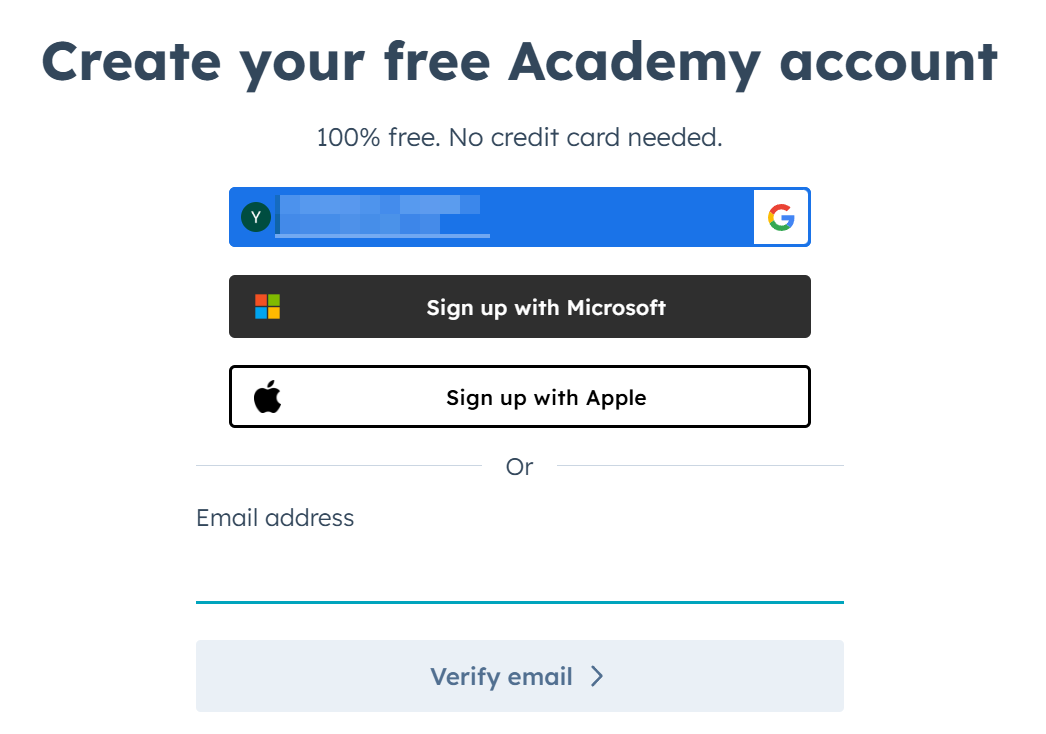
HubSpot Academy offers to provide free online courses in exchange for users’ email addresses. They can sign up in seconds using their Google, Microsoft, or Apple account, or enter their email address. In return, subscribers will get educational content related to marketing.
Yoga with Kate Amber
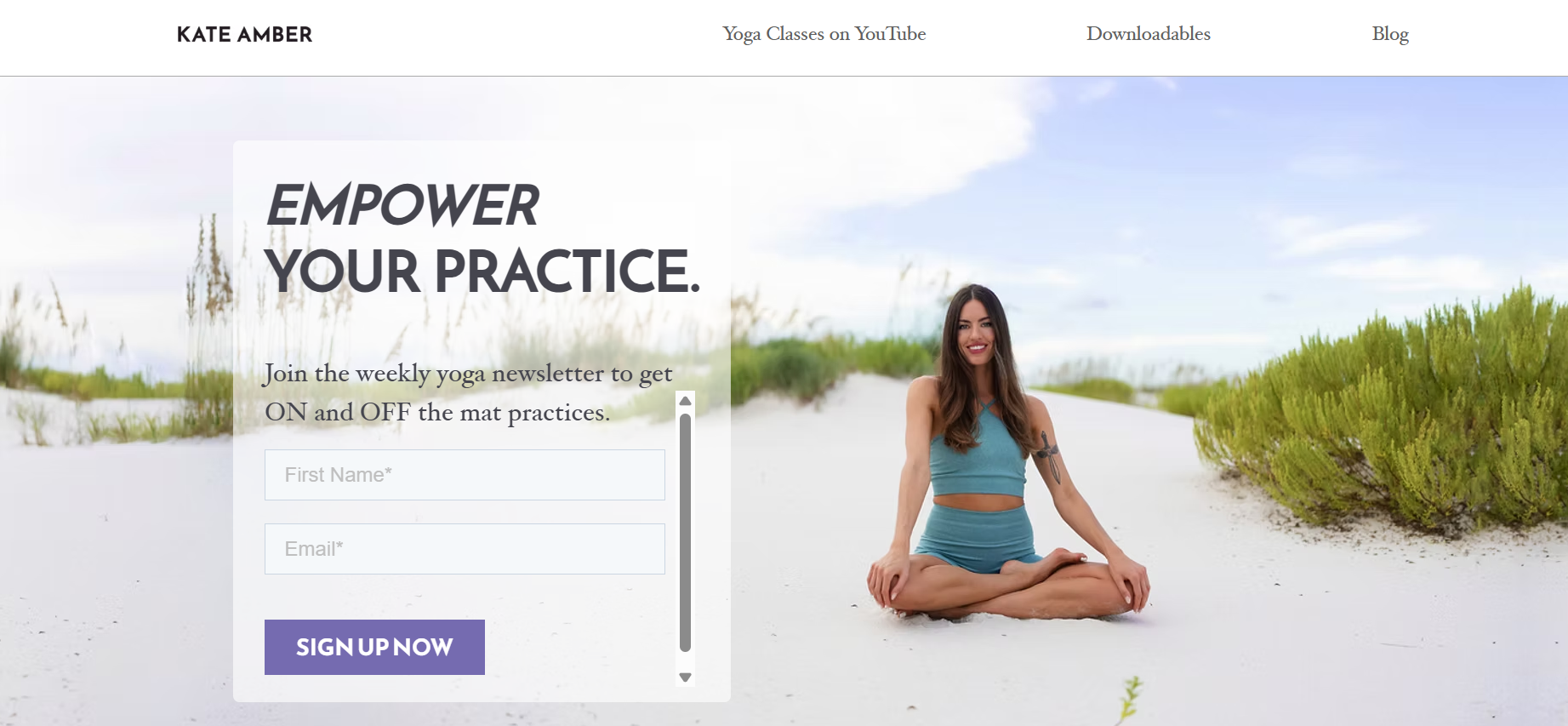
After signing up for this email newsletter, you’ll get weekly yoga updates regarding mat practices. It’s very convenient because students can instantly know when new classes are available on YouTube. After receiving these messages, practitioners will be able to access their favorite classes. The form requests the bare minimum, including first name and email, to complete the subscription process.
The subscription form is a powerful tool for generating leads and establishing a direct channel of communication with them. If designed right, they can let you establish strong relationships with your audience without having to pay for ads.
FAQ
How can SendPulse help with email subscriptions?
You need to register your SendPulse account, create a subscription form, and add the generated code to your webpage to collect subscribers. Read detailed instructions on how to create a free subscription form with SendPulse.
How can I collect an email subscription list?
You need to place a subscription form on your website pages that have lots of visitors. To encourage more email subscriptions, add a lead magnet to your subscription form. Another option is to get traffic from your social pages. Note that when you communicate with subscribers via different channels, you need to provide various offers and different kinds of value. Read this article to learn how to grow your mailing list.
What is a realistic email subscription growth rate?
It depends on the quality of your subscription forms, the number of fields required to fill in, and the number of pages that include your form. Take into account how many users visit these specific pages. Of course, you can grow your audience quickly by holding giveaways on socials, but it leads to acquiring tons of subscribers who joined you only hoping for the freebie. Subscriber engagement matters more than the numbers for practical email subscription growth.
Why do I need an email subscription form on my blog?
Because it allows you to collect email addresses for future communication via email. On your blog, you share knowledge and expertise in a particular field, meaning your readers are probably in the awareness stage of their buyer journey, not ready to buy yet. Sending emails is a good starting point to nurture relationships with your target audience and build long-lasting relationships.
or