Troubleshooting Instagram and Facebook chatbot messaging issues
If your Instagram or Facebook chatbot can't deliver a message, Meta returns an error with a code and a short text. SendPulse shows this error in the campaign report, in the list of flow element recipients, and in the affected chat.
If you run into connection or conversation routing errors, such as (#190) Access Token Error or (#200) Permission Error, see Troubleshooting Instagram and Facebook chatbot connection issues.
Let's talk about how to find the error code and what to do about each type of error.
Find the error code
Meta returns error messages in your account language, so the wording may differ from the English ones in this article. To find your error, search for its code in parentheses, such as (#10). If Meta also returns a subcode, use it to narrow down the result.
You can see the error message in the following places:
- the campaign report, next to each recipient who didn’t receive the message;
- the flow statistics, in the recipient list of the element that failed to send.;
- the affected chat, next to the undelivered message.
Messages outside the standard messaging window
Your chatbot can send messages only while Meta’s standard messaging window is open. Each time the subscriber messages you, clicks a button, reacts to a message, or comments on your post, the window opens for 24 hours.
If the subscriber messages you from a click-to-message ad, the window lasts up to 7 days.
Facebook chatbots can send a message outside the window using a message tag. However, tags work only for specific purposes approved by Meta. Read more in Types of Facebook chatbot campaigns.
Instagram chatbots can send a message outside the window only with the HUMAN_AGENT tag. It lets a team member reply within 7 days of the subscriber’s last message.
Effective April 27, 2026, Meta returns error code 100 for messages with the CONFIRMED_EVENT_UPDATE, ACCOUNT_UPDATE, and POST_PURCHASE_UPDATE tags. Read more in Meta's documentation.
Outside the messaging window, Meta returns the following errors:
| Issue | Cause | What to do |
|---|---|---|
|
Instagram: Facebook: |
The standard messaging window has closed because the subscriber hasn’t interacted with your chatbot in the last 24 hours. | Wait until the subscriber interacts with your chatbot again, then send the message. If Meta allows it, use a message tag. |
Facebook: (#613) Warning! You are engaging in behavior that may be considered bothersome or abusive by users. You must significantly decrease the rate at which you are sending messages using message tags to this person. Subcode 2018338. |
You send tagged messages to this subscriber too often. | Don’t send as many tagged messages to this subscriber. Otherwise, Meta may restrict your Page. |
Subscribers who can’t receive messages
These errors are caused by the subscriber’s actions or settings, so you can't fix them in SendPulse. Meta returns them when the subscriber blocks your Facebook Page or Instagram account, deletes their account, or limits who can message them.
| Issue | Cause | What to do |
|---|---|---|
|
Facebook: Also returned as:
|
The subscriber blocked your Page, deactivated their Facebook account, or is otherwise unreachable. | No action is needed. You can't message this subscriber until they contact you again. |
|
Facebook: Instagram: |
Meta no longer recognizes the subscriber’s ID, for example, because the subscriber deleted their account. | No action is needed. Messages to this subscriber can’t be delivered. |
Instagram: (#9010) No matching Instagram user. |
Meta couldn’t find the subscriber’s Instagram profile at the time they subscribed. | No action is needed. |
Instagram: User consent is required to access the user profile. Code 230. |
The user commented on your post or Story but hasn't messaged you. Meta doesn’t share their profile until they do. | Send a private reply to the comment. Once the user replies, the standard messaging window opens. |
Instagram: The conversation was deleted or archived. Code 100. |
The subscriber deleted the conversation with you on Instagram. | No action is needed. |
Private reply errors
A flow with the Comment on your post, Comment on your live video, or Comment on a post trigger sends its first message as a private reply to the comment.
Meta allows one private reply per comment within 7 days of the comment. For comments on a live video, you can reply only during the broadcast.
In Instagram, the reply lands in the person's Inbox, or in Requests if the person doesn't follow you. Read more in Meta's documentation for Instagram and Facebook.
Meta returns the following errors when a private reply isn't possible:
| Issue | Cause | What to do |
|---|---|---|
Instagram: (#100) The comment is invalid for a private reply. Subcode 2534025. |
Meta doesn't allow a private reply to this comment. The comment was deleted, is older than 7 days, or was left on a live video after the broadcast. | No action is needed. |
Facebook: (#10903) This user cant reply to this activity. Subcode 1893049. |
Meta doesn't allow a private reply to this comment, for example, because another Facebook Page left it. | No action is needed. |
Facebook: (#100) Invalid parameter. Subcode 1893060. |
The comment no longer exists or can't get a private reply. | No action is needed. |
|
Facebook: Instagram: an error saying the comment already has a reply. |
Meta allows one private reply per comment, and this comment already has one, from your flow or your Instagram or Facebook inbox. | No action is needed. You can continue the conversation after the person replies to your message. |
Restrictions and limits
Meta restricts an account or Page that violates its Messaging Policies, takes the same action too many times, or exceeds the request limits. The following errors mean the restriction is on Meta's side:
| Issue | Cause | What to do |
|---|---|---|
Facebook: (#10) You are temporarily restricted from sending messages. Subcode 1893063. |
Meta temporarily restricted your Page for activity that doesn't follow its Messaging Policies. | Check the restriction details and appeal it as described in Common reasons why your Facebook page got blocked. Send fewer automated messages while the restriction is active. |
Facebook: (#2022) The ability to send commerce messages has been temporarily disabled. This is the result of a feature limit placed after a policy violation. |
Meta placed a feature limit on your Page after a policy violation, for example, after users reported your messages. | Review your recent messages for violations and appeal the limit. Read more in Common reasons why your Facebook page got blocked. |
Instagram and Facebook: (#368) Temporarily blocked for policies violations. |
Meta temporarily blocked the action as abusive, for example, because the chatbot sent many identical messages in a short time. | Pause sending for a while and avoid taking the same action many times in a row. If the restriction persists, check your account status in the Instagram app or your Page violations in Facebook. |
Instagram: Links in messages are blocked. Code 508, subcode 2534122. |
Meta blocks links in messages from your account, usually after a spam suspicion or a restriction. | Remove the links from the message and check your account status in the Instagram app. |
|
Also returned as:
|
Too many requests were sent to Meta in a short time, for example, during a large campaign. | Wait and send the message later. |
Content and attachment errors
These errors mean Meta rejected the message content. Fix the element in the flow or the campaign and send the message again:
| Issue | Cause | What to do |
|---|---|---|
Facebook: Button template without buttons. Code 100, subcode 2018397. |
The message was sent as a button template, but it has no buttons. | Add at least one button to the message or delete the empty buttons. |
Invalid URL. Code 100. |
A button or text link has an invalid URL, for example, one without https:// or with spaces. | Correct the link. |
Text is too long. |
The message text, including variable values, exceeds Meta's limit: 1,000 characters for Instagram and 2,000 for Facebook. | Shorten the text or split it into multiple messages. |
(#100) Upload attachment failure. A common way to trigger this error is that the provided media type does not match type of file provided int the URL. Subcode 2018047. |
The file type doesn't match the attachment type, for example, a video file is attached as an image. | Check that the file type matches the attachment type and attach the file again. |
(#100) Attachment size exceeds allowable limit. Subcode 2018109. |
The file is larger than Meta's limit: 8 MB for images and 25 MB for audio, video, and files. | Compress the file or attach a smaller one. |
|
Also returned as:
|
Meta couldn't download the file from the link in time (75 seconds for videos), or the video is corrupted. | Use a direct https link to a file available without logging in, or upload the video again. |
Meta supports the following attachments:
- Instagram: images of up to 8 MB (png, jpeg); audio (aac, m4a, wav, mp4), video (mp4, ogg, avi, mov, webm), and pdf files of up to 25 MB;
- Facebook: images of up to 8 MB; audio, video, and files of up to 25 MB.
Read more in Meta's documentation.
Conversation routing
Conversation routing in your Meta settings defines which app receives and replies to conversations with your Page or Instagram account. Meta replaced the Handover Protocol with Conversation Routing.
If another app is the default app, the chatbot might not receive messages, including those from ads and links. If no default app is set, the chatbot can't take control of conversations from other apps, and Meta returns the error (#27) Request thread control not supported when Conversation Routing is not enabled.
When the chatbot sends a message in a conversation that another app controls, Meta returns the following error: (#10) The message failed to send because another app controls the conversation. Instagram chatbots get the following error: (#100) The action is invalid because your app is not the thread owner.
Set SendPulse as the default app
You can set the default app in Meta Business Suite or in your Facebook Page settings. If your Instagram account is not linked to a Facebook Page, use Meta Business Suite.
In Meta Business Suite, go to Settings > Integrations > Conversation routing and select your Facebook Page or Instagram account. On the Routing tab, click Set up and select SendPulse Inst-IG.
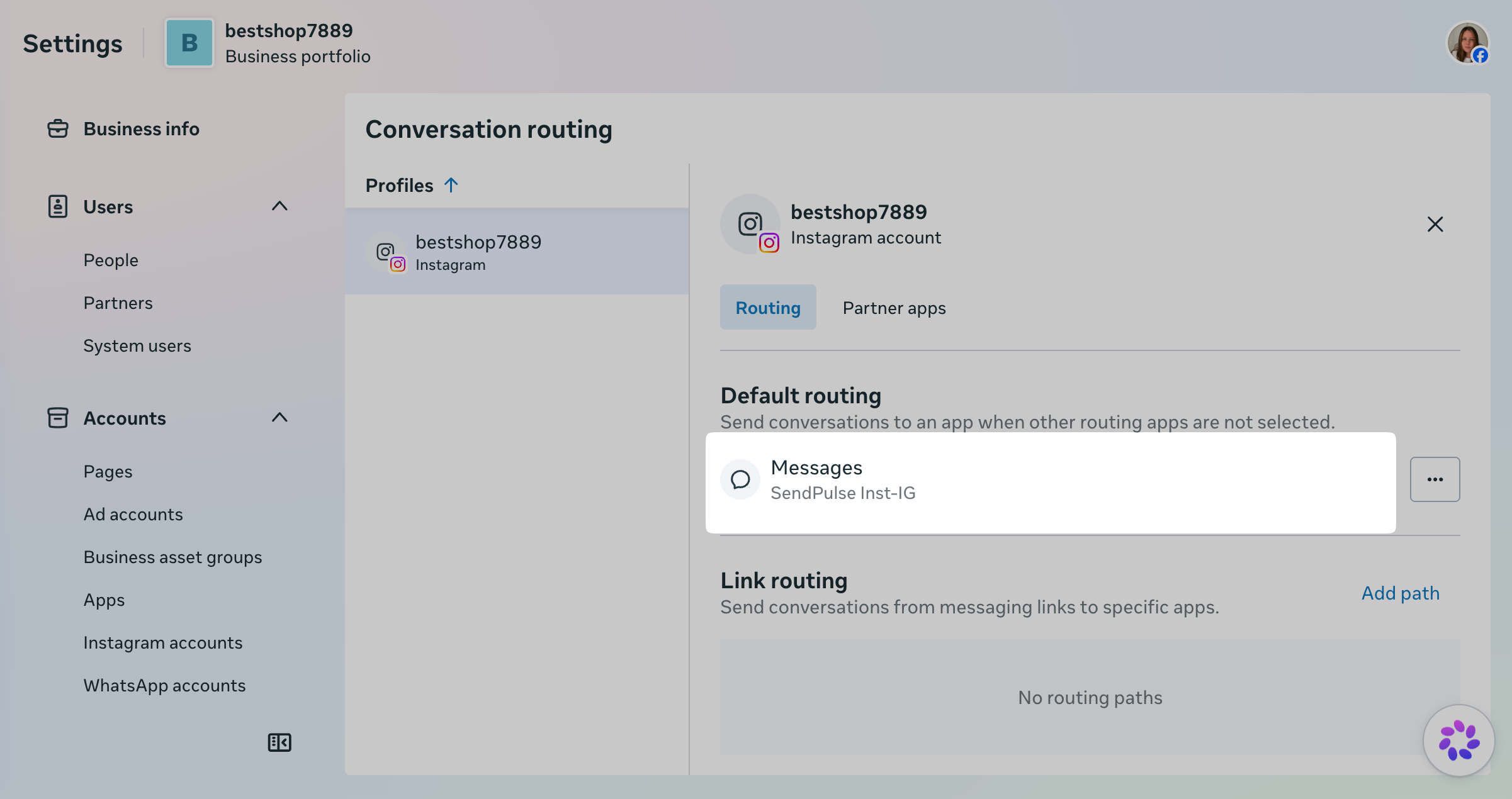
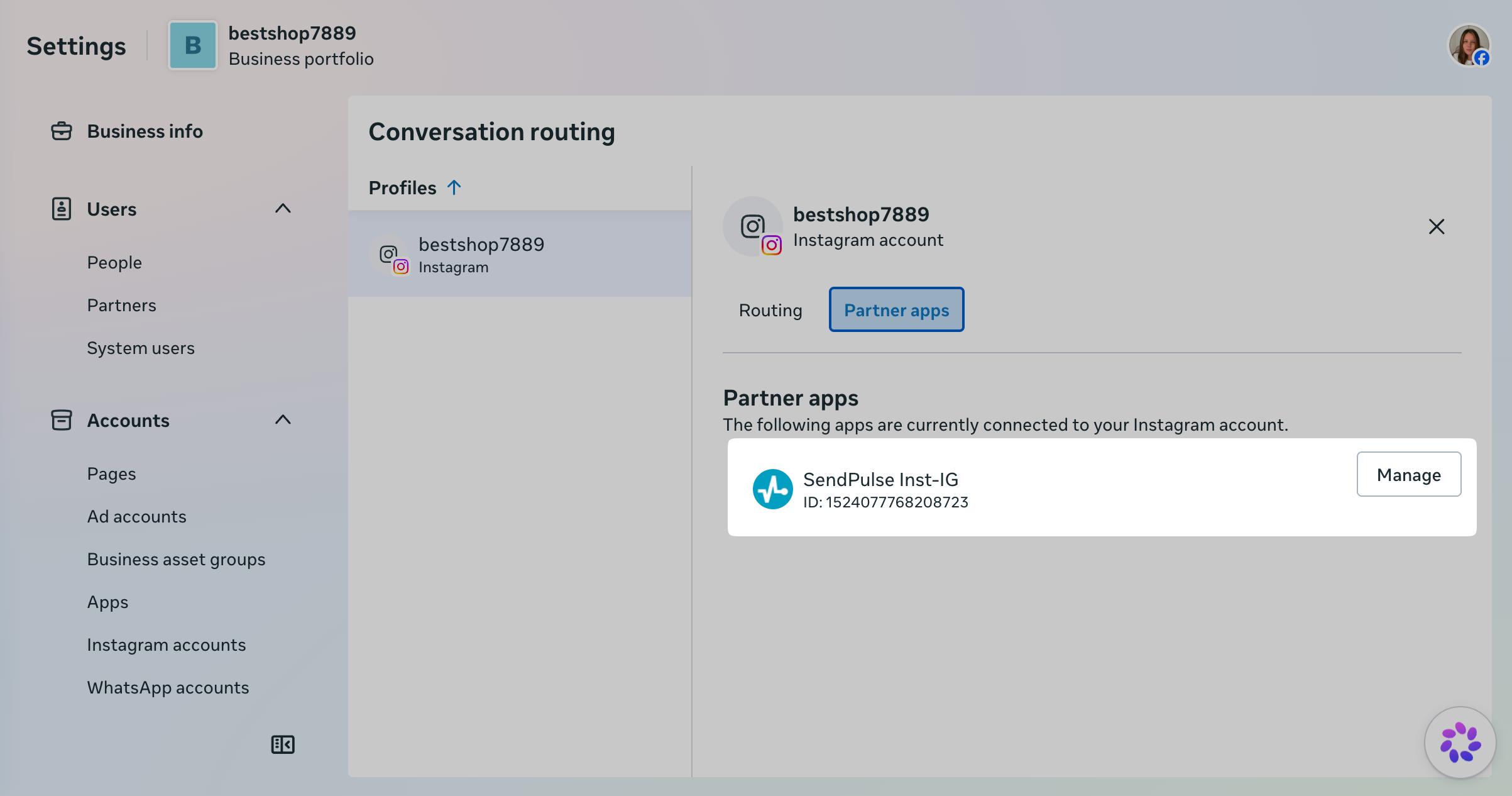
On the Partner apps tab, click Manage next to SendPulse.
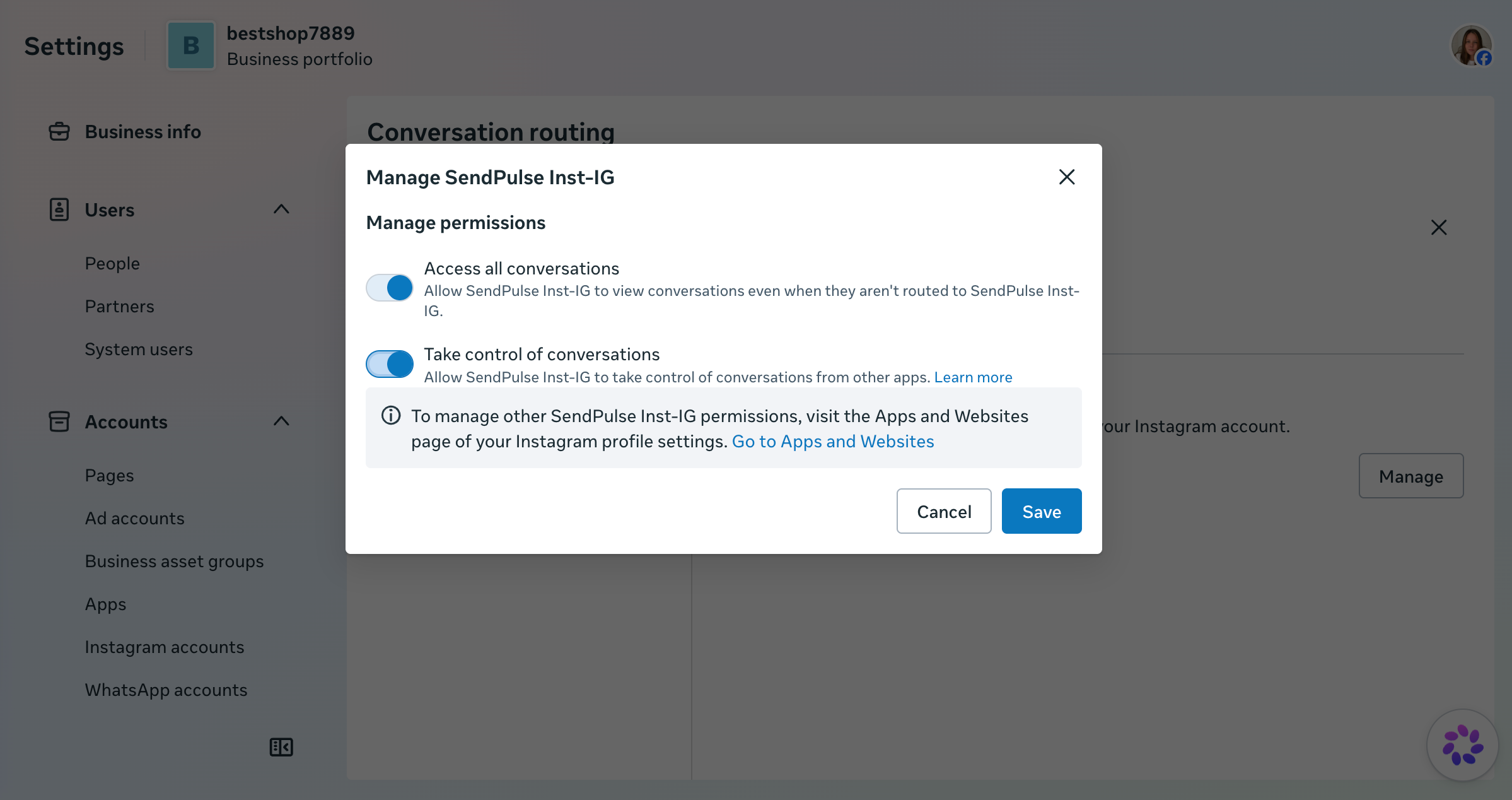
Turn on all permissions.
Check the connected app permissions
If a required permission is off, or another app takes control of your conversations, the chatbot might not receive or send messages.
To check the permissions, go to your Facebook Page's Settings > Page setup > Advanced messaging. In the Connected apps section, find SendPulse or SendPulse Inst for Instagram and click Edit.
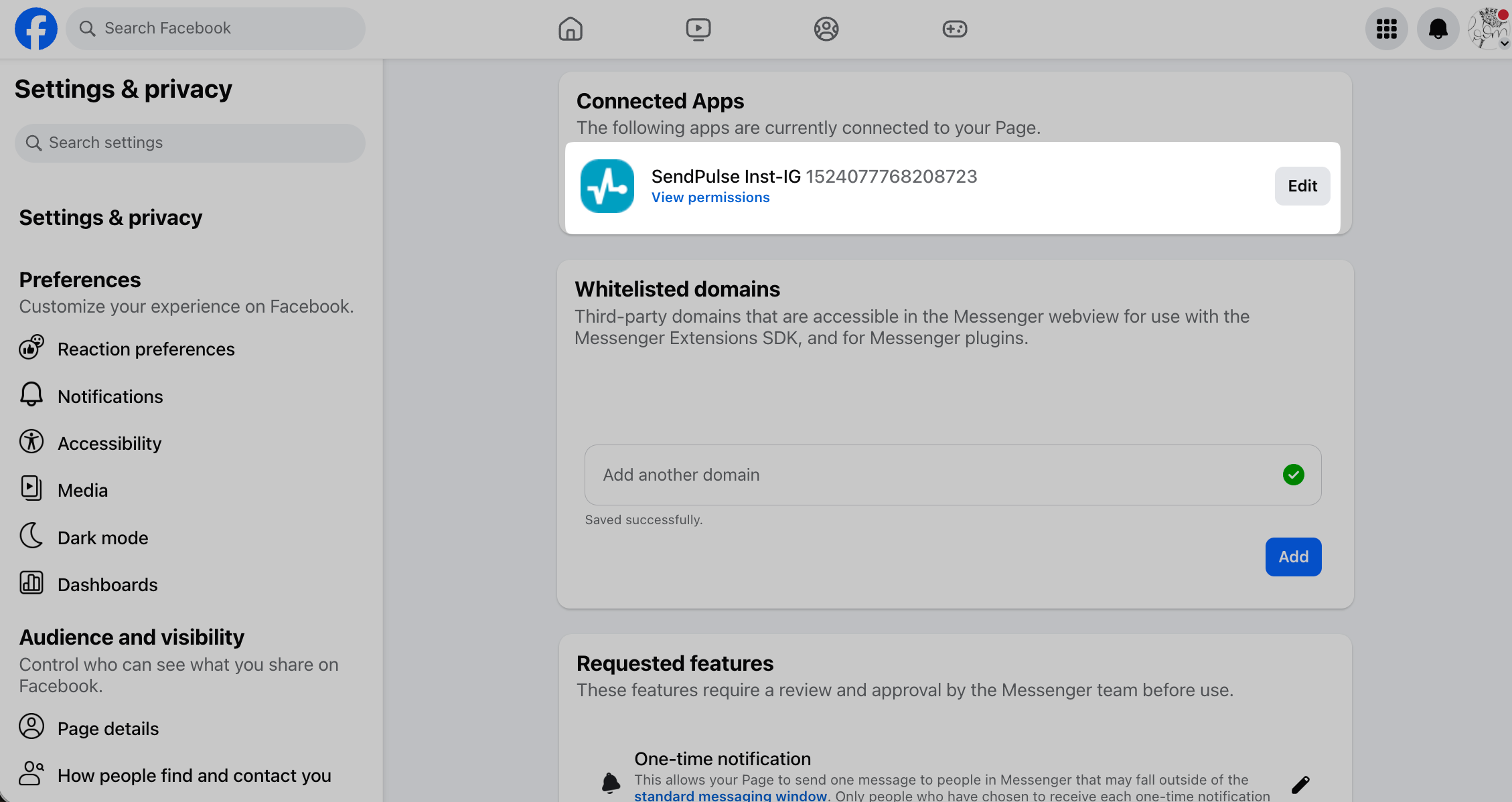
In the dialog box, go to Messenger permissions and turn on the Access standby channel and Take control of conversations toggles. The first toggle lets SendPulse see conversation events when another app owns the conversation. The second lets SendPulse take control. The Take control of conversations toggle works only when a default app is set.
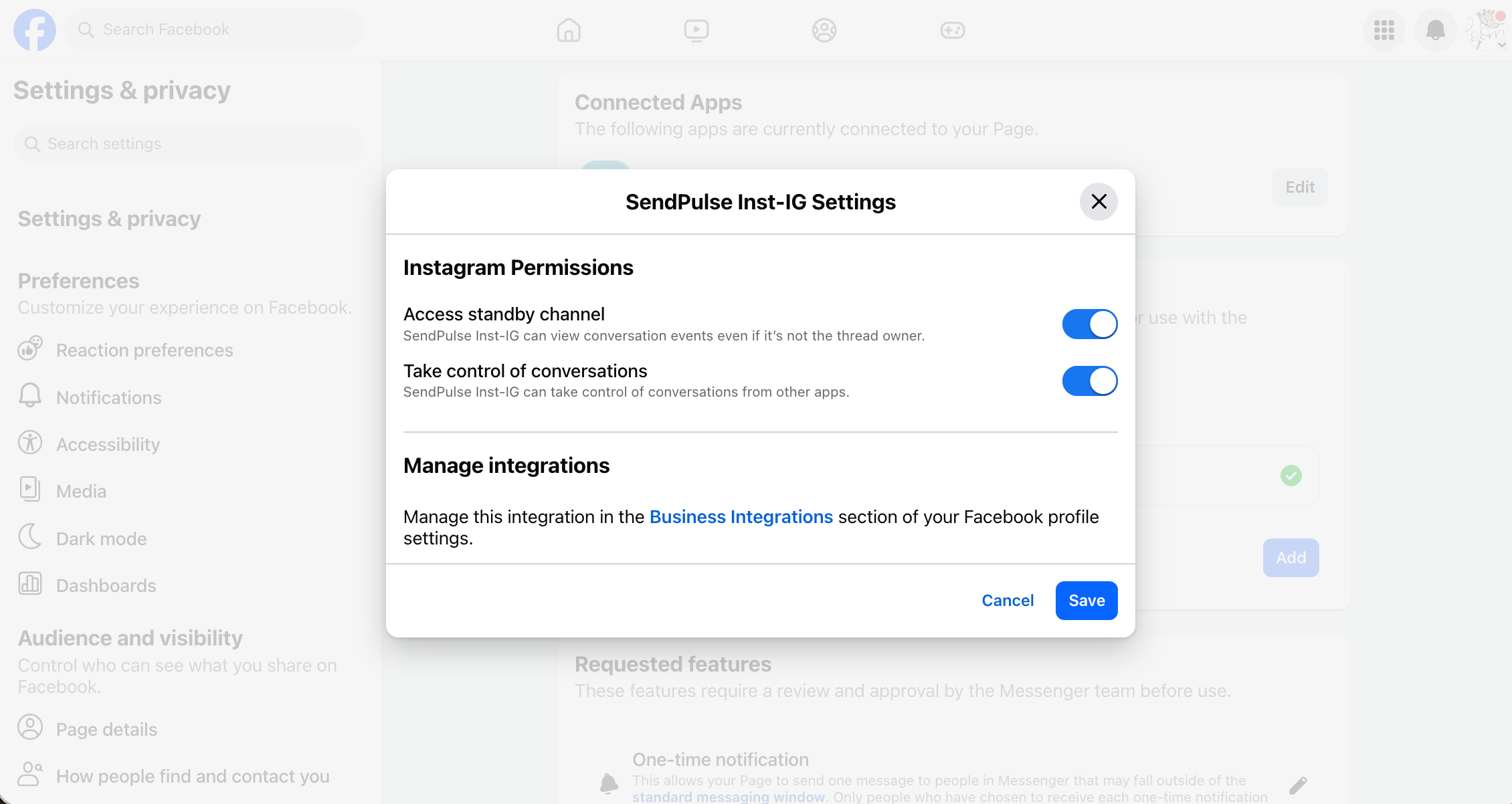
For other apps in the Connected apps section, turn off the Take control of conversations toggle so they don't intercept conversations from the chatbot.
Temporary Meta errors
Sometimes Meta fails to process a request on its side. These errors don't need any changes in your chatbot:
| Issue | Cause | What to do |
|---|---|---|
(#1) An unknown error occurred. |
A temporary error on Meta's side. Meta notes that missing permissions can also cause this error. | Send the message again later. If the error appears for all subscribers, refresh permissions in Manage bots. |
(#2) An unexpected error has occurred. Please retry your request later. |
A temporary error on Meta's side. Meta notes that it can also appear when the subscriber has blocked your business. | Check the Meta status page and send the message again later. |
Facebook, private replies: (#1) Please reduce the amount of data you're asking for, then retry your request. |
A Meta-side error on comment replies that doesn't depend on your message. | Send the message again later. |
|
Facebook: Instagram: |
A temporary error on Meta's side. | Send the message again later. |
If an error isn't listed here, look it up in Meta's error codes. If the issue persists, contact support.
 Last Updated: 01.11.2026


or