The File upload pop-up element
Use this element to add an expandable space that can hide certain pop-up sections to save space. This is useful when you need customers to upload documents like unique discount vouchers.
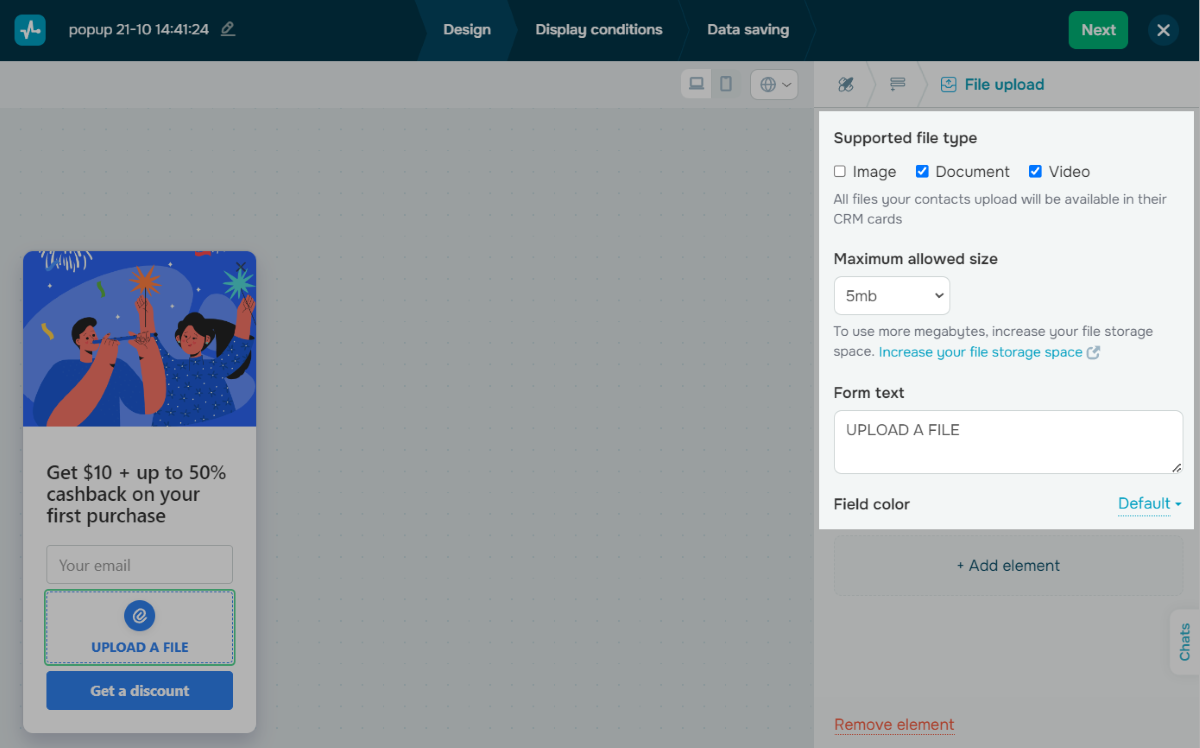
In the pop-up builder, select the File upload element and go to its settings.
Customize the element
Adjust the element using the following settings:
| Supported file type | Select Image, Document, Video, or several options simultaneously.
All uploaded files are available in your contact’s CRM card. |
| Maximum allowed size | Set the maximum file upload size. You can set this value up to 25 MB. |
| Form text | Enter your file uploader text. |
To add a CRM contact correctly, we recommend adding Entry field elements along with File upload to your pop-up.
Customize the style
In the Field color section, select an element color or keep the default color in pop-up style settings.
 Last Updated: 18.06.2025





or