The Slot machine pop-up element
Use this element to add a slot machine that users can spin to win a promo code. This can help gamify contact collection and enhance user experience.
In the pop-up builder, select the Slot machine element and go to its settings.
Choose where to save the data
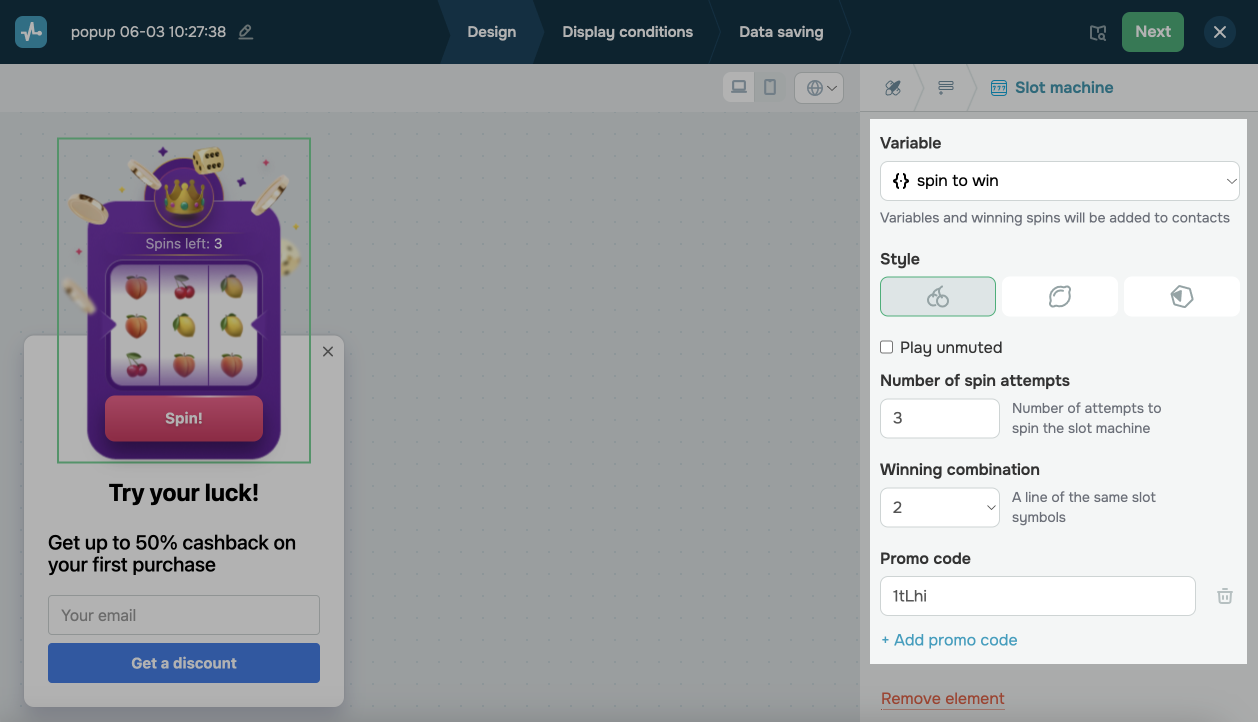
In the Variable field select or create a variable to store the value.
In the variables list, system variables can be found above the line while the variables you created in Pop-ups and CRM are found under the line.
Customize the appearance
In the Style section, select a slot machine design. Select the Play unmuted checkbox to add a sound.
Customize the element
Adjust your settings in the following sections:
| Number of spin attempts | Enter the number of spins a user can make. |
| Winning combination | Select a winning combination of 2 or 3 identical elements in a row. |
| Promo code | Enter the promo code that will appear if a user wins. To add multiple promo codes, click Add promo code under the input field.
Promo codes will be distributed randomly. |
| Button text | Enter a slot machine button text. |
Add result texts
Next, add spin result texts.
| Pre-spin text | Enter the text that will appear before spinning. |
| Winning text | Enter the text that will appear if a user wins. |
| Out-of-spins text | Enter the text that will appear when a user is out of spin attempts and does not win. |
 Last Updated: 18.06.2025





or